Showing posts with label DPI. Show all posts

Monday, April 20, 2015

Breaking Up When You're Still In Love


Change comes with an array of mixed emotions.  It is with both joy and sorrow in my heart today to announce that I have resigned my position with Limestone County Schools.  This decision has come with great thought and contemplation but I feel that I would be remise to not walk through doors that God has found fit to open for me at this time.

Below is my open letter of resignation to Ms. Zebra Green, Ms. Karen Tucker and Mr. Garris.


Thank you Ms. Tucker, Ms. Green and Mr. Garris for allotting 5 minutes out of your busy schedules to meet with you today, Monday, April 20, 2015.

First, it has been an incredible professional growth experience to work under the guidance of Ms. Karen Tucker during the 2014-2015 school year as Limestone County Schools Digital Passport Initiative was rolled out to all 3rd and 4th grade students.  

Ms. Tucker’s vision for this initiative along with the foresight and wherewithal to understand the critical need for embedded PD that lead to the hiring of a top notch team of Instructional Technology Facilitators is to be commended.  School districts across the country from the east coast to the west coast, in the north and in the south are envious of what Limestone County Schools has been able to accomplish with the Digital Passport Initiative this school year.

In addition to Ms. Tucker’s vision for the Digital Passport Initiative her trust in the team she assembled for this monumental task should also be recognized and praised.  While many administrators micromanage or have their program planned down to the smallest detail, Ms.Tucker trusted each Instructional Technology Facilitator the freedom to design an instructional program that best fit the needs of their individual schools with little oversight and no formal evaluations or feedback as to if each Instructional Technology Facilitator was meeting the anticipated goals and objectives envisioned for the Digital Passport Initiative.  

This brave “letting go” by Ms. Tucker and the Central Office lead to an amazingly supportive, collaborative group of Instructional Technology Facilitators that has ultimately brought out the best in each of us that has benefited each of the Digital Passport Initiative schools.  I cannot thank you enough for trusting me as a member of this very special team.

Mr. Garris.  From the first day I meet the 3rd and 4th grade teachers at Elkmont High School I fell head over heels in love. As I have worked with them and grown to know their students my love has only grown stronger.  You, like Ms. Tucker, have allowed me to bring my expertise, the shared know-how of the other Limestone County School Instructional Technology Facilitators and the ingeniousness of my Professional Learning Network into your school and trusted me to deliver the best instructional program to the teachers and students at Elkmont High School with little oversight and no formal evaluations or feedback.  This hands off approach has allowed our Digital Passport Initiative Team to make progress beyond what I had thought possible at the beginning of the 2014-2015 school year.  They have truly surpassed my greatest expectations.  

It is with mixed emotions that I come before you today to turn in my letter of resignation with Limestone County Schools.  Mixed emotions because I have truly loved every single minute working with the teachers and students at Elkmont High School and the Instructional Technology Facilitator Team and it breaks my heart to leave such a dynamic group of dedicated educators.

My experiences this year have been one of the greatest professional growth opportunities in my 23 years as an Alabama educator and for this I am filled with gratitude.  I am also thankful for this opportunity to learn and grow in Limestone County Schools as it has lead to many wonderful new professional opportunities.  I am excited about the many doors that have opened and are continuing to open in regards to my future endeavors in education and know that many of these doors are opening due to the unique experience I have had working with the Digital Passport Initiative in Limestone County Schools this year.   

Thank you again for this unique opportunity to be a part of Limestone County Schools Digital Passport Initiative. I know without a doubt that Limestone County School will continue to grow under Ms. Karen Tucker’s leadership.


Sunday, February 15, 2015

Learning Strategies From The Fourth Dimension


A small, rural, mostly Title I district located near the Alabama-Tennessee line, Limestone County Schools, under the guidance of Superintendent Dr. Sisk, Technology Director Karen Tucker and Curriculum Director Allison Usery, have been shaking up learning with dynamic results.

Several things attracted me to this rare gem of a school district. First, Limestone County Schools not only talk the talk about school reform and improvement but walk the walk. Allison Usery has not only effectively organized professional development trainings centered around the Learning Focused strategies model but has also embedded Instructional Coaches in each school to assist teachers with applying Learning Focused strategies in their classrooms.  I have seen these strategies put into place and used continuously as each new strategy is learned.  I have seen students embrace the learning strategies and actively use them to improve understanding of learning objectives.   

Second, Limestone County Schools is serious about integrating technology into it's curriculum.  Karen Tucker is leading the way on this front.  Rather than rolling out a 1:1 initiative with little training and no one "in house" for teachers to turn to for guidance, Ms. Tucker insisted that an Instructional Technology Facilitator be embedded in each school to work side by side with teachers to guide them in connecting the device to it's appropriate use in supporting the curricular goals of the school. This, I feel, is a critical and often overlooked component to a well designed 1:1 or BYOD rollout.

Third, Limestone County Schools embodies the word, collaboration.  Digital Passport Initiative teachers, Instructional Coaches and Instructional Technology Facilitators work collaboratively to ensure that all components of Learning Focused four dimensions of exemplary practice are effectively implemented in the classroom.    

Recently, this powerful team of collaborative educators was tasked with creating a video that demonstrated a component of Learning Focused combined with technology in the classroom.  These videos will be used to not only assist new teachers but teachers who will be a part of the four year Digital Passport Initiative rollout.  

The video created by the Elkmont High School Team demonstrates the use of the technology, Kaizena, as a technology tool teachers can use to meet the Learning Focused strategy: Formative Assessment, Feedback and Remediation.   


A plethora of technology tools paired with Learning Focused strategies can be found on the Limestone County School's SchoolTube Channel.

We'd love your feedback, suggestions of more technology-curriculum ties we could implement, and are always looking for opportunities to collaborate with dynamic educators from across the nation.  

Saturday, February 14, 2015

Using Padlet to Summarize Learning


Elkmont High School's 3rd grade DPI teachers have started using Padlet as a part of our Learning Focused strategies for summarizing, exit tickets, and more!

3rd graders learned how to use Padlet last week to show what they know about the story, The Talented Clementine. We had so much fun using Padlet we tweeting about what we were doing. The illustrator of The Talented Clementine, Marla Frazee, liked our tweet and offered to Skype with our 3rd graders soon! How cool is that?!

This week students used Padlet to summarize their reading prompt of the week, Life in the Cold.


For more ways to use Padlet in your classroom check out these sites:


Also, be sure to check out what Elkmont's 3rd graders have done using Padlet on our 3rd grade Virtual Hallway.


Find out what all Elkmont DPI students have been doing with their MacBooks on the DPI Virtual Hallway as well!


Monday, January 26, 2015

TECH Tuesday: Google Slides


Elkmont High School faculty and staff will continue their journey into the world of LCS GAFE (Limestone County School's Google Apps For Education) on Tuesday, January 27, 2015.  With the rollout of Limestone's Digital Passport Initiative teachers in grades 3-12 will all have 1:1 MacBook Air laptops in their classrooms within the next four years.  With this in mind, PD sessions are offered each Tuesday to keep teachers "ahead of the curve" and ready for when devices come to their classrooms.

You are welcome to tune into our live TECH Tuesday session on January 27th around 3:15 pm CT.


Friday, December 19, 2014

How We Are Keeping Parents Informed of DPI Learning Progress


This week the Instructional Technology Facilitators embedded in each DPI school in the Limestone County School District were asked by our IT Director and Digital Passport Initiative (DPI) visionary, Karen Tucker, to provide documentation regarding state curriculum evidence standards for technology.


Technology 5. Does the LEA implement the Tech Plan to ensure the effective use of technology to promote parental involvement and increase communication with parents?  

Technology 6. Does the Tech Plan include how the parent will be informed of the technology being applied in their child's education?   

I began collecting the information I have shared regarding what the 3rd and 4th grade teachers and students at Elkmont High School have accomplished thus far this year.  It was thrilling to take few moments to walk down memory lane and see all the progress we have made so far this year.  Below is the report I submitted.  

Please let me know how YOU keep your parents and community members informed of the amazing things happening in your classroom, school, and district.  I am always looking for new ideas on how to include parents in what we are learning with DPI.


Parents are kept up to date on all things DPI related through weekly blog posts, newsletters and the recently added Virtual Hallway.  Teachers make sure to include links to this information in their weekly parent newsletters that are sent home with students.  Parents can also follow our DPI learning via Twitter, FaceBook, or Google+ using the following hashtags:


Here are links to DPI Parent/Community information:

Sunday, December 7, 2014

Who Really Learns From the RED PEN?


I am the daughter of English teachers.  I watched them as night after night they made student's papers bleed, folded the papers in half and wrote the grade on the outside.  Personally, when I received these types of papers back from my teachers I never even looked inside at the corrections, suggestions and notes my teacher had spent hours making.  I saw my grade and that was that.  So my question is this.  Who really learns from the RED PEN?

In a perfect world teachers would have time to sit down one on one with students to discuss their writing and allow time for revising, editing & rewriting with continuous feedback from the teacher before the final grading process.  But my experience as a child of English teachers and as an educator for 23 years is that we (educators) rarely go beyond the pre-writing/rough draft phase with our students; assigning grades to first drafts.  Our time is limited and a new writing prompt is in the pacing guide for the following week. There simply isn't time to go through the entire writing process: PreWriting, Drafting,  Revising & Editing, ReWriting, & Publishing. 

The 3rd grade teachers at Elkmont High School recently decided that they needed to spend more time assisting students with the writing processes and not rushing to the next writing prompt as the skills in each writing prompt role back around and are repeated in multiple content areas.

Using the MacBook Airs provided to each 3rd grade student via the Digital Passport Initiative and the Google add-on, Kaizena, 3rd grade teachers will provide students with a type of one on one conferencing that will have students making corrections rather than the teacher's red pen making the corrections.

So how will this work you might be wondering.  First, the teacher will send out the writing prompt to students via Google Classroom.  Students access the prompt via Google Classroom and will type their rough drafts.  The teacher will use the Google add-on, Kaizena, to provide students with recorded feedback on their writings as if the student was sitting next to them for a one on one conference.  Once all the writings have received feedback, the teacher will instruct students to put on their headphones, listen to the feedback and make the suggested corrections.  This process may need to be repeated.  Finally, student writings will be published to an authentic audience in a variety of ways including our 3rd grade blog, ebooks, comic strip makers, etc.

This Week @Elkmont & Beyond! November 30th-December 6th, 2014


It is amazing to me just how quickly December has arrived this year. I started out my week doing GoNoodle BrainBreaks with Ms. Walker's 3rd Grade students.  They had been working on a particularly tough skill all morning and decided to give their brains a break with GoNoodle! It was fun to stretch and give my brain a break too!

I like looking for GoNoodle activities via Tags and even using them for myself when I need to de-stress, change my attitude, or just get my blood circulating.  You can find activities by grade level, subject area, amount of time, etc.  


Our 3rd and 4th grade teachers meet this week to reflect on our Digital Passport Initiative (DPI) notable achievements and plan out our target areas for the second semester.  


Notable Achievements:


3rd & 4th grade DPI Teachers have done an outstanding job this semester getting acclimated with using MacBooks in the classroom.  


My favorite quote from this semester came when I walked into Ms. Adams’ room and she exclaimed: “Look what we did without you!”  This is exactly the goal of DPI.  Getting teachers to the point where they feel comfortable exploring and applying technologies to lessons on their own.


Their positive attitudes and willingness to explore and learn right along with the kids is to be commended!  In my 23 years as an educator I haven’t worked with a better group of teachers.


Target Areas for Second Semester:


Finding “time” to use the MacBooks is still a struggle for some of the 3rd and 4th grade teachers.  Getting to the point where the MacBooks are used as a naturally as a textbook, worksheet, etc will come with time and practice.  Some suggestions include using the MacBooks:


  • Morning Work
  • Reading Centers
  • Small Groups
  • Think: How could I use technology with this lesson?


These suggested times could also be used to give students time to work on individualized learning paths to help improve skills for Aspire testing.


3rd grade wants more opportunities to work with Ms. Pam Hammock to improve student  writing skills.  3rd grade teachers are also going to use Google Classroom and Kaizena to improve student writing skills and build eporfolios to show student writing progress over time.  4th grade would benefit greatly from doing this as well.


During the 2nd semester we will continue to work with the technologies below so that teachers feel comfortable using these with little guidance next school year:

  • Google Drive/Classroom

  • Moodle
  • Symbaloo
  • Power My Learning
  • Kahoot
  • iMovie
  • StoryBird


DIY Professional Development

This week I participated in two professional development opportunities.  The first was using a brand new format, ShinDig, with the #EdChat group.  

What is a ShinDig? 
Shindig is a NYC start-up committed to unleashing the unrealized potential of video chat. Shindig's proprietary technology enables you to give an online reading, talk, or interview in front of an online group of 50 to 1000. In Shindig, you can share the stage with fans and take questions from audience members. Additionally Shindig adds a unique social dimension to events by allowing fans themselves to also interact with one another in private video chats.


What is EdChat Interactive? 

Edchat Interactive started with Steven Anderson, Tom Whitby, and Mitch Weisburgh. 
The three of us saw an opportunity to conduct PD more in tune with the way we learn, and to use technology to bring the skills and knowledge of education thought leaders to hundreds of thousand of educators. 
People don't learn just by watching. We need to interact, reflect, and participate. That's our model, in 45 minute segments that fit into the busy lives of educators.


This week the topic of the EdChat Interactive PD Session was "Collaboration Beyond the Classroom" and was lead by Mark Barnes using his book, Teaching the iStudent, as a framework for the conversation. The format using ShinDig was exciting and quite easy to use as a participant.  

Steven Anderson got the session started by introducing Mark Barnes. Mr. Barnes introduced the topic of conversation and explained briefly how ShinDig works. After a few minutes, Mark presented the audience with two questions and had us partner up or form small groups to discuss our thoughts regarding the questions.  

I partnered up with Stella from Argentina and Tami from Hawaii. We were able to see and talk to each other quite easily, although there may have been a bandwidth issue with Stella's connection from Argentina. It was cool also to see thumbnails of the other partnerships/groups that formed outside of our own.  

After a few minutes Mark brought all the groups together again and then asked for a spokesperson from each group to summarize what their group had discussed.  

This method of presenting, grouping, sharing was the pattern for the evening. I found this webinar method to be engaging, fun and just outright COOL!

If you would like to participate in one of these events sign up HERE.


The second professional development I participated in was a #ptchat Twitter chat session discussing the very serious subject of Ferguson and how to deal with this topic in schools.  I feel that I came away from this conversation more prepared to talk about it with students yet saddened that the event happened at all.  

Here is a link to the Twitter chat archive or you can view it below: http://goo.gl/cXd35d


#iCONNECT Tech Tips Newsletter

Each week I create a newsletter for my school using S'more.  Here is our latest issue:


Wednesday, December 3, 2014

Collaboration Gold


Mrs.  Tammy  Hilliard, High School English teacher at Ardmore High School in Limestone County is our Moodle Guru!  No only does Ms. Hilliard set up all of our classes county wide, but has also branched out this year to create collaborative classes in Moodle so that teachers can share what they have on their individual pages.  

Ms. Hilliard sent this out a few weeks ago to the LCS Instructional Technology Facilitators.

I firmly believe that collaboration with other teachers is the best way to get new ideas, but it's just so HARD to find time to talk to each other and share resources.  
I really want to see these communities thrive and become a place where we can all go for ideas and resources. If I've already made a test on Jason and the Golden Fleece, I just see no need for the mythology teacher at Tanner or West to have to reinvent the wheel.  
Moodle scrambles tests and choices, so it's not as if kids can just spread the word that number one is D, number two is B, and so forth, right? Now, I'm not about to ask teachers to share their tests if they don't want to, but I DO want to give them a place to do it if they're willing. Of course, it's not just tests--we can share websites, handouts, project ideas, whatever we think our fellow teachers can use.

How awesome is this idea for helping teachers within a school district to collaborate?!


Mrs. Amanda Gibbs, Instructional Technology Facilitator at West Limestone, has set up a shared Google folder for the nine Instructional Technology Facilitator in Limestone County. Inside this folder are other folders and all the important documents we need to successfully do our jobs. We all contribute to these folders, but Ms. Gibbs is definitely the driving force behind this great collaboration.


Ms. Wendy Davis, Instructional Technology Facilitator at Owens Elementary, has been creating Kahoot games that are correlated to our 3rd & 4th grade Reading vocabulary. Wendy has added this document to our shared Google Folder and with all of the 3rd & 4th grade teachers in Limestone County Schools.

How is your school system encouraging collaboration within your school district?

Saturday, November 15, 2014

Doin' It For Themselves


One of the ultimate goals for the Digital Passport Initiative (DPI) and the Instructional Technology Facilitators (ITFs) in each school are to get teachers and students comfortable with using and exploring the Internet with their MacBook Airs even when we are not in the classroom with them.

The teachers at Elkmont High School, even those not yet a part of the Digital Passport Initiative, are enthusiastic about integrating these devices into their classrooms as a natural part of the curriculum.

This week I walked into two different classrooms to the exclamation, "Look what we did!" First, Ms. Anita Bates showed me how her students were using what they had learned about researching and Google Slides to create presentations about the American Revolutionary War.  Next, Ms. Luann Adams told me about how she was getting ready to assign her students to draw examples of a food chain and then thought to use Google instead.  The class tried using a Google Document to make their food chains but found this to be a bit cumbersome.  They search and found Google Drawing (which I haven't even introduced them to yet) and created great food chain examples.  They had them already printed out and posted in the classroom when I arrived!

Judson Meadows, Middle Grades Social Studies teacher & basketball coach at Elkmont High School, has embraced BYOD in his classroom. This week he created a formative assessment quiz that grades itself using Google Forms and Flubaroo. Voila...simple, easy, success!

Tina McMunn, 3rd grade DPI teacher, discovered Soft Schools, a website filled with a dizzying array of games, quizzes, worksheet and more for grades Kindergarten through Middle Grades. Ms. McMunn also search the Internet and found great supporting videos and lesson ideas for their unit on Poetry via LearnZillion. Her kids used LearnZillion to read and analyze the poems "The Fog" by Carl Sandburg and Who Has Seen the Wind? By Christina Rossetti.

Anita Bates, 4th grade DPI teacher, started her unit on the American Revolutionary War by challenging her students to create a Google Presentation based on their own research using the Alabama Virtual Library and other research sources like Kid Rex. Without the Instructional Technology Facilitator in the classroom, the kids had no problem jumping right into the project, as they had learned these skills earlier in the school year.

Atina English, 3rd grade DPI teacher, has tackled using Google Classroom head on with her students. Ms. English is doing an incredible job mastering this new technology and her students see using their MacBook Airs and Google Classroom as a natural part of their everyday classroom experience.

Luann Adams, 4th grade DPI teachers, has incorporated the MacBooks and Google into her daily morning bell ringer to get students started for the day. Ms. Adams has also worked hard to get her students organized with Google Drive folders and using the calendar to keep track of important dates.

I am so proud of the teachers at Elkmont High School for not only being open to learning new technologies but delving into experimenting and discovering new technologies and applications on their own.

Sunday, November 2, 2014

Collaborative Learning with Google Maps


My school district launched their 1:1 initiative, the Digital Passport Initiative (DPI), this year by providing all 3rd and 4th grade students with a MacBook Air.  Assisting teachers and students with how to seamlessly integrate these devices into the classroom setting is the focus of my position with the district this year.  

Now that students are not limited to when a computer lab is available we have launched into research, a must have yet often overlooked skill.  This starts with assisting students in locating reliable websites for gathering information.  In Alabama we are lucky that our legislators provide funding to a slew of databases for our students through the Alabama Virtual Library.  Starting the students off with a reliable website will give them a basis of comparison as they expand later in the year to finding reliable sources on their own.


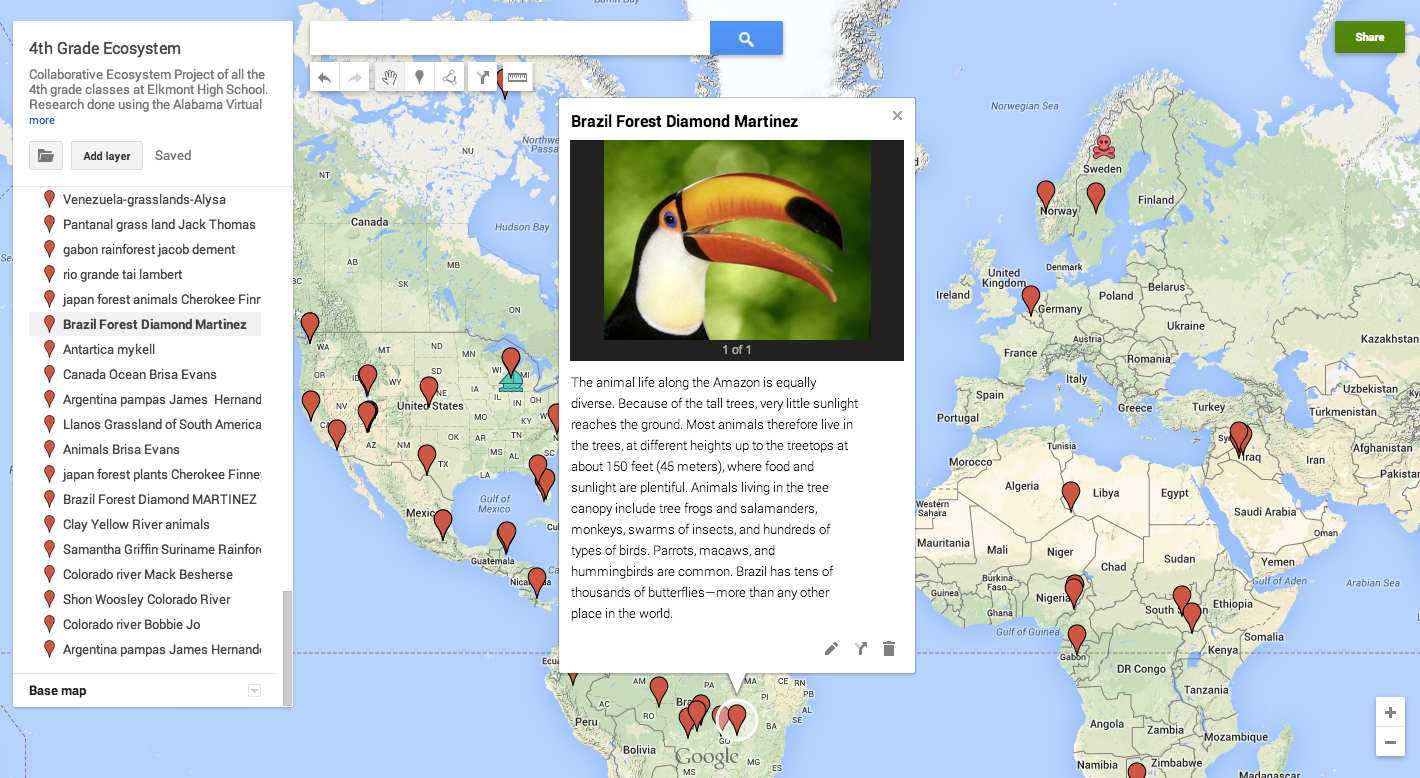
This past week our 4th graders began their unit on Ecosystems.  We wanted this activity to be a collaborative one combining all the research from 120 fourth graders into one interactive location. It was decided that this activity seemed like a perfect fit for learning how to use Google Maps.  

To begin the unit, students were presented with a list of Ecosystems and the countries where these ecosystems are located and asked to commit to one as their individual research goal.    Next, students were introduced to the Alabama Virtual Library’s database, Britannica Elementary,  as the resource they were to use for this unit.  Using Britannica Elementary students were asked to find the following about their country’s ecosystem:

  • One interesting fact about the country where their ecosystem is located. Include a image/video.
  • A description of animal life found in their country's ecosystem. Include a image/video.
  • A description of the vegetation found in their country's ecosystem. Include a image/video.

Once students had located the basic facts about their country’s ecosystem we moved on to learning how to input that information on a collaborative Google Map.  One thing I love about working with the DPI students is that they are willing to jump right into a new technology with little or no apprehension.  I demonstrated how to add a pin to the map and that is all they needed.  Before long students had discovered how to change the color and shape of their pins to individualize their pins from those of their peers.  As students worked they were eager to share their discoveries with their teacher and other students.  

Now that the interactive map has been made, our 4th grade teachers have been using it as a point of reference as they continue to teach the Ecosystem unit.  The kids love this approach to the unit as their teacher references their pins and uses their pictures and videos to teach.   

There are many great tie in activities that can be pursued throughout the year using this Google map, including longitude and latitude, mathematics, social studies and so much more!

Because this was our first time using Google maps our lesson was quite simple. Here are a few links to much more involved lessons with Google maps: