Showing posts with label AVL. Show all posts

Tuesday, April 12, 2016

Essays & Research Papers Made Bearable

Lhs.loswego.k12.or.us. N. p., 2016. Web. 12 Apr. 2016.


Co-teaching with the talented teachers at James Clemens High School this year has been a big highlight of my 24 year career as an educator.  Yesterday I spent the day with Ms. McLaughlin's classes helping them out with their big research paper by showing them a few tips and tricks to making the research/essay writing process a little less tedious.  This co-teaching experience also gave me an opportunity to show Ms. McLaughlin a cool tool to make the grading processes less daunting.

Ms. McLaughlin's students are lucky to have her as their teacher. She is very organized and has really embraced using Google Classroom.  We started the lesson by having students access their Google Classroom and open the pre formatted MLA document provide by their teacher.  Google has a dizzying array of templates to make student and teacher lives a little easier.  Below are just a few templates that are available in Google Documents.


Although Ms. McLaughlin had already provided students with a pre-formatted MLA template I took time to show the students how to find the template on their own so they could use for other classes.

The next tidbit I shared was the relatively new Voice Typing feature in Google.  This is more of a "fun" feature that I like to show students but it actually really helped one student who had had quite a gruesome encounter with a chainsaw.  


Next, we moved on to the nitty gritty....research!  Google has a built in research feature right inside of Google Docs.  You can choose to search all of Google, Google, Scholar, Images, and more. Once you have put in your search term and websites have been pulled up you have three options: preview, insert, & cite.  Preview allows you to see a thumbnail of the website. Insert will insert the website link into your document wherever your cursor is located. Cite will add all related footnote features. The video below walks you through this great tool.


The one thing I wish this tool would do is add the Work Cited information. We circumvented this minor flaw with the Google Add On, EasyBib.  


From there we moved on to reviewing the best databases available through the Alabama Virtual Library (AVL).  Students and teachers are fortunate that our legislature has seen fit to fund the Alabama Virtual Library which is filled will a large number of databases for all age levels, including college and the general pubic.  Most of the databases inside the AVL also connect to Google Classroom, making the task of note taking, highlighting and accessing previously viewed resources later so easy!  Below is an AVL Tour Video. It is a bit dated so it does not show some of the awesome Google Classroom integration features.  AVL databases now also all have a "listening" button which is extremely helpful for students with dyslexia or other reading challenges.


The final tech tool, JoeZoo Express, will help make the grading process easier and more streamlined for Ms. McLaughlin.  JoeZoo Express analyses the student's paper and looks for the following errors: formatting, grammar, mechanics, punctuation, and structure.  Feedback included tips and hints that teach students how to correct their own mistakes. All of this is automated and teacher created. JoeZoo also contains a feature for seamless interactivity with Google Classroom.


Saturday, November 15, 2014

Doin' It For Themselves


One of the ultimate goals for the Digital Passport Initiative (DPI) and the Instructional Technology Facilitators (ITFs) in each school are to get teachers and students comfortable with using and exploring the Internet with their MacBook Airs even when we are not in the classroom with them.

The teachers at Elkmont High School, even those not yet a part of the Digital Passport Initiative, are enthusiastic about integrating these devices into their classrooms as a natural part of the curriculum.

This week I walked into two different classrooms to the exclamation, "Look what we did!" First, Ms. Anita Bates showed me how her students were using what they had learned about researching and Google Slides to create presentations about the American Revolutionary War.  Next, Ms. Luann Adams told me about how she was getting ready to assign her students to draw examples of a food chain and then thought to use Google instead.  The class tried using a Google Document to make their food chains but found this to be a bit cumbersome.  They search and found Google Drawing (which I haven't even introduced them to yet) and created great food chain examples.  They had them already printed out and posted in the classroom when I arrived!

Judson Meadows, Middle Grades Social Studies teacher & basketball coach at Elkmont High School, has embraced BYOD in his classroom. This week he created a formative assessment quiz that grades itself using Google Forms and Flubaroo. Voila...simple, easy, success!

Tina McMunn, 3rd grade DPI teacher, discovered Soft Schools, a website filled with a dizzying array of games, quizzes, worksheet and more for grades Kindergarten through Middle Grades. Ms. McMunn also search the Internet and found great supporting videos and lesson ideas for their unit on Poetry via LearnZillion. Her kids used LearnZillion to read and analyze the poems "The Fog" by Carl Sandburg and Who Has Seen the Wind? By Christina Rossetti.

Anita Bates, 4th grade DPI teacher, started her unit on the American Revolutionary War by challenging her students to create a Google Presentation based on their own research using the Alabama Virtual Library and other research sources like Kid Rex. Without the Instructional Technology Facilitator in the classroom, the kids had no problem jumping right into the project, as they had learned these skills earlier in the school year.

Atina English, 3rd grade DPI teacher, has tackled using Google Classroom head on with her students. Ms. English is doing an incredible job mastering this new technology and her students see using their MacBook Airs and Google Classroom as a natural part of their everyday classroom experience.

Luann Adams, 4th grade DPI teachers, has incorporated the MacBooks and Google into her daily morning bell ringer to get students started for the day. Ms. Adams has also worked hard to get her students organized with Google Drive folders and using the calendar to keep track of important dates.

I am so proud of the teachers at Elkmont High School for not only being open to learning new technologies but delving into experimenting and discovering new technologies and applications on their own.

Sunday, November 2, 2014

Collaborative Learning with Google Maps


My school district launched their 1:1 initiative, the Digital Passport Initiative (DPI), this year by providing all 3rd and 4th grade students with a MacBook Air.  Assisting teachers and students with how to seamlessly integrate these devices into the classroom setting is the focus of my position with the district this year.  

Now that students are not limited to when a computer lab is available we have launched into research, a must have yet often overlooked skill.  This starts with assisting students in locating reliable websites for gathering information.  In Alabama we are lucky that our legislators provide funding to a slew of databases for our students through the Alabama Virtual Library.  Starting the students off with a reliable website will give them a basis of comparison as they expand later in the year to finding reliable sources on their own.


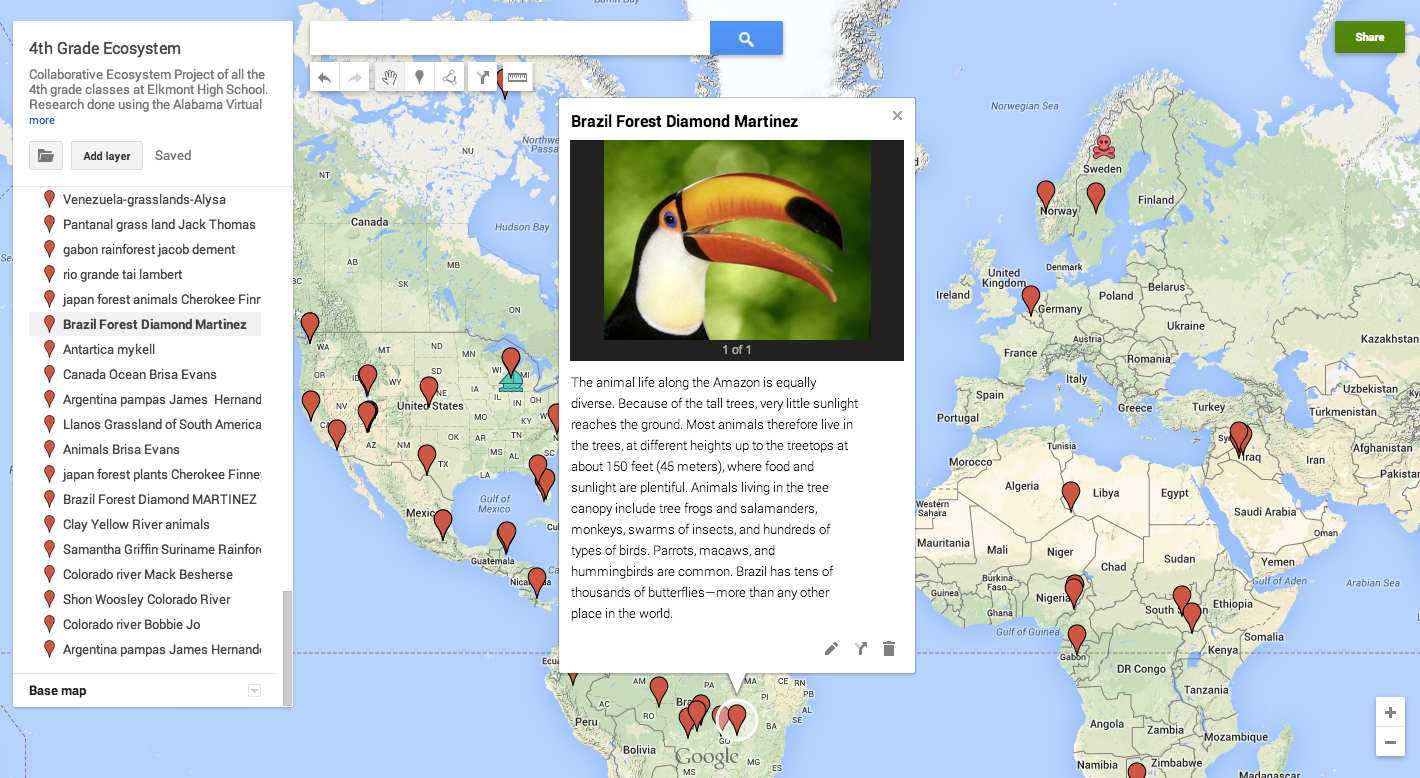
This past week our 4th graders began their unit on Ecosystems.  We wanted this activity to be a collaborative one combining all the research from 120 fourth graders into one interactive location. It was decided that this activity seemed like a perfect fit for learning how to use Google Maps.  

To begin the unit, students were presented with a list of Ecosystems and the countries where these ecosystems are located and asked to commit to one as their individual research goal.    Next, students were introduced to the Alabama Virtual Library’s database, Britannica Elementary,  as the resource they were to use for this unit.  Using Britannica Elementary students were asked to find the following about their country’s ecosystem:

  • One interesting fact about the country where their ecosystem is located. Include a image/video.
  • A description of animal life found in their country's ecosystem. Include a image/video.
  • A description of the vegetation found in their country's ecosystem. Include a image/video.

Once students had located the basic facts about their country’s ecosystem we moved on to learning how to input that information on a collaborative Google Map.  One thing I love about working with the DPI students is that they are willing to jump right into a new technology with little or no apprehension.  I demonstrated how to add a pin to the map and that is all they needed.  Before long students had discovered how to change the color and shape of their pins to individualize their pins from those of their peers.  As students worked they were eager to share their discoveries with their teacher and other students.  

Now that the interactive map has been made, our 4th grade teachers have been using it as a point of reference as they continue to teach the Ecosystem unit.  The kids love this approach to the unit as their teacher references their pins and uses their pictures and videos to teach.   

There are many great tie in activities that can be pursued throughout the year using this Google map, including longitude and latitude, mathematics, social studies and so much more!

Because this was our first time using Google maps our lesson was quite simple. Here are a few links to much more involved lessons with Google maps:


This Week @Elkmont & Beyond! October 27-31, 2014


Creepy Crawly Mind Maps


3rd graders got into the Halloween spirit this week by researching creepy, crawly spiders! We started the lesson by using KidRex to find interesting facts about spiders. Once students had written down at least four interesting or unusual facts about spiders, we organized their information using Popplet to build a mind map (graphic organizer).

Tuesday I started this project with Ms. Walker's 3rd grade students but we were only able to finish our research. I showed the students quickly what we would do with their research using Popplet the next time I was scheduled to come to their class. I was so excited and surprised when I walked in to Ms. Walker's class on Thursday and several students had already been on Popplet and had already made their mind map! 

TIP: Be sure to change up the mind maps (graphic organizers) you use with your students. Check out this link for some great online graphic organizers and what areas are best to use them with kids. https://sites.google.com/site/richardbyrnepdsite/rsu-1-mind-maps-and-timelines


Math, Reading, Grammar...Oh My! My MobyMax!


3rd grade spent time this week getting familiar with MobyMax. MobyMax is similar to Khan Academy in that it is an adaptive program and provides real time reports so that teachers can provide just in time intervention but covers not only math, but reading and grammar as well. Students can earn game time by completing set amounts of activities with a passing score. Students can also earn badges and other incentives as well as they work through the learning modules.

MobyMax makes it easy for teachers to differentiate based on each students ability level and actually find the gaps and fills them for each student's academic development.


Coding For Kids- By Linda Smith


Google has provided a fun, just in time for Halloween coding project for kids, The Yeti Project.

Coding is the ability to read and write a machine language as well as to think computationally. Learning to code can lead to outputs valuable in and of themselves, but the process of learning to code also develops problem-solving skills, (digital) confidence, and helps young people understand the world around them. In many respects, we should encourage kids to code for similar reasons to those we give for encouraging them to play sports and learn an instrument: it's good for their development.

Try it out and see how good you can be at coding! 


Collaborative Learning with Google Maps


My school district launched their 1:1 initiative, the Digital Passport Initiative (DPI), this year by providing all 3rd and 4th grade students with a MacBook Air.  Assisting teachers and students with how to seamlessly integrate these devices into the classroom setting is the focus of my position with the district this year.  

Now that students are not limited to when a computer lab is available we have launched into research, a must have yet often overlooked skill.  This starts with assisting students in locating reliable websites for gathering information.  In Alabama we are lucky that our legislators provide funding to a slew of databases for our students through the Alabama Virtual Library.  Starting the students off with a reliable website will give them a basis of comparison as they expand later in the year to finding reliable sources on their own.


This past week our 4th graders began their unit on Ecosystems.  We wanted this activity to be a collaborative one combining all the research from 120 fourth graders into one interactive location. It was decided that this activity seemed like a perfect fit for learning how to use Google Maps.  

To begin the unit, students were presented with a list of Ecosystems and the countries where these ecosystems are located and asked to commit to one as their individual research goal.    Next, students were introduced to the Alabama Virtual Library’s database, Britannica Elementary,  as the resource they were to use for this unit.  Using Britannica Elementary students were asked to find the following about their country’s ecosystem:

  • One interesting fact about the country where their ecosystem is located. Include a image/video.
  • A description of animal life found in their country's ecosystem. Include a image/video.
  • A description of the vegetation found in their country's ecosystem. Include a image/video.

Once students had located the basic facts about their country’s ecosystem we moved on to learning how to input that information on a collaborative Google Map.  One thing I love about working with the DPI students is that they are willing to jump right into a new technology with little or no apprehension.  I demonstrated how to add a pin to the map and that is all they needed.  Before long students had discovered how to change the color and shape of their pins to individualize their pins from those of their peers.  As students worked they were eager to share their discoveries with their teacher and other students.  

Now that the interactive map has been made, our 4th grade teachers have been using it as a point of reference as they continue to teach the Ecosystem unit.  The kids love this approach to the unit as their teacher references their pins and uses their pictures and videos to teach.   

There are many great tie in activities that can be pursued throughout the year using this Google map, including longitude and latitude, mathematics, social studies and so much more!

Because this was our first time using Google maps our lesson was quite simple. Here are a few links to much more involved lessons with Google maps:


Professional Learning Opportunities

Wonders, GoMath, Global Scholar

Limestone County School District held a training this week to get Instructional Technology Facilitators not familiar with Wonders, GoMath, & Global Scholar up to speed.  This training also set up ITFs as administrators over these accounts for their schools.

New Teacher Training (Graphic Organizers)

Limestone County School District provides a through new teacher training series to help orient new teachers to best teaching practices.  This month our meeting concentrated on effective use of graphic organizers.

#USEdChat

This past Monday night (October 27, 2014) at 9 pm ET was the quarterly #USEdChat, a joint chat that brings state twitter chats together.  This #USEdChat was extra special as guest moderators 
Tom Murray, Sheryl NussbaumBeach, Hal Roberts, Jimmy Casas, & Brian & Jessica Sztabnik joined Jennifer Hogan, Holly Sutherland and Michael McLendon from #ALEdChat to bring the nation an exhilarating discussion about connecting & collaborating.


#GaEd

October 30, 2014 I jumped in on the #GaED chat session about assessment lead by Aaryn Schmuhl, Henry County Asst. Super. for Learning and Leadership.  Assessment is a very hot topic in education right now as 1:1 initiatives change the educational landscape to more student centered, competency based environment.  


Wednesday, October 2, 2013

This Week in The Library @HHS: September 23rd - 27th, 2013


Library Orientations
This week we finished up our 9th grade library orientations.  Now that we are a 1:1 iPad school our orientation centered around downloading important library apps and going through the initial set up for each app.  Apps downloaded included the following:


Curriculum & Technology Leadership Meeting
Hoover High School believes in creating leaders within our own school.  The Curriculum & Technology Leadership Meeting this month met in the beautiful library atrium.  We discussed creating common core experts in each department as well as a new test prep programs for the SAT & ACT.  


A Visit From the Hoover Public Library
Once a month The Library@HHS gets a visit from Katie Jane Morris, Children's Outreach representative from Hoover Public Library.  Katie Jane reads and has fun with  Ms. Hollis and Ms. Vann's classes. Katie Jane visit is the highlight of the month!


Open House
Open House was Tuesday night at Hoover High School.  A session for students and parents new to Hoover High School (new=after the first few weeks of school) was held in the library to help orient students and parents to what they missed during the week of official registration.  Sessions about iPads, Edmodo & other technology related issues were held in other parts of the building. 

Our wonderful PTSO provided yummy sandwiches and sides for teachers since they were staying at school late for Open House.  We LOVE our PTSO!

Several of our student library aide parents came to visit us as well.  Open House night is always a special treat for The Library@HHS!


Club Day
Club Day B was this past Wednesday.  Ms. Camp leads a Bookaneers Club in The Library@HHS.  I leave the library and head upstairs to help lead the Techaneers Club.  I helped get the Techaneers connected via Celly, my favorite communication tool for teachers and students.  All Techaneers received a message asking them to fill out a Google Form so that we could learn their interests and expertise in technology.  Want to learn more about Cel.ly? Access my Simple K12 webinar HERE.

Two subgroups of the Techaneers I am most excited about our White Hat group that will try to hack the tech at our school to help expose vulnerabilities to our system.  Another group is going to work to develop an app for our school so that you can use the app to get into sports events, in the cafeteria, in the library, and lots of other purposes.  

Collaboration
As I came back from meeting with the Techaneers, Ms.Kemp grabbed me and asked if I had a moment to brainstorm how she and her students could collaborate on an emagazine via their iPads.  Basically we concluded that they really needed a way to turn in an assignment to a shared Google Drive Folder using their iPads.

We sat down in my office and walked through a few scenarios  and finally came up with a great plan.  I felt a bit like Nancy Drew solving a great tech mystery!  To assist Ms. Kemp with instructing her students to our plan I created a quick tutorial using Google Hangouts On Air.  Below is the tutorial I created:


GISL
Thursday was an exhaustingly busy but exhilarating day in The Library@HHS. We had our last classes of 9th grade orientations 1st, 4th, 5th, 6th & 7th periods.  During 3rd period I was an invited guest speaker for the Georgia Independent School Librarians Association.  Since I couldn't leave school in Birmingham to travel to Atlanta for this I connected with the group virtually using Google Hangouts On Air.  The topic of our discussion was how to connect and build your PLN using Twitter.  Below are the two broadcasts. (Two because I lost my connection halfway through---ahhh...Technology!)


HHSiBucs Learning During the Day
This past Thursday teachers had an HHSiBucs Learning During the Day that focused on learning how to use various aspects of Google during their planning time. The decision as to the focus for the day of learning was generated via a teacher survey of their professional development needs.

I presented a session during 4th period about using Google Hangouts as a tool for flipping your classroom.

The teachers who attended my session and I carried on a lively philosophical debate regarding The Traditional Classroom vs. The Flipped Classroom. This was a lively, spirited yet friendly discussion that I think was well worth our time.  I did not record this part of our session as I felt is was more important for session participants to feel as if they could speak freely.

Near the end of the session we got down to business and the video below is the end result of our session together.


AVL/Ware
Friday I had the opportunity to teach Mr. Ware's Social Studies classes about free databases available through the Alabama Virtual Library.  

Mr. Ware's students needed at least two book sources for their project.  We pulled books from our shelves for the students to use, but we also wanted to show the students how to find book sources online through the Alabama Virtual Library.  The two databases I share with Mr. Ware's students were Book Collection: Non Fiction and Student Research Center.  Both of these databases are helpful for finding book sources online.

Below is the Google Hangout I recorded during one of the classes:


Pep Rally
Friday ended the week with a Pep Rally.  The word Pep Rally doesn't even begin to express the school spirit at a Hoover High School Pep Rally.   A video of the Bucanettes is below.  They were AWESOME!


Below is a slide show of pics and video taken throughout the week:


Friday, September 27, 2013

The Alabama Virtual Library-The One Stop Shop For Your Research Needs


Today I had the opportunity to teach Mr. Ware's Social Studies classes about free databases available through the Alabama Virtual Library.  

Mr. Ware's students needed at least two book sources for their project.  We pulled books from our shelves for the students to use, but we also wanted to show the students how to find book sources online through the Alabama Virtual Library.  The two databases I share with Mr. Ware's students were Book Collection: Non Fiction and Student Research Center.  Both of these databases are helpful for finding book sources online.

Below is the Google Hangout I recorded during one of the classes: