Daily Canvas Announcements Tour: (click image to view video)
*Co-written with help from ChatGPT
As a high school librarian, one of my goals is to keep the library top-of-mind for students—whether they visit in person or not. That’s where Canvas comes in.
Each day, I use the Announcements feature in my Student Library Canvas Course to drop something fresh, fun, and purposeful into students' digital lives. It takes just a few minutes a day, but the impact? HUGE. Students stop me in the hallway to talk about the daily post. They message me with answers. They start to see the library as more than just a room—it’s a relationship.
Here’s what a week looks like in my Canvas announcements:
🟣 Mondays = #BookTok
I spotlight a trending or relatable book, using fun language and pop culture references students love. It’s a casual way to build a culture of reading—and all of the titles are available in the library collection.
🧠 Tuesdays = Brain Teasers
From riddles to rebus puzzles, Tuesdays are all about curiosity and challenge. Students love solving these and submitting their guesses via a Google Form embedded in the announcement page. Some even stop by the library just to see if they got it right or for a little hint. Students who answer the brain teaser correctly receive a sticker that reflects the answer!
📚 Wednesdays = Did You Know?
We dive into weird, surprising, or totally random facts. It’s a light mid-week touchpoint that gets students thinking—and sometimes laughing.
🤔 Thursdays = This or That / Would You Rather
Quick, engaging, and made for participation. I often tie these to library themes, seasons, or current events. The goal? Get them clicking and thinking—even for just a moment.
🎉 Fridays = Weekly Wins
Inspired by our school-wide “Weekly Wins” initiative, students can share something they’re proud of or excited about. Students who share a weekly win receive a personal email from me celebrating their weekly win! It’s joyful, affirming, and deeply human.
These daily digital connections have helped me form real connections with students who might never walk through the library doors. It's more than content—it's community.
If you're a school librarian looking to build student relationships, showcase your space, or simply be more visible, Canvas announcements are a low-lift, high-impact strategy.
I learned about the LitBox subscription program at the April 2023 Texas Library Association Conference in a session presented by Morgan Green-Griffin. Morgan was the recipient of the 2022 Young Adult Reading Incentive (YARI) Award for the Teen LitBox subscription program she developed for 6th- 12th graders at the public library of Coppell, TX.
The LitBox subscription is similar to a BarkBox or other monthly subscription service. Like BarkBox the contents of the LitBox match the theme of the month. Each LitBox contains one to two books, an informative trifold brochure, and some swag and goodies.
Because of a limited budget and because I was unsure about how the LitBox program would be received by students, I chose to limit the number of NGC LitBoxes to 10 per month. On August 28, 2023, I sent out an informative flyer about the NGC LitBox subscription program and the subscription form for September using the Announcements feature of the NGC Library Canvas course. Nine students (with a little arm twisting from me) signed up to receive the very first ever NGC LitBoxes. I expect more students will sign up to receive an NGC LitBox now that they have seen what a LitBox actually is.
During library orientation, students completed a Reading Genre Personality Quiz. Using their answers I found books that fell within the theme of Hispanic Heritage Month and that also matched their reading personality.
How did I create the informative trifold brochure?
I created the informative trifold brochure by slightly editing the one created by Morgan Green-Griffin. Morgan was quite generous and provided me with editable copies of all of the LitBox brochures she created in Canva!
How did I choose what swag and treats to include in the NGC LitBox?
I looked at what Morgan Green-Griffin included in her LitBoxes and duplicated or substituted items while remaining true to the theme.
How do you pick which students get the NGC LitBox?
Students who are interested in receiving an NGC LitBox must subscribe everymonth. Students who receive an NGC LitBox must submit a brief book review to be eligible to receive any future NGC LitBoxes. The first 10 students who subscribe and meet the eligibility requirements will receive the NGC LitBox for that month.
What will be in the October NGC LitBox?
The theme for the October NGC LitBox is SPOOKY! The box will include two books from our library collection, an informational trifold brochure, a costume, scary coloring sheets, spooky buttons & stickers, and treats.
24-25 UPDATES
October NGC LitBox 2024:
Organizing LitBoxes each month is a detailed process:
Plan the topic/theme for the month
Design the tri-fold brochure
Decide the “swag” needed for each month
Ordering or soliciting “swag” items
Create a Google Form for students to register for the LitBox
Create and schedule an announcement in Canvas announcing registration is now open
Review each student's Genre Personality to match books with the student and the theme
Checking student’s checkout history
Pull two books that match the Genre Personality and the theme for the LitBox month for each student
Check books out through Destiny for each student
Design, print, and fold the LitBox informational brochure
Fold boxes, pack with tissue paper, and pack all the LitBox items
Look up 8th period room numbers for each student
Deliver LitBoxes to students
Amanda Chacon started her litbox program this year. Instead of using library books from her collection, Amanda purchased books for students to keep. I love this idea! Callie Dawson, my district's high school librarian and lead librarian, did this type of litbox last year.
2024-2025 NGC LitBox Themes:
September: Graphic Novels and Manga
October: Spooky
November: Kindness
December: I Survived!
January: New Year, Sustainable You
February: Kaleidoscope of Diverse Joy
March: Seeds of Strength: Women's History in Full Bloom
April: Chill Vibes Only: Your Stress-Free Survival Kit
May: Animal Antics
What questions do you have for me?
Questions from Readers:
From the Future Ready Librarians' Facebook Group: I have a question about funding the Litboxes.
How do I pay for the items in the NGC LitBoxes?
This school year (23-24), I purchased most of the items myself, through donations, or with Library Supply funds. Morgan Green-Griffin did quite a bit of community outreach asking for donations. The items included in the December LitBox were almost entirely supplied by the Hutto, TX Department of Emergency Management, Police Department, Fire Department, and the Department of City Services. Next school year I plan to seek more community support.
Like many as we leave one year and move onto the next, the promise of new things to come is just around the corner. This year we don't just usher in a new year but a new decade making the reflection process common for this time of year especially poignant.
In the last decade, I welcomed to the world three amazing grandchildren and four fur babies (I miss you Oliver kitty), met the love of my life and got married, made some of my best friends on social media and collaborated on some incredible projects, wrote a book, retired, turned fifty, relocated to a new state, served a year as the ISTE Librarians Network President, started a new career, became a Ph.D. student, and bought a house.
Being a school librarian is the very essence of who I have been but it is and has always been the technology part of being a school librarian that has sustained my interest and propelled me forward. This is why I fully support organizations like the Future Ready Librarians and the ISTE Librarians Network who understand the vital role school librarians wield when they work as and in unison with educational technology leaders.
In 2019 my lifelong love of technology came to a crescendo with my new career as a leader in digital learning and the pursuit of a doctorate degree with an emphasis on educational technology.
As 2020 dawns I dedicate this next decade to the integration of technology, learning, and school librarianship.
Cheers to a new decade of opportunities to connect, share, learn and grow together!
Recently I came across the following articles that made me stop and reflect on how we as school librarians and educators teach and address issues with digital citizenship, online safety, and cyberbullying with our students, yet fall short of the most insidious influences to which our children are increasingly falling prey.
These three articles recount the ways in which extremist groups are targeting vulnerable kids, playing on their frustrations and feelings of isolation to gradually grooming them by providing online acceptance, building friendships based on common topics of anger, and desensitizing through gradually more and more exposure to extremist memes and other tactics. When the kid being groomed by these extremist groups, specifically white supremacists, is already dealing with emotional instability the end result can sadly continue to add to the staggering statistics of “white men (and boys) committing more mass shooting than any other group” (Kruzel, 2017).
One platform popular with extremist groups are sites like Reddit, specifically the use of memes, and multiplayer online games. The use of images to desensitize people to racist views is not new. Disney, Warner Brothers, and Dr. Seuss are among some of the most well-known creators of cringe-worthy examples of conditioning deep discrimination and hatred towards particular groups of people through images and film.
I don’t have the answers to how we start addressing these issues in our schools and libraries, but I do know that we need to start having some serious conversations. Our children's lives are literally at stake.
References
Anonymous | Published on May 5, 2. (2019, May 14). What Happened After My 13-Year-Old Son
Strom, A. (2019, September 25). Understanding Dr. Seuss' Depictions of the 'Other' in his Political
Cartoons - Re-imagining Migration. Retrieved from https://reimaginingmigration.org/dr-seuss-
A librarian shares her journey from approaching burnout to becoming her school’s technology innovator.
By Nikki D. Robertson
During the 2009–2010 school year, I became convinced I was missing out on something. So many of the educators around me were excited about their role, innovating at every turn and sharing those experiences with the world. I couldn’t help but wonder how they were able to do what they were doing with so much passion. Reflecting on this period of my career, it’s safe to say I was burnt out, but I also realized that feeling would only be permanent if I allowed it to be.
I wanted to learn and to expand my horizons, so I looked for my own PD experiences and discovered Shelly Sanchez Terrell’s 30 Goals Challenge. One of her challenges was to get involved in a Twitter chat, so I attended #EdChat, the first educational Twitter chat.
I was blown away by all the connections I made with superstar educators, and by seeing the amazing things they were doing with technology in their classrooms. One part of the process of becoming a connected educator is the overwhelming tide of emotions you feel. When you first start connecting with these incredibly accomplished educators, it can be intimidating. One night after #EdChat, I found myself thinking “I can’t do this. I’m not capable of being these people.”
After the chat, I emailed these new friends of mine who I had connected with online and said, “It’s been really fun learning from you, but I’m not capable of doing these things.” I sent that off at about 10:00 PM, then got up at 5:00 in the morning and checked my email, wondering if anyone would have replied.
Every single one of those superstar educators, people I admired so much, had emailed me back. And they all said basically the same thing: “You can do this. We’ve got your back. All you have to do is try every day to be a little bit better than yesterday.”
Since that day, I’ve never looked back, and nothing I’ve done has been through my own power alone—it’s been through the power of my tribe, my professional learning network (PLN). For example, our district has really embraced augmented reality and virtual reality, and through my network I’ve been the one to introduce new technology to my school: the WITHIN app for my older kids, along with Discovery VR and 3DBear, which mashes up AR and 3D printing. I’m no longer intimidated by trying new things in my library, and I’m willing to step off that cliff because I know that my PLN is there to help me fly.
Why Every Librarian Needs a PLNBeing a connected educator is important for all of us, but especially for school librarians. We’re usually the only person in our schools with our specific role, which makes finding collaborative networks within your own building challenging, to say the least. In several districts I’ve worked for, I was at the only high school; which meant I was the only high school librarian.
For years, I had no one to brainstorm ideas with. Getting connected via social media introduced me to a world of other school librarians asking the same questions I was wondering about myself. Branching out of your own school, district, or even country will bring the best ideas from around the globe straight into your classroom.
How Librarians Are Reclaiming PD LeadershipPart of being a connected educator is being a PD leader in your own school. Librarians have always been the gatekeepers of technology in schools. Way back when the overhead projector came in, who was the one leading the PD and making sure teachers knew how to change its light bulb? When devices went from rolling around school on a cart to digital platforms and clouds, schools felt they needed a technology person—and some of them forgot that librarians have been their tech advocate all along. Our interest and knowledge regarding technology didn’t necessarily change, but our leadership role in PD did. With all the emerging technology these days, librarians have to step out of the stacks and become PD leaders.
We can do this in large-group presentations, one-on-one meetings, co-teaching, or providing “just in time” PD by recording Tech Tips sessions. With my current schedule, the most effective way for me to model new technology use is to “ride shotgun.” I’ll see new technology come across my social media feed, and my wheels will start turning. I’ll run in the next day to tell my kids about this cool new tech. They’ll ask me what it does, and I’ll say, “We’re gonna figure it out together, and you tell me how it works!” We explore together, and they can’t wait to share their discoveries with their classroom teachers.
Once I get more familiar with the technology, I find an organized way to incorporate it into curricula and then share it with educators on social media. This gets other educators with their own tool belt of ideas to engage on my feed, so the cycle of collaboration continues.
As educators, we’re all in this together. Getting connected via social media launched me to where I am now. I went from being a burned-out educator to being completely ignited—and more on fire than I was when I first started teaching.
Nikki D. Robertson is an educator, librarian, instructional technology facilitator, and ISTE Librarians Network President.
It sounds like your classes all rotate through over 6 days like mine, and you said you keep the centers the same until they all go through all the centers. So why do you have 9 centers? (I feel really stupid for not understanding this!)
Great question! I have 9 centers because the elementary school operates on a 9 week rotation. Since each class only has 5 teams, I only have 5 centers open at a time. This helps me because I have a limited number of iPads and iPods so I have to carefully plan which center will be open when so that I have the technology available for the centers that are open.
How are the number signs with velcro on the walls used?
The number signs on the wall are used when we have “free centers”. I try to do free centers at the end of each 9 weeks. During this time students can go to any center they want. They do not have to stay in that center the whole time. They can go to as many centers as they want during their library time.
Instead of getting their team badge they get a Lego character badge and tag. They wear the badge and then use the matching tag to “mark their place” in the center of the choice. Only four people can be in a center at a time so the numbers are where they put their tag. If all the numbers have tags attached to them that signals to a student that the center is full and they will need to choose a different center.
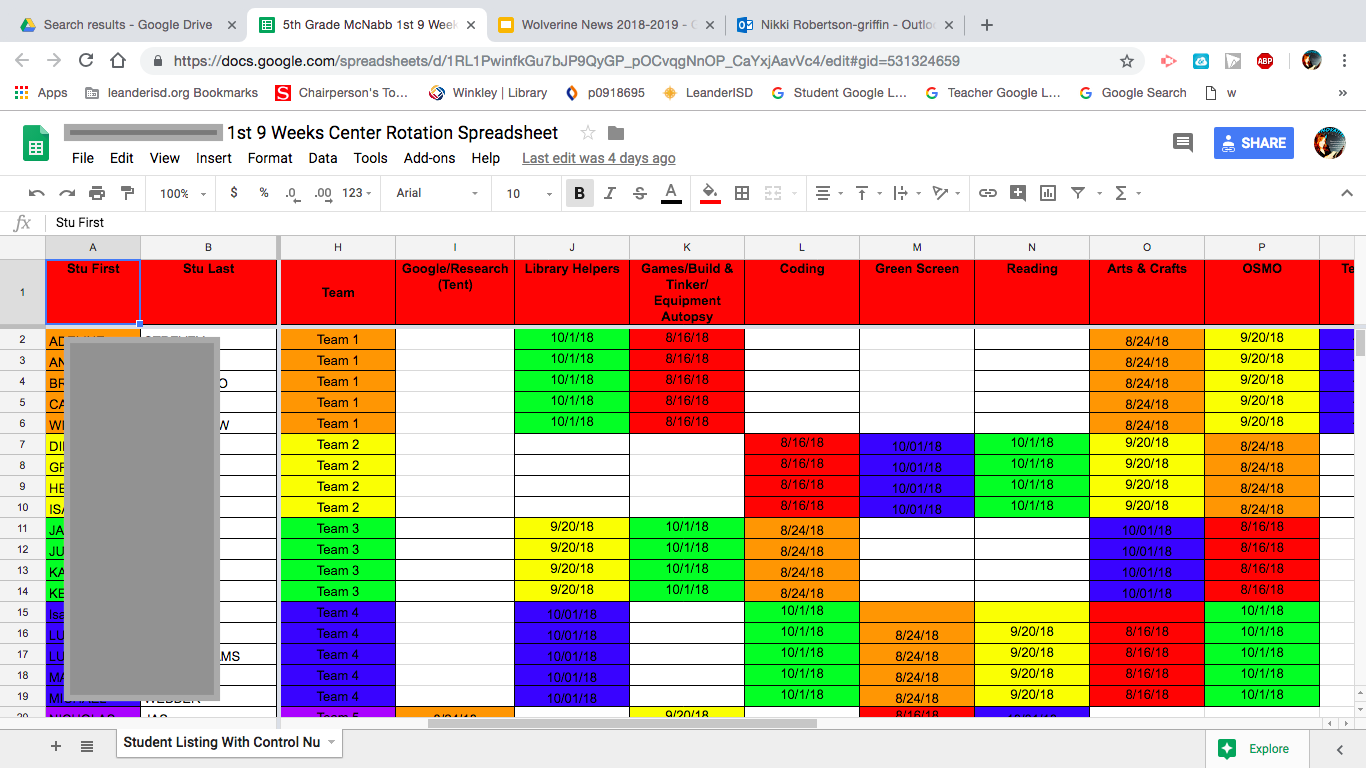
How/Do you keep track of which groups have been to which centers?
I have a spreadsheet for every teachers class with student names and centers. I mark off the team and center for each six day rotation. Here is an example.
What app did you use to create your Lego themed signage?
I just used Google Slides : )
I saw a pic of a library card. How do you use these and what info is on them?
I use library cards with Kindergarten. I print the information from Destiny. It has their name, teacher’s name, grade, student number, and student number as a barcode. I use it to teach them the check out process and then later in the year we start having them type in their library number rather than scan the library card. Tiny steps.
Do you keep reset/check in/check out barcode cards loose or are they connected to your circ desk somehow? Or do you use one computer for return and one for check out?
I keep a RESET card next to the Check Out computer. I have specific computers that are used for specific tasks. My computers are: Check In Check Out Book Search
Do you have a list of library helper group tasks by grade level?
*Students check out books by CENTER AFTER they start working in their centers. Library Helper center always checks out their books first.
Kindergarten:
Unload the book return cart (the one like a real library with the slot and cart on wheels that goes down with the weight of the books).
Duties:
One students tells students to stand behind the “blue” line until it is their turn. That student is also in charge of reminding students to scan the “RESET” card
One student gives kids a “I returned my book” sticker is they have returned all of their books.
One (or two) student stand behind the desk and give directions to the student checking out their book.
Put your book on the counter
Scan your library card
Scan your book
Scan reset
Thank you. Please go back to your center.
1st Grade:
Unload the book return cart (the one like a real library with the slot and cart on wheels that goes down with the weight of the books).
Duties:
One students tells students to stand behind the “blue” line until it is their turn. That student is also in charge of reminding students to scan the “RESET” card
One student gives kids a “I returned my book” sticker is they have returned all of their books.
One (or two) student stand behind the desk and give directions to the student checking out their book.
Thank you. Please go back to your center.
If time these students arrange the books on the cart
2nd Grade:
Unload the book return cart (the one like a real library with the slot and cart on wheels that goes down with the weight of the books).
Duties:
One students tells students to stand behind the “blue” line until it is their turn. That student is also in charge of reminding students to scan the “RESET” card
One student gives kids a “I returned my book” sticker is they have returned all of their books.
One (or two) student stand behind the desk and give directions to the student checking out their book.
Thank you. Please go back to your center.
If time these students arrange the books on the cart
If time the student put E (Everybody) books on the shelves
3rd Grade:
Unload the book return cart (the one like a real library with the slot and cart on wheels that goes down with the weight of the books).
Duties:
Students help teams check out their books
Students help Ms. Perez make overdue slips
Students help Ms. Perez give out ‘Mystery Picture” stickers to students who have returned all of their books.
Students shelve books
4th & 5th Grades Unload the book return cart (the one like a real library with the slot and cart on wheels that goes down with the weight of the books).
Duties:
Students help teams check out their books
Students help Ms. Perez make overdue slips
Students help Ms. Perez give out ‘Mystery Picture” stickers to students who have returned all of their books.
Students shelve books
I LOVE that you house your how to draw books in the arts/crafts center! So I'm assuming they are non-circulating? How have students used the laptops in the arts/crafts center?
I house drawing, origami, and paper airplane books in the Arts & Crafts center. They do circulate with the regular collection.
I have used computers at the Arts & Crafts Center to:
New to Texas and new (again) as an Elementary School Librarian last year I wrote a blog post detailing my library procedures and centers. After a year working through mistakes I have entered this new school year with lots of new ideas.
*Disclaimer 1: This post is in no way meant to undermine the way any other librarian runs their library. I do, however, point out examples of various ways other libraries are run that just aren't my thing and, yes, occasionally rub me the wrong way.
*Disclaimer 2: My school is a K-5 school with student numbers hovering near 700 with 10% of our population receiving free/reduced meals. Schools with vastly different numbers than mine would need to evaluate what works best in their school.
*Disclaimer 3: My school district has lumped libraries in with the Specials rotation (Art, Music, PE) in a fixed schedule.I see the same class once every six days for 50 minutes. I have advocated for the library to be removed from the Specials schedule but have not been successful as of yet.
Before going to centers or checking out books, I like starting off each library class together as a team. The first thing we do is empower student voice by giving students an opportunity to share.
Last year we shared using "Hey! Listen To This" where students could share whatever they wanted to share, from a tooth falling out to a grandparent dying.
It was a great way to come together as a class and learn about and better understand each other.
This summer, I came across a video where students shared either an Appreciation, an Apology, or an Aha! moment.
Even though the video example showed older students using this process, I felt that it could also be used in my K-5 library as a replacement for "Hey! Listen To This". The main reason this method appealed to me so much more than "Hey! Listen To This" was that the focus added deeper meaning and more self reflection to what students shared.
I only have two days of school and 11 classes under my belt using this new method and it has been a great success! I was surprised with how many students wanted to share an apology or an appreciation.
One student shared an apology because she yelled at her mom because her mom wanted her to wear one outfit on the first day of school but she wanted to wear something different. Her mom started crying. I asked her if she had told her mom the apology she shared with us. The student responded that she had not but she would do it as soon as she got home.
Another students shared an appreciation to her grandparents for taking care of her this summer and letting her have so much fun.
Yet another student shared a great Aha! moment he had when he and his mom were just sitting around the house not really doing anything but watching TV. He said, "Then I had a great idea!" He asked his mom, "Hey! Don't you think it would be fun to get out of the house and go to the pool?!". He said his mom loved the idea and they had a really fun day together because of his great Aha! moment.
There have been some pretty powerful goosebumps and teary eyed moments in our two short days.
Mini lessons (if needed) are also taught during this time before dispersing to centers.
Center Changes
The first change to our center activities this school year was to expand the center choices from six to nine to match the nine week Elementary School rotation schedule. The nine centers now include:
Google
Google Classroom
Google Sites for Digital Portfolios
MyMaps
Research
Library Helpers
Students check books in/out and
Shelve books
Straighten shelves
Add genre tags to books
Oh Snap! Team
Take pictures on students working in centers for the @WinkleyLibrary social media sites
It is important to align centers for minimum materials/equipment transition as there are only five minutes in between classes to change out center materials. Centers also need to be as self explanatory as possible and can be started and completed in 20 minutes or less.
My detailed Center plans can be found in this Google Folder:
This year I have done away with the Center Binders. Ya'll, I don't know what kind of crazy I was for even thinking of this time consuming idea...but it is GONE!
I have replaced the Center Binders with Teams! Students are put into teams of 4 or 5 students (sometimes 3). These teams are assigned a Team Number that they will keep all year long. Then all I need to change out every six days are what center each Team Number sign will be placed. Students wear Team Badges that match the Team Sign at the center they are to work in that day.
What Hasn't Changed
Book Check Out
I know so many Elementary School librarians who don't allow Kindergartners to check out books on the first day. Even if (or when) they "allow" Kinders to check out books they pull a selection of books off the shelves and put them on a table. Kinders can then only pick out books from the selection the librarian has made for them. Even when librarians allow Kindergarteners to pick out books from the shelves they limit their choices to just the E books (everybody/easy reader books). They further incumber students and make the process of finding a book a chore by saddling students with shelf markers (often in the form of paint stirring sticks).
*Don't even get me started on not being genrefied....
Many librarians further make going to the library, a less than enjoyable experience, especially that first week, by having students color worksheets and read books about book care. Yes, we do need to teach book care but aren't there better ways to do this that aren't so incredibly boooooorrrrriiiiinnnnngggg?
1:
I empower Kindergarteners (and all students) check out books on the FIRST day of library.
2:
I empower Kindergarteners (and all students) to find books on ANY shelf in the library. (YES! Even *gasp* chapter books)! My grandson was reading Harry Potter by himself in Kindergarten. I would have ripped his librarian a new one if she had restricted his selection of reading materials. Additionally, I have lots of Kindergarteners whose parents read chapter books with them to help form a firm foundation of the joy of reading.
3:
I empower rather than encumber Kindergarteners (and all students) by providing "I Changed My Mind" boxes at the ends of each stack. If students pull a book off of a shelf and decide it's not the book for them they just place it in the nearest box. Other students can look through the boxes for a "just right" book as well.
4:
Students check out books one center at a time. Once they have checked out their book they return to working in their center until it is time for story time.
I have a conversation with each child as they checkout their books asking them to tell me some things they should do to take care of their books at home. This way each child gets my undivided attention and gets to show me how grown up and responsible they are for knowing how to care for a book rather than being lectured to. We review how to hold books when we line up to leave the library.
5:
Clean up of centers so that they are ready for the next group coming in the library. This is a lifesaver with transitioning from one grade to another in a fixed schedule.
6:
Story Time happens after all centers have checked out books. Many librarians have a prepared book to read to students during this time. I prefer to read the titles of each child's book they chose on their own. I also have students stand up if they got a non fiction book, a chapter book, or an everybody book. this way we have an interactive conversation about different types of books rather than a lecture or worksheet.
I then choose one book from those that students have check out to read aloud. Any book you chose can easily be tied to predicting, reflecting, comprehension, etc. PLUS...students will soon learn to slow down and choose their books more carefully in anticipation of story time.
With that said, I have seen librarians who have storytelling down to an art with incredibly engaging follow up activities. If you are one of these talented, Broadway worthy librarians, please don't change what you are doing. I am in awe of your talents but am also self aware enough to know I don't possess those same talents and must find my own path.
Wolverine News (Morning Announcements)
Wolverine News will continue to be an "extra" library activity that runs before and sometimes after "official" school hours and mostly at students homes with parent assistance.
Wolverine News has both stayed the same AND changed.
Wolverine News will continue using the Green Screen Room, an iPad, iPad tripod, WeVideo, Youtube, and Google Slides to produce and distribute each show.
Wolverine News stays the same as select shows will be 100% student produced from beginning to end.
Wolverine News stays the same in that I will produce Wolverine News when there is not a student assigned to that date.
Wolverine News stays the same in that I retain all rights to edit student produced shows. (yes...this was an issue last year)
Wolverine News will stay the same in that we will continue to use FlipGrid to incorporate ALL student voice.
Wolverine News is different in that it is much more organized:
Students in 4th & 5th grades have the opportunity during the first and second 9 week periods to apply to become a Wolverine News correspondent. Students in 3rd grade will gain the opportunity to apply during the third and fourth 9 week periods.
Students interested in applying must have a strong work ethic, be able to complete tasks independently, have access to a computer/laptop and the Internet at home, have a positive teacher recommendation, and parent commitment to assist student at home with completing tasks associated with Wolverine News.
Students who participate in Wolverine News will meet in the Winkley Library twice a week from 7:20-7:45 to work on their Wolverine News assignment(s).
Skills students gain by being a part of Wolverine News include (but are not limited to):
Use of a green screen in video production
Uploading and downloading videos from one device to another device
Downloading and converting of images and videos online
Editing of videos
Adding transitions to videos
Adding title slides to videos
Adding backgrounds to green screen videos
Finding and adding music to videos
Giving attribution to resources used
Collaborating with others
Creative thinking
I have also created a checklist for Wolverine News Team members to use to assist in making sure they have all of the news segments covered in their production. In addition, I have every teacher on a list to be included in the pledges, Book of the Day, and Quote of the Day. Wolverine News Team members are not able to choose a teacher to use in their show until ALL teachers have been given an opportunity to be a part of Wolverine News.
Welcoming, Fun Environment free of "yet more work to do"
I want my library to be a place where students get solace from the desk bound, worksheet encumbered, being talked at environment that still exist in many classrooms. I want them to learn without feeling as if they are learning. I want the library to be a safe place where they can explore, discover, create and learn.
Be sure to follow our adventures this school year via our social media platforms.