
· 
Rolling out a successful 1:1 initiative is a massive undertaking for a school district that requires careful and deliberate planning well in advance of the actual deployment of devices. Whether your school district has already rolled out it’s 1:1 initiative or is planning one, Project 24 with the Alliance For Excellent Education, provides a framework that can assist your district in it’s endeavors. Project 24 is a systemic planning framework around the effective use of technology and digital learning to achieve the goal of "career and college readiness" for all students. It is a free, one-stop shop of planning tools, expert advice, creative ideas, and tangible suggestions from experienced education experts and nonprofit education membership organizations.
Last school year I was part of the 1:1 roll out of iPads in one of the largest school district in Alabama. This year I got married, moved, and took a job in a small, rural school district deploying it’s 1:1 initiative. The experience in both places has been eye opening and I have learned a great deal about what works well and what pitfalls to avoid.
First and foremost a school district can’t just jump on the bandwagon of Bring Your Own Device (BYOD) or providing 1:1 devices without a well studied and thought out plan that includes everything from infrastructure to classroom use and teacher training.
Under the leadership of Dr. Tom Sisk (Superintendent) and Ms. Karen Tucker (Director of Information Technology), Limestone County Schools although a small, rural, impoverished school district, has gotten their 1:1 deployment right.
In 2012 the journey to a 1:1 initiative began in Limestone County. Gathering information and laying out a plan to success was key when Dr. Sisk came aboard as Superintendent of Limestone County Schools. A team from Limestone County visited Mooresville Graded School District to learn how their one-to-one laptop program led to higher test scores and a lower dropout rate and how to bring that same success to the students of Limestone County. Next, issues dealing with infrastructure, device choice, grade levels to begin deployment, and teacher training were tackled. Two full years were spent just getting the infrastructure in place to handle the bandwidth needed to handle a 1:1 deployment.
“This is not about the technology,” Mark Edwards, superintendent of Mooresville Graded School District, would tell the visitors later over lunch. “It’s not about the box. It’s about changing the culture of instruction — preparing students for their future, not our past.”
Taking to heart the words of Mooresville Graded School District’s superintendent, Ms. Karen Tucker should be commended for sticking to her guns and insisting that Instructional Technology Facilitators be embedded in each school for the deployment and incorporating of 1:1 devices into the curriculum. This, unfortunately, is a step that many school districts fail to take that I feel is key to a true integration of the technology into the daily curriculum in a 1:1 school.
Limestone County Schools decided to launch their 1:1 program using 11’ MacBook Air laptops with 3rd and 4th grade students. The plan is to expand the program each year by adding two more grade levels ensuring a complete 1:1 program for grades 3-12 within four years.
During the second semester of the 2013-2014 school year, Limestone County Schools deployed a 1:1 pilot program at Blue Springs Elementary School with Ms. Wendy Brightman as the Instructional Technology Facilitator embedded in the school. Ms. Brightman, Ms. Tucker, Dr. Sisk and principal Mr. Randy Hamilton worked collaboratively to create a program that could be replicated in each school throughout the district the following year.
During the Spring and Summer of 2014 an exhaustive search for nine Instructional Technology Facilitators for eight schools resulted in a dedicated, collaborative team:
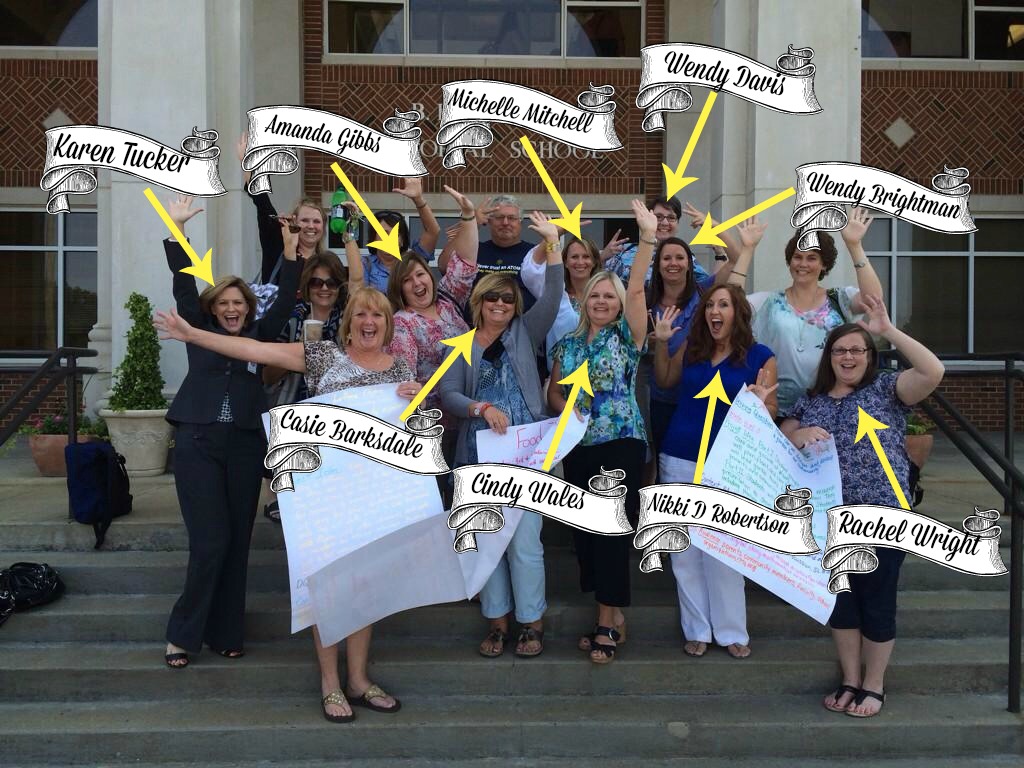
Wendy Brightman
|
Rachael Wright
|
Cindy Wales
|
Wendy Davis
|
Amy Jackson
Michelle Mitchell
|
Casie Barksdale
|
Nikki D Robertson
|
Amanda Gibbs
|
Beginning in August, after a summer of training sessions, the Limestone County Instructional Technology Facilitators began teaching 3rd and 4th grade students digital citizenship using Digital Passport from Common Sense Education using a set of 30 MacBook Air laptops per school. It was important to the district that students knew how to use the devices provided in a safe, ethical manner before issuing 1:1 devices.

The Instructional Technology Facilitators also used this time to teach students the basic functions of the MacBook Air as many had only used the PCs located in each school’s computer lab. In addition to training students, the Instructional Technology Facilitators also worked closely with teachers training them as well and strategizing the best implementation for each school. Instructional Technology Facilitators also held mandatory parent meetings before, during and after school to inform and train parents about the devices their students would bring home.
 |  |
 |  |
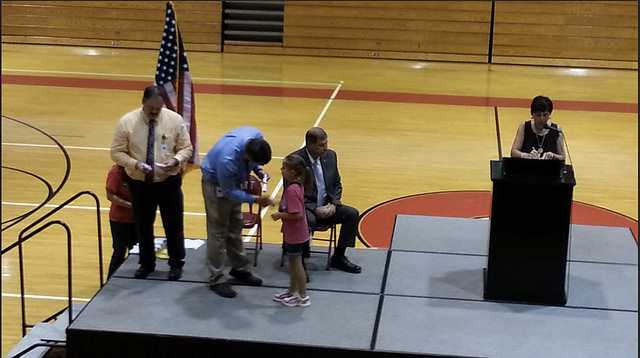
After a month of training the big day finally arrived to distribute the devices to students. Each school had their own unique way of rolling out the devices, but all included parents, school staff, central office staff, and community members. Elkmont went with a graduation style roll out. A stage was set up in the gym and parents, family members, community members and students from 2nd grade and 5th grade were invited to participate. Dr. Sisk delivered an inspiring keynote after which students were called one by one to the stage. As students walked across the stage their teacher placed their laptop (in bag) over their head and shoulder. Students then proceeded to Mr. Garth Garris, Elkmont principal, who presented them with their Digital Citizenship Diploma from Common Sense Education. Pictures were taken and our PTSO provided refreshments afterwards.
Since that day the Instructional Technology Facilitators have worked daily with the 3rd and 4th grade teachers to ensure that the devices are being used as a natural and integral part of daily learning, not just as something special to use occasionally. Each day brings new challenges, new discoveries, and new opportunities. You can read details of our weekly DPI escapades on our Limestone County School’s DPI Blog.
This is just the beginning of our journey with our 1:1 Digital Passport Initiative. Currently, Ms. Tucker has assembled a team consisting of an Instructional Technology Facilitator, Curriculum Coordinator, Instructional Coach, Classroom Teacher, & Principal to look at establishing student and teacher benchmarks for the DPI program as well as correlating DPI with district curriculum goals. We still have a long way to go and much to learn but feel that, thanks to the vision of our district leaders, we have a solid foundation on which to build.


