

UPDATE:
Recently a friend asked so great questions to get more specifics about how Centers work in the Winkley Library. I have also update my K-5 Lesson Plans: https://drive.google.com/open?id=1ZVT2fTync_0yAOH6oqMenScaMdWf2zDD
Here are the questions asked and my responses:
It sounds like your classes all rotate through over 6 days like mine, and you said you keep the centers the same until they all go through all the centers. So why do you have 9 centers? (I feel really stupid for not understanding this!)
Great question! I have 9 centers because the elementary school operates on a 9 week rotation. Since each class only has 5 teams, I only have 5 centers open at a time. This helps me because I have a limited number of iPads and iPods so I have to carefully plan which center will be open when so that I have the technology available for the centers that are open.
How are the number signs with velcro on the walls used?
The number signs on the wall are used when we have “free centers”. I try to do free centers at the end of each 9 weeks. During this time students can go to any center they want. They do not have to stay in that center the whole time. They can go to as many centers as they want during their library time.
Instead of getting their team badge they get a Lego character badge and tag. They wear the badge and then use the matching tag to “mark their place” in the center of the choice. Only four people can be in a center at a time so the numbers are where they put their tag. If all the numbers have tags attached to them that signals to a student that the center is full and they will need to choose a different center.
How/Do you keep track of which groups have been to which centers?
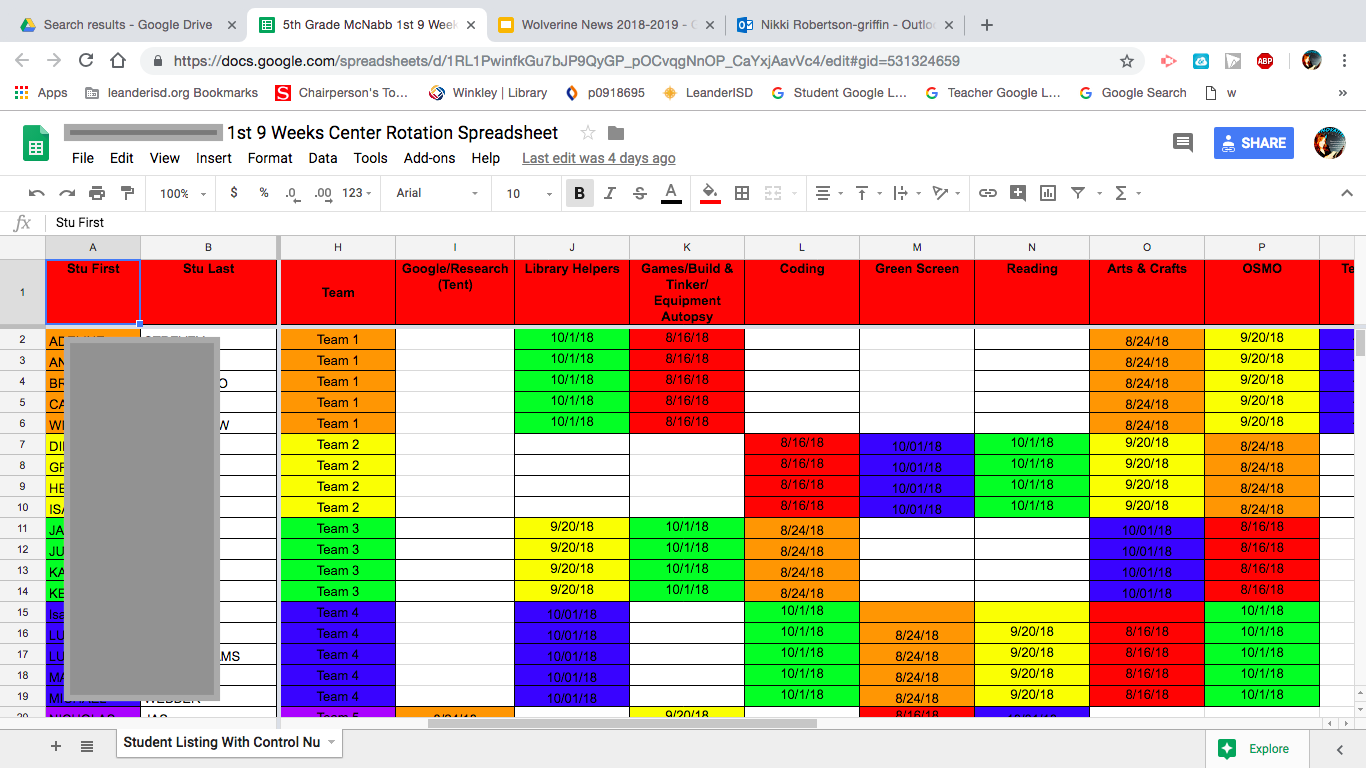
I have a spreadsheet for every teachers class with student names and centers. I mark off the team and center for each six day rotation. Here is an example.
Recently a friend asked so great questions to get more specifics about how Centers work in the Winkley Library. I have also update my K-5 Lesson Plans: https://drive.google.com/open?id=1ZVT2fTync_0yAOH6oqMenScaMdWf2zDD
Here are the questions asked and my responses:
It sounds like your classes all rotate through over 6 days like mine, and you said you keep the centers the same until they all go through all the centers. So why do you have 9 centers? (I feel really stupid for not understanding this!)
Great question! I have 9 centers because the elementary school operates on a 9 week rotation. Since each class only has 5 teams, I only have 5 centers open at a time. This helps me because I have a limited number of iPads and iPods so I have to carefully plan which center will be open when so that I have the technology available for the centers that are open.
How are the number signs with velcro on the walls used?
The number signs on the wall are used when we have “free centers”. I try to do free centers at the end of each 9 weeks. During this time students can go to any center they want. They do not have to stay in that center the whole time. They can go to as many centers as they want during their library time.
Instead of getting their team badge they get a Lego character badge and tag. They wear the badge and then use the matching tag to “mark their place” in the center of the choice. Only four people can be in a center at a time so the numbers are where they put their tag. If all the numbers have tags attached to them that signals to a student that the center is full and they will need to choose a different center.
How/Do you keep track of which groups have been to which centers?
I have a spreadsheet for every teachers class with student names and centers. I mark off the team and center for each six day rotation. Here is an example.
What app did you use to create your Lego themed signage?
I just used Google Slides : )
I saw a pic of a library card. How do you use these and what info is on them?
I use library cards with Kindergarten. I print the information from Destiny. It has their name, teacher’s name, grade, student number, and student number as a barcode. I use it to teach them the check out process and then later in the year we start having them type in their library number rather than scan the library card. Tiny steps.
Do you keep reset/check in/check out barcode cards loose or are they connected to your circ desk somehow? Or do you use one computer for return and one for check out?
I keep a RESET card next to the Check Out computer. I have specific computers that are used for specific tasks. My computers are:
Check In
Check Out
Book Search
Do you have a list of library helper group tasks by grade level?
*Students check out books by CENTER AFTER they start working in their centers. Library Helper center always checks out their books first.
Kindergarten:
Unload the book return cart (the one like a real library with the slot and cart on wheels that goes down with the weight of the books).
*Students check out books by CENTER AFTER they start working in their centers. Library Helper center always checks out their books first.
Kindergarten:
Unload the book return cart (the one like a real library with the slot and cart on wheels that goes down with the weight of the books).
Duties:
One students tells students to stand behind the “blue” line until it is their turn. That student is also in charge of reminding students to scan the “RESET” card
One student gives kids a “I returned my book” sticker is they have returned all of their books.
One (or two) student stand behind the desk and give directions to the student checking out their book.
Put your book on the counter
Scan your library card
Scan your book
Scan reset
Thank you. Please go back to your center.
1st Grade:
Unload the book return cart (the one like a real library with the slot and cart on wheels that goes down with the weight of the books).
Duties:
One students tells students to stand behind the “blue” line until it is their turn. That student is also in charge of reminding students to scan the “RESET” card
One student gives kids a “I returned my book” sticker is they have returned all of their books.
One (or two) student stand behind the desk and give directions to the student checking out their book.
Thank you. Please go back to your center.
If time these students arrange the books on the cart
2nd Grade:
Unload the book return cart (the one like a real library with the slot and cart on wheels that goes down with the weight of the books).
Duties:
One students tells students to stand behind the “blue” line until it is their turn. That student is also in charge of reminding students to scan the “RESET” card
One student gives kids a “I returned my book” sticker is they have returned all of their books.
One (or two) student stand behind the desk and give directions to the student checking out their book.
Thank you. Please go back to your center.
If time these students arrange the books on the cart
If time the student put E (Everybody) books on the shelves
3rd Grade:
Unload the book return cart (the one like a real library with the slot and cart on wheels that goes down with the weight of the books).
Duties:
Students help teams check out their books
Students help Ms. Perez make overdue slips
Students help Ms. Perez give out ‘Mystery Picture” stickers to students who have returned all of their books.
Students shelve books
4th & 5th Grades
Unload the book return cart (the one like a real library with the slot and cart on wheels that goes down with the weight of the books).
Duties:
Students help teams check out their books
Students help Ms. Perez make overdue slips
Students help Ms. Perez give out ‘Mystery Picture” stickers to students who have returned all of their books.
Students shelve books
I LOVE that you house your how to draw books in the arts/crafts center! So I'm assuming they are non-circulating? How have students used the laptops in the arts/crafts center?
I house drawing, origami, and paper airplane books in the Arts & Crafts center. They do circulate with the regular collection.
I have used computers at the Arts & Crafts Center to:
Give video directions (for example: Origami)
For Google Auto Draw
For Google Quick Draw
For drawing (KidLitTV Ready, Set, Draw)
ORIGINAL POST:
New to Texas and new (again) as an Elementary School Librarian last year I wrote a blog post detailing my library procedures and centers. After a year working through mistakes I have entered this new school year with lots of new ideas.
*Disclaimer 1: This post is in no way meant to undermine the way any other librarian runs their library. I do, however, point out examples of various ways other libraries are run that just aren't my thing and, yes, occasionally rub me the wrong way.
*Disclaimer 2: My school is a K-5 school with student numbers hovering near 700 with 10% of our population receiving free/reduced meals. Schools with vastly different numbers than mine would need to evaluate what works best in their school.
*Disclaimer 3: My school district has lumped libraries in with the Specials rotation (Art, Music, PE) in a fixed schedule. I see the same class once every six days for 50 minutes. I have advocated for the library to be removed from the Specials schedule but have not been successful as of yet.

Before going to centers or checking out books, I like starting off each library class together as a team. The first thing we do is empower student voice by giving students an opportunity to share.
Last year we shared using "Hey! Listen To This" where students could share whatever they wanted to share, from a tooth falling out to a grandparent dying.


Students in 4th & 5th grades have the opportunity during the first and second 9 week periods to apply to become a Wolverine News correspondent. Students in 3rd grade will gain the opportunity to apply during the third and fourth 9 week periods.
Students interested in applying must have a strong work ethic, be able to complete tasks independently, have access to a computer/laptop and the Internet at home, have a positive teacher recommendation, and parent commitment to assist student at home with completing tasks associated with Wolverine News.
Students who participate in Wolverine News will meet in the Winkley Library twice a week from 7:20-7:45 to work on their Wolverine News assignment(s).
Skills students gain by being a part of Wolverine News include (but are not limited to):
Use of a green screen in video production
Uploading and downloading videos from one device to another device
Downloading and converting of images and videos online
Editing of videos
Adding transitions to videos
Adding title slides to videos
Adding backgrounds to green screen videos
Finding and adding music to videos
Giving attribution to resources used
Collaborating with others
Creative thinking
DEADLINE to apply is Friday, August 31, 2018.

You can watch Wolverine News episodes from last year here:
https://docs.google.com/presentation/d/1z8WsuLgCbfi03On7d_EYxoPzVRV5P7m-k6aXvboTvgQ/edit?usp=sharing
Or watch this season here:
https://docs.google.com/presentation/d/18O1JAOCPckHXxN2H8MsaOfR86yCCczl1WHlx7CbpLgE/edit?usp=sharing

Watch our slideshow grow!
One students tells students to stand behind the “blue” line until it is their turn. That student is also in charge of reminding students to scan the “RESET” card
One student gives kids a “I returned my book” sticker is they have returned all of their books.
One (or two) student stand behind the desk and give directions to the student checking out their book.
Put your book on the counter
Scan your library card
Scan your book
Scan reset
Thank you. Please go back to your center.
1st Grade:
Unload the book return cart (the one like a real library with the slot and cart on wheels that goes down with the weight of the books).
Duties:
One students tells students to stand behind the “blue” line until it is their turn. That student is also in charge of reminding students to scan the “RESET” card
One student gives kids a “I returned my book” sticker is they have returned all of their books.
One (or two) student stand behind the desk and give directions to the student checking out their book.
Thank you. Please go back to your center.
If time these students arrange the books on the cart
2nd Grade:
Unload the book return cart (the one like a real library with the slot and cart on wheels that goes down with the weight of the books).
Duties:
One students tells students to stand behind the “blue” line until it is their turn. That student is also in charge of reminding students to scan the “RESET” card
One student gives kids a “I returned my book” sticker is they have returned all of their books.
One (or two) student stand behind the desk and give directions to the student checking out their book.
Thank you. Please go back to your center.
If time these students arrange the books on the cart
If time the student put E (Everybody) books on the shelves
3rd Grade:
Unload the book return cart (the one like a real library with the slot and cart on wheels that goes down with the weight of the books).
Duties:
Students help teams check out their books
Students help Ms. Perez make overdue slips
Students help Ms. Perez give out ‘Mystery Picture” stickers to students who have returned all of their books.
Students shelve books
4th & 5th Grades
Unload the book return cart (the one like a real library with the slot and cart on wheels that goes down with the weight of the books).
Duties:
Students help teams check out their books
Students help Ms. Perez make overdue slips
Students help Ms. Perez give out ‘Mystery Picture” stickers to students who have returned all of their books.
Students shelve books
I LOVE that you house your how to draw books in the arts/crafts center! So I'm assuming they are non-circulating? How have students used the laptops in the arts/crafts center?
I house drawing, origami, and paper airplane books in the Arts & Crafts center. They do circulate with the regular collection.
I have used computers at the Arts & Crafts Center to:
Give video directions (for example: Origami)
For Google Auto Draw
For Google Quick Draw
For drawing (KidLitTV Ready, Set, Draw)
ORIGINAL POST:
New to Texas and new (again) as an Elementary School Librarian last year I wrote a blog post detailing my library procedures and centers. After a year working through mistakes I have entered this new school year with lots of new ideas.
*Disclaimer 1: This post is in no way meant to undermine the way any other librarian runs their library. I do, however, point out examples of various ways other libraries are run that just aren't my thing and, yes, occasionally rub me the wrong way.
*Disclaimer 2: My school is a K-5 school with student numbers hovering near 700 with 10% of our population receiving free/reduced meals. Schools with vastly different numbers than mine would need to evaluate what works best in their school.
*Disclaimer 3: My school district has lumped libraries in with the Specials rotation (Art, Music, PE) in a fixed schedule. I see the same class once every six days for 50 minutes. I have advocated for the library to be removed from the Specials schedule but have not been successful as of yet.

Let's start with Ch-ch-ch-ch-changes:
Before going to centers or checking out books, I like starting off each library class together as a team. The first thing we do is empower student voice by giving students an opportunity to share.
Last year we shared using "Hey! Listen To This" where students could share whatever they wanted to share, from a tooth falling out to a grandparent dying.

It was a great way to come together as a class and learn about and better understand each other.
This summer, I came across a video where students shared either an Appreciation, an Apology, or an Aha! moment.
Even though the video example showed older students using this process, I felt that it could also be used in my K-5 library as a replacement for "Hey! Listen To This". The main reason this method appealed to me so much more than "Hey! Listen To This" was that the focus added deeper meaning and more self reflection to what students shared.

I only have two days of school and 11 classes under my belt using this new method and it has been a great success! I was surprised with how many students wanted to share an apology or an appreciation.
One student shared an apology because she yelled at her mom because her mom wanted her to wear one outfit on the first day of school but she wanted to wear something different. Her mom started crying. I asked her if she had told her mom the apology she shared with us. The student responded that she had not but she would do it as soon as she got home.
Another students shared an appreciation to her grandparents for taking care of her this summer and letting her have so much fun.
Yet another student shared a great Aha! moment he had when he and his mom were just sitting around the house not really doing anything but watching TV. He said, "Then I had a great idea!" He asked his mom, "Hey! Don't you think it would be fun to get out of the house and go to the pool?!". He said his mom loved the idea and they had a really fun day together because of his great Aha! moment.
There have been some pretty powerful goosebumps and teary eyed moments in our two short days.


Mini lessons (if needed) are also taught during this time before dispersing to centers.
Center Changes
The first change to our center activities this school year was to expand the center choices from six to nine to match the nine week Elementary School rotation schedule. The nine centers now include:
- Google
- Google Classroom
- Google Sites for Digital Portfolios
- MyMaps
- Research
- Library Helpers
- Students check books in/out and
- Shelve books
- Straighten shelves
- Add genre tags to books
- Oh Snap! Team
- Take pictures on students working in centers for the @WinkleyLibrary social media sites
- Games
- LEGOs
- Magnetic Building
- Puzzles
- Card Games
- Board Games
- Coding
- Scratch Jr
- Scratch 3.0 (still in beta)
- Hour of Code
- Made with Code
- Tynker Hour of Code
- Incredibox
- Green Screen
- Varies
- Reading
- LISD Online Book Resources
- Unite for Literacy
- Epic! Books for Kids
- Books
- Magazines
- Arts and Crafts
- Varies
- Word
- Numbers
- Masterpiece
- Newton
- Tangrams
- Coding Awbie
- Coding Jam
- Pizza Co
- Monster
- Technology
- Augmented Reality
- Virtual Reality
- Various websites and apps that do not neatly fall under another center category
- Bloxels EDU (4th & 5th only)
It is important to align centers for minimum materials/equipment transition as there are only five minutes in between classes to change out center materials. Centers also need to be as self explanatory as possible and can be started and completed in 20 minutes or less.
My detailed Center plans can be found in this Google Folder:

Bye Bye Center Binders

This year I have done away with the Center Binders. Ya'll, I don't know what kind of crazy I was for even thinking of this time consuming idea...but it is GONE!
I have replaced the Center Binders with Teams! Students are put into teams of 4 or 5 students (sometimes 3). These teams are assigned a Team Number that they will keep all year long. Then all I need to change out every six days are what center each Team Number sign will be placed. Students wear Team Badges that match the Team Sign at the center they are to work in that day.

What Hasn't Changed
Book Check Out
I know so many Elementary School librarians who don't allow Kindergartners to check out books on the first day. Even if (or when) they "allow" Kinders to check out books they pull a selection of books off the shelves and put them on a table. Kinders can then only pick out books from the selection the librarian has made for them. Even when librarians allow Kindergarteners to pick out books from the shelves they limit their choices to just the E books (everybody/easy reader books). They further incumber students and make the process of finding a book a chore by saddling students with shelf markers (often in the form of paint stirring sticks).
*Don't even get me started on not being genrefied....
Many librarians further make going to the library, a less than enjoyable experience, especially that first week, by having students color worksheets and read books about book care. Yes, we do need to teach book care but aren't there better ways to do this that aren't so incredibly boooooorrrrriiiiinnnnngggg?
1:
I empower Kindergarteners (and all students) check out books on the FIRST day of library.
2:
I empower Kindergarteners (and all students) to find books on ANY shelf in the library. (YES! Even *gasp* chapter books)! My grandson was reading Harry Potter by himself in Kindergarten. I would have ripped his librarian a new one if she had restricted his selection of reading materials. Additionally, I have lots of Kindergarteners whose parents read chapter books with them to help form a firm foundation of the joy of reading.
3:
I empower rather than encumber Kindergarteners (and all students) by providing "I Changed My Mind" boxes at the ends of each stack. If students pull a book off of a shelf and decide it's not the book for them they just place it in the nearest box. Other students can look through the boxes for a "just right" book as well.
4:
Students check out books one center at a time. Once they have checked out their book they return to working in their center until it is time for story time.
I have a conversation with each child as they checkout their books asking them to tell me some things they should do to take care of their books at home. This way each child gets my undivided attention and gets to show me how grown up and responsible they are for knowing how to care for a book rather than being lectured to. We review how to hold books when we line up to leave the library.
5:
Clean up of centers so that they are ready for the next group coming in the library. This is a lifesaver with transitioning from one grade to another in a fixed schedule.
6:
Story Time happens after all centers have checked out books. Many librarians have a prepared book to read to students during this time. I prefer to read the titles of each child's book they chose on their own. I also have students stand up if they got a non fiction book, a chapter book, or an everybody book. this way we have an interactive conversation about different types of books rather than a lecture or worksheet.
I then choose one book from those that students have check out to read aloud. Any book you chose can easily be tied to predicting, reflecting, comprehension, etc. PLUS...students will soon learn to slow down and choose their books more carefully in anticipation of story time.
With that said, I have seen librarians who have storytelling down to an art with incredibly engaging follow up activities. If you are one of these talented, Broadway worthy librarians, please don't change what you are doing. I am in awe of your talents but am also self aware enough to know I don't possess those same talents and must find my own path.
Wolverine News (Morning Announcements)
Wolverine News will continue to be an "extra" library activity that runs before and sometimes after "official" school hours and mostly at students homes with parent assistance.
Wolverine News has both stayed the same AND changed.
Wolverine News will continue using the Green Screen Room, an iPad, iPad tripod, WeVideo, Youtube, and Google Slides to produce and distribute each show.
Wolverine News stays the same as select shows will be 100% student produced from beginning to end.
Wolverine News stays the same in that I will produce Wolverine News when there is not a student assigned to that date.
Wolverine News stays the same in that I retain all rights to edit student produced shows. (yes...this was an issue last year)
Wolverine News will stay the same in that we will continue to use FlipGrid to incorporate ALL student voice.
Wolverine News is different in that it is much more organized:


Students interested in applying must have a strong work ethic, be able to complete tasks independently, have access to a computer/laptop and the Internet at home, have a positive teacher recommendation, and parent commitment to assist student at home with completing tasks associated with Wolverine News.
Students who participate in Wolverine News will meet in the Winkley Library twice a week from 7:20-7:45 to work on their Wolverine News assignment(s).
Skills students gain by being a part of Wolverine News include (but are not limited to):
Use of a green screen in video production
Uploading and downloading videos from one device to another device
Downloading and converting of images and videos online
Editing of videos
Adding transitions to videos
Adding title slides to videos
Adding backgrounds to green screen videos
Finding and adding music to videos
Giving attribution to resources used
Collaborating with others
Creative thinking
I have also created a checklist for Wolverine News Team members to use to assist in making sure they have all of the news segments covered in their production. In addition, I have every teacher on a list to be included in the pledges, Book of the Day, and Quote of the Day. Wolverine News Team members are not able to choose a teacher to use in their show until ALL teachers have been given an opportunity to be a part of Wolverine News.

https://docs.google.com/presentation/d/1z8WsuLgCbfi03On7d_EYxoPzVRV5P7m-k6aXvboTvgQ/edit?usp=sharing
Or watch this season here:
https://docs.google.com/presentation/d/18O1JAOCPckHXxN2H8MsaOfR86yCCczl1WHlx7CbpLgE/edit?usp=sharing

Welcoming, Fun Environment free of "yet more work to do"
I want my library to be a place where students get solace from the desk bound, worksheet encumbered, being talked at environment that still exist in many classrooms. I want them to learn without feeling as if they are learning. I want the library to be a safe place where they can explore, discover, create and learn.
Be sure to follow our adventures this school year via our social media platforms.


Watch our slideshow grow!


