Showing posts with label MobyMax. Show all posts

Sunday, March 8, 2015

It's a Reading Wonderland!


My grandson loves the EPIC! App


Looking for ways to encourage and improve reading?  Here are some of my favorite apps and websites I have used with my students and with my grandson.

The sites below range for kids from PreK to Seniors.


Endless Alphabet

While Endless Alphabet is not really a "reading" app, it does help teach toddlers their letters in the context of words.  Each letter has it's own unique monster look and sound.  A word appears on the screen then monsters run through the word scattering letters everywhere.  Your child must put the letters back in their proper place to form the word again. The letters make the sound associated with the letter when they are touched.  Once the word has been spelled the definition is provided and acted out by the monsters.  It is an app that kept my grandson occupied enough for us to eat at a restaurant which is quite an endorsement!


Endless Reader

Endless Reader builds on what kids have learned via Endless Alphabet although it is not necessary to have used Endless Alphabet.  Rather than just spelling the words, kids are using the words within sentences.  The engaging monsters continue to make learning to read fun!


Unite For Literacy

Unite for Literacy provides a large, free, online library for kids to help eliminate "book deserts".  My ELL teachers LOVE Unite for Literacy as it provides the option of having a book read to the student in English AND in their native language.  It also includes an option to have the book read in American Sign Language, something very rare in online books.


Epic! Books For Kids

EPIC! is a type of "Netflix" for books.  Parents pay a monthly fee and have access to an amazing array of quality, popular books online.  The good news is that educators can use their school email and get the service FREE.  My grandson (just turned 4 years old) absolutely love this app.  In just a little over two months he has read over 100 books through EPIC!  He know how to search for books he wants to read. Once he asked me, "Grandma, how do you spell kittens?" because he wanted to read a book about kittens.  Kids can also give the books they read a star ranking and add books to their "favorites" list.


Books That Grow


"Books That Grow is a differentiated reading platform that can be accessed as a website application, and as a Ipad and Chromebook app. Within our application, students, parents and teachers can access a growing library of adaptable books that can be read at multiple levels of text complexity. Our library contains classic fiction pieces, biographies, social studies texts, myths and folktales, and popular science pieces. Teachers can create virtual classrooms within our app, and afterward, assign books to their students, monitor their progress, and adjust their reading levels as they see fit. Students can create personalized libraries that reflect their own interests, in addition to the books assigned to them by their teachers. With Books That Grow, teachers can easily assign the same reading assignment to an entire class of mixed ability students, while also permitting these students to learn at their own level, so they can keep up with the class, progress measurably in their reading skills, and—of course—enjoy reading."


Moby Max


"Moby Reading pairs literature and informational texts with similar topics to encourage deep reading and facilitate learning. Informational texts draw in students with interesting topics, and all students love stories. The pairing of both creates a fertile ground for critical thinking."


Newsela

Common Core emphasizes reading non fiction text but finding these materials can be difficult. Newsela makes this task easy and monitoring student comprehension and progress even easier. 
"Newsela is an innovative way to build reading comprehension with nonfiction that's always relevant: daily news. It's easy and amazing."


Actively Learn


"Let Students Find Joy and Purpose In Reading.  More than 200,000 K-12 students use Actively Learn to read together as a class or for fun on their own. Students think more, write more, and collaborate more with their peers when they read."

Sunday, November 2, 2014

This Week @Elkmont & Beyond! October 27-31, 2014


Creepy Crawly Mind Maps


3rd graders got into the Halloween spirit this week by researching creepy, crawly spiders! We started the lesson by using KidRex to find interesting facts about spiders. Once students had written down at least four interesting or unusual facts about spiders, we organized their information using Popplet to build a mind map (graphic organizer).

Tuesday I started this project with Ms. Walker's 3rd grade students but we were only able to finish our research. I showed the students quickly what we would do with their research using Popplet the next time I was scheduled to come to their class. I was so excited and surprised when I walked in to Ms. Walker's class on Thursday and several students had already been on Popplet and had already made their mind map! 

TIP: Be sure to change up the mind maps (graphic organizers) you use with your students. Check out this link for some great online graphic organizers and what areas are best to use them with kids. https://sites.google.com/site/richardbyrnepdsite/rsu-1-mind-maps-and-timelines


Math, Reading, Grammar...Oh My! My MobyMax!


3rd grade spent time this week getting familiar with MobyMax. MobyMax is similar to Khan Academy in that it is an adaptive program and provides real time reports so that teachers can provide just in time intervention but covers not only math, but reading and grammar as well. Students can earn game time by completing set amounts of activities with a passing score. Students can also earn badges and other incentives as well as they work through the learning modules.

MobyMax makes it easy for teachers to differentiate based on each students ability level and actually find the gaps and fills them for each student's academic development.


Coding For Kids- By Linda Smith


Google has provided a fun, just in time for Halloween coding project for kids, The Yeti Project.

Coding is the ability to read and write a machine language as well as to think computationally. Learning to code can lead to outputs valuable in and of themselves, but the process of learning to code also develops problem-solving skills, (digital) confidence, and helps young people understand the world around them. In many respects, we should encourage kids to code for similar reasons to those we give for encouraging them to play sports and learn an instrument: it's good for their development.

Try it out and see how good you can be at coding! 


Collaborative Learning with Google Maps


My school district launched their 1:1 initiative, the Digital Passport Initiative (DPI), this year by providing all 3rd and 4th grade students with a MacBook Air.  Assisting teachers and students with how to seamlessly integrate these devices into the classroom setting is the focus of my position with the district this year.  

Now that students are not limited to when a computer lab is available we have launched into research, a must have yet often overlooked skill.  This starts with assisting students in locating reliable websites for gathering information.  In Alabama we are lucky that our legislators provide funding to a slew of databases for our students through the Alabama Virtual Library.  Starting the students off with a reliable website will give them a basis of comparison as they expand later in the year to finding reliable sources on their own.


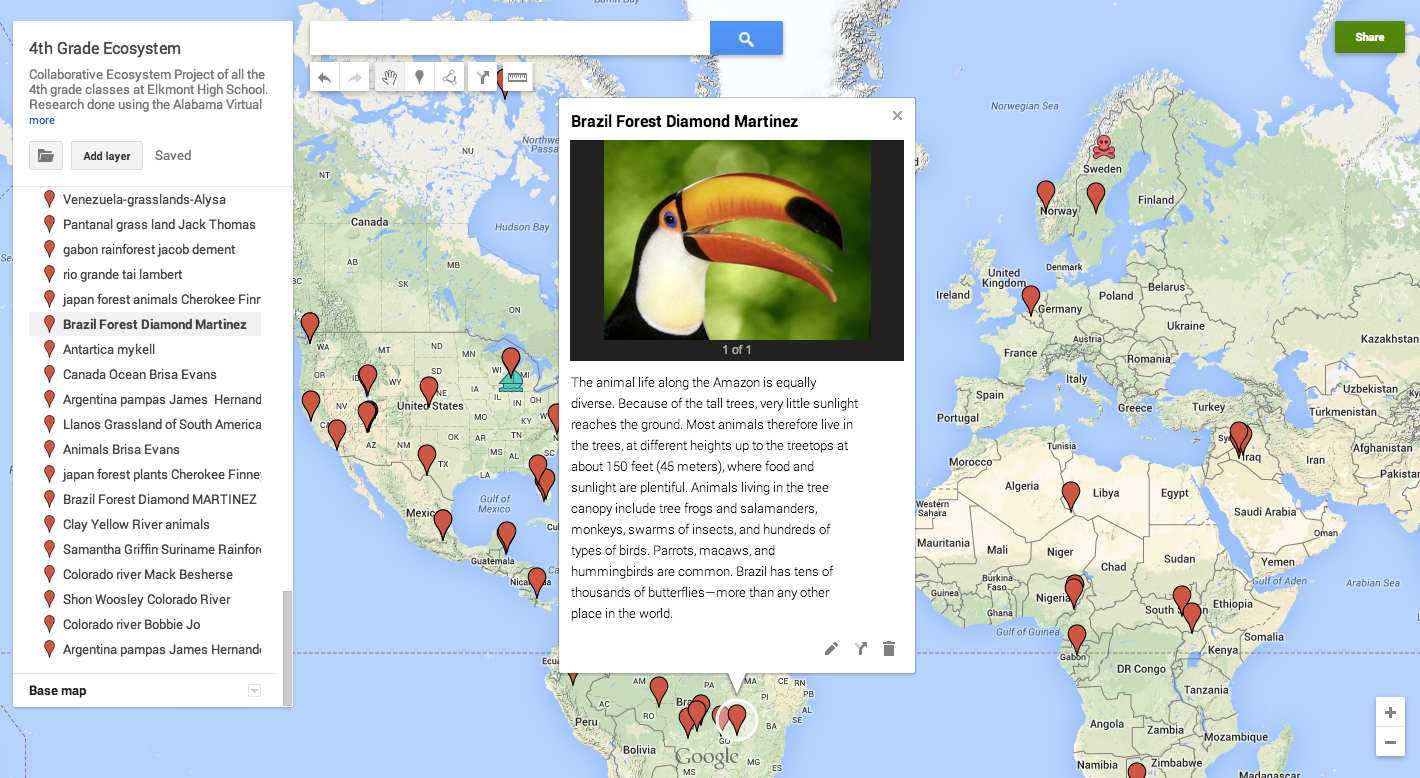
This past week our 4th graders began their unit on Ecosystems.  We wanted this activity to be a collaborative one combining all the research from 120 fourth graders into one interactive location. It was decided that this activity seemed like a perfect fit for learning how to use Google Maps.  

To begin the unit, students were presented with a list of Ecosystems and the countries where these ecosystems are located and asked to commit to one as their individual research goal.    Next, students were introduced to the Alabama Virtual Library’s database, Britannica Elementary,  as the resource they were to use for this unit.  Using Britannica Elementary students were asked to find the following about their country’s ecosystem:

  • One interesting fact about the country where their ecosystem is located. Include a image/video.
  • A description of animal life found in their country's ecosystem. Include a image/video.
  • A description of the vegetation found in their country's ecosystem. Include a image/video.

Once students had located the basic facts about their country’s ecosystem we moved on to learning how to input that information on a collaborative Google Map.  One thing I love about working with the DPI students is that they are willing to jump right into a new technology with little or no apprehension.  I demonstrated how to add a pin to the map and that is all they needed.  Before long students had discovered how to change the color and shape of their pins to individualize their pins from those of their peers.  As students worked they were eager to share their discoveries with their teacher and other students.  

Now that the interactive map has been made, our 4th grade teachers have been using it as a point of reference as they continue to teach the Ecosystem unit.  The kids love this approach to the unit as their teacher references their pins and uses their pictures and videos to teach.   

There are many great tie in activities that can be pursued throughout the year using this Google map, including longitude and latitude, mathematics, social studies and so much more!

Because this was our first time using Google maps our lesson was quite simple. Here are a few links to much more involved lessons with Google maps:


Professional Learning Opportunities

Wonders, GoMath, Global Scholar

Limestone County School District held a training this week to get Instructional Technology Facilitators not familiar with Wonders, GoMath, & Global Scholar up to speed.  This training also set up ITFs as administrators over these accounts for their schools.

New Teacher Training (Graphic Organizers)

Limestone County School District provides a through new teacher training series to help orient new teachers to best teaching practices.  This month our meeting concentrated on effective use of graphic organizers.

#USEdChat

This past Monday night (October 27, 2014) at 9 pm ET was the quarterly #USEdChat, a joint chat that brings state twitter chats together.  This #USEdChat was extra special as guest moderators 
Tom Murray, Sheryl NussbaumBeach, Hal Roberts, Jimmy Casas, & Brian & Jessica Sztabnik joined Jennifer Hogan, Holly Sutherland and Michael McLendon from #ALEdChat to bring the nation an exhilarating discussion about connecting & collaborating.


#GaEd

October 30, 2014 I jumped in on the #GaED chat session about assessment lead by Aaryn Schmuhl, Henry County Asst. Super. for Learning and Leadership.  Assessment is a very hot topic in education right now as 1:1 initiatives change the educational landscape to more student centered, competency based environment.  


Sunday, October 26, 2014

This Week @ Elkmont and Beyond! October 20th -24th, 2014


1:1 Success Story

This week my school district received some very positive feedback about our Digital Passport Initiative that put a MacBook Air in the hands of every 3rd and 4th grade student this year.  We are happy that this initiative is already making a positive difference in our students lives.


Digital Passport Initiative: Full Steam Ahead!

The amazing 3rd and 4th grade teachers at Elkmont High School continue to expand the use of technology in their classrooms. Students have added the Limestone County School District's Symbaloo webmix as their home page in both Safari and Google. By using Symbaloo this way students can easily navigate to websites their teachers want them to use without the hassle of typing in a long or confusing URL.

Ms. Katie Walker is using Class DoJo to help encourage good behavior in her classroom. Class DoJo helps teachers instantly reinforce good behavior, communicate with parents, increase student engagement and collaborate with colleagues.

Next week the 4th grade DPI Team will work on a collaborative project using Google Maps to support what they are learning about Ecosystems. Watch our map grow HERE.

The 3rd grade DPI Team will begin using MobyMax next week to assist students in building their reading and math skills. MobyMax is an outstanding online resources that offers a free math, language, and reading curriculum for K-8 teachers. All lessons are aligned with the Common Core Standards and teachers can implement the service with very little work on their end.


Athens Storytelling Festival


3rd and 4th grade students attended the Athens Storytelling Festival this week on Wednesday, October 22nd. Storytellers featured at the 8th annual event included Donald Davis, Carmen Deedy, Kevin Kling, Bil Lipp, John McCutcheon, and Andy Offutt Irwin. Our 3rd grade students were especially excited to hear from Carmen Deedy as they had just read a story written by Ms. Deedy in their Language Arts/Reading class.

Friday, DPI students wrote their own original stories using StoryBird. Storybird lets anyone make visual stories in seconds. StoryBird curates artwork from illustrators and animators around the world that inspire writers of any age to turn those images into original stories of their own.

Here is are a few links to first time very rough drafts:

http://storybird.com/books/emma-the-busy-girl/?token=2jmte7va8t

http://storybird.com/books/ghost-girl-30/?token=8fsdts7hmv

http://storybird.com/books/the-bad-storm-10/?token=tb5t5pyhvk


Students will continue to work on their stories and examine them for grammar, spelling, plot, beginning, middle, end, conflict and resolution, etc.  Stay tuned to see our final stories soon!

Other story writing technologies students could use include:

StoryScape


MakeBeliefComix


ToonDoo

What story writing sites have you used?


Celebrating Accomplishments

Elkmont High School Coach, Barry Pugh, won the amateur storytelling competition at the Athens Storytelling Festival this year.  Congratulations Coach Pugh!


Professional Learning

The week started with TL News Night with special guests from the North Carolina Library Media Association.  The topic of conversation was, The Tale of Three Libraries.  It was great to see the contrast between three libraries all in different parts of the state, different budgets and different levels of technology integration.  It was inspiring to learn how each of these librarians made the most out of what they had to bring the best, student centered learning to their students.

Links shared during the show:


Wednesday night I missed out on two professional learning opportunities but hope to catch up on these soon.  The first was the ISTE Librarian Network Webinar featuring Diana Rendina who discussed makerspaces in your school library. The other learning opportunity I missed was to be part of the inaugural Edchat Interactive.  I love their motto: Replacing Talking Head Webinars With An Awesome Interactive Online PD Experience.  I hope that I will be able to participate next month and learn more about the new webinar format Shindig!

October 22, 8:00 Eastern time (Wednesday)
Being A Relevant Educator
Moderators: Tom Whitby and Steven Anderson
Join Tom and Steven as they will examine how connectedness empowers educators to be better professionals. Taking cues from their book, The Relevant Educator: How Connectedness Empowers Learning, participants will work in small groups to discuss the challenges faced by connected educators and how we all can over come them. You will share tips and techniques to save time, overcome obstacles, and develop new skills.

Wednesday, October 15, 2014

Panning For Technology Gold


Recently I went panning for technology gold in preparation for a conference presentation.  I was specifically looking for device agnostic math and language arts technologies for grades K-12.  I searched all my usual haunts, Twitter, Free Technology for Teachers, Kathy Schrock's Guide To Everything, Cybraryman's Educational Websites, & Common Sense Media.  I found many great resources but a feeling kept gnawing away at me that I was missing something more.  Then late, late, late one night I had one of those face palm moments.


SmackDowns!  Why had it never occurred to me to search EdCamp SmackDown documents?! For those of you who have never had the pleasure of attending an EdCamp event (something you MUST rectify ASAP), the SmackDown portion is my favorite part!  During an EdCamp SmackDown all attendees are invited to share one website, app, lesson, etc with the group in two minutes or less.  SmackDowns typically last for 30-45 minutes, thus, ensuring a plethora of great information to explore after EdCamp ends.  I started by going to the EdCamp Atlanta website because I remembered mathematics was well represented there this year.  I then moved on to trolling other EdCamp events for their SmackDown shares.

Here are my top five finds:

MobyMax-Math & Language Arts for grades K-8

MobyMax is for all students K-8. Moby's adaptive curriculum creates a unique, individualized education plan for each student, allowing gifted students to progress as quickly as they like while simultaneously ensuring that remedial students get the extra instruction they need. You've never experienced differentiation like this in the classroom.

Some parts of MobyMax are free, however, the price for additional features is extremely reasonable and worth the investment.


Newslea- Language Arts & Current Events for grades 3-12

Newsela is an innovative way to build reading comprehension with nonfiction that's always relevant: daily news. One of the best features is the Lexile scale that students or teachers can slide to the needed level for maximum comprehension, a must with differentiated learning.

Newslea has a free & pro version.


ActivelyLearn- Reading Comprehension for grades 3-12

ActivelyLearn allows teachers to discover already added reading materials or add their own reading materials from the web. Teachers can then embed questions, notes, or videos directly into the text. This gets students thinking, writing and collaborating while reading. This allows teachers to measure student effort and see where comprehension breaks down.

ActivelyLearn has a free & pro version.


Get The Math- Math for grades 6-12

Get the Math combines video and web interactivity to help middle and high school students develop algebraic thinking skills for solving real-world problems. Drawing on conventions of popular reality TV shows, video segments begin with profiles of young professionals, who then pose challenges connected to their jobs to two teams of teens. Viewers are encouraged to try the challenges themselves using interactive tools provided on the Get the Math website before returning to the video to see the teams’ solutions. Students can further explore the same, as well as extended, algebraic concepts through additional interactive challenges on the website.

Get The Math helps students understand how math applies to real world situations, not just an upcoming test.

Get the Math is FREE.


Geddit- Classroom Management Tool for grades K-12

Geddit allows you to know exactly what all of your students understand about the lessons at any given point in time.  As your lesson progresses, students can “check-in” at any time on their own device by selecting their comfort levels on a series of ascending bars. The feedback is private and updates in real time on the teacher’s screen. You can send your pre-made questions directly to student devices whenever you are ready for them to answer them, or pause on key objectives to get students to indicate their current comfort levels with the materials. You can also ask questions on the fly if your lesson takes a new direction or you just want to create a quick poll to vote on student ideas.

Geddit is FREE.


BONUS TECHNOLOGY:

The Peanut Gallery- Creative Writing for grades K-12


The Peanut Gallery is a Chrome Experiment that lets you add intertitles to old film clips using your voice, then share those clips with your friends. It uses your computer's microphone and the Web Speech API in Google Chrome to turn speech into text.

Students could write scripts before recording to match the videos with concepts learned in science, social studies, language arts & math lessons.  The possibilities are endless.  


I discovered this when my librarian friend, Shannon Miller shared it on Facebook.  She is brilliant!