Creepy Crawly Mind Maps
3rd graders got into the Halloween spirit this week by researching creepy, crawly spiders! We started the lesson by using KidRex to find interesting facts about spiders. Once students had written down at least four interesting or unusual facts about spiders, we organized their information using Popplet to build a mind map (graphic organizer).
Tuesday I started this project with Ms. Walker's 3rd grade students but we were only able to finish our research. I showed the students quickly what we would do with their research using Popplet the next time I was scheduled to come to their class. I was so excited and surprised when I walked in to Ms. Walker's class on Thursday and several students had already been on Popplet and had already made their mind map!
Math, Reading, Grammar...Oh My! My MobyMax!
3rd grade spent time this week getting familiar with
MobyMax. MobyMax is similar to Khan Academy in that it is an adaptive program and provides real time reports so that teachers can provide just in time intervention but covers not only math, but reading and grammar as well. Students can earn game time by completing set amounts of activities with a passing score. Students can also earn badges and other incentives as well as they work through the learning modules.
MobyMax makes it easy for teachers to differentiate based on each students ability level and actually find the gaps and fills them for each student's academic development.
Coding For Kids- By Linda Smith
Google has provided a fun, just in time for Halloween coding project for kids, The Yeti Project.
Coding is the ability to read and write a machine language as well as to think computationally. Learning to code can lead to outputs valuable in and of themselves, but the process of learning to code also develops problem-solving skills, (digital) confidence, and helps young people understand the world around them. In many respects, we should encourage kids to code for similar reasons to those we give for encouraging them to play sports and learn an instrument: it's good for their development.
Try it out and see how good you can be at coding!
Collaborative Learning with Google Maps
My school district launched their 1:1 initiative, the Digital Passport Initiative (DPI), this year by providing all 3rd and 4th grade students with a MacBook Air. Assisting teachers and students with how to seamlessly integrate these devices into the classroom setting is the focus of my position with the district this year.
Now that students are not limited to when a computer lab is available we have launched into research, a must have yet often overlooked skill. This starts with assisting students in locating reliable websites for gathering information. In Alabama we are lucky that our legislators provide funding to a slew of databases for our students through the Alabama Virtual Library. Starting the students off with a reliable website will give them a basis of comparison as they expand later in the year to finding reliable sources on their own.
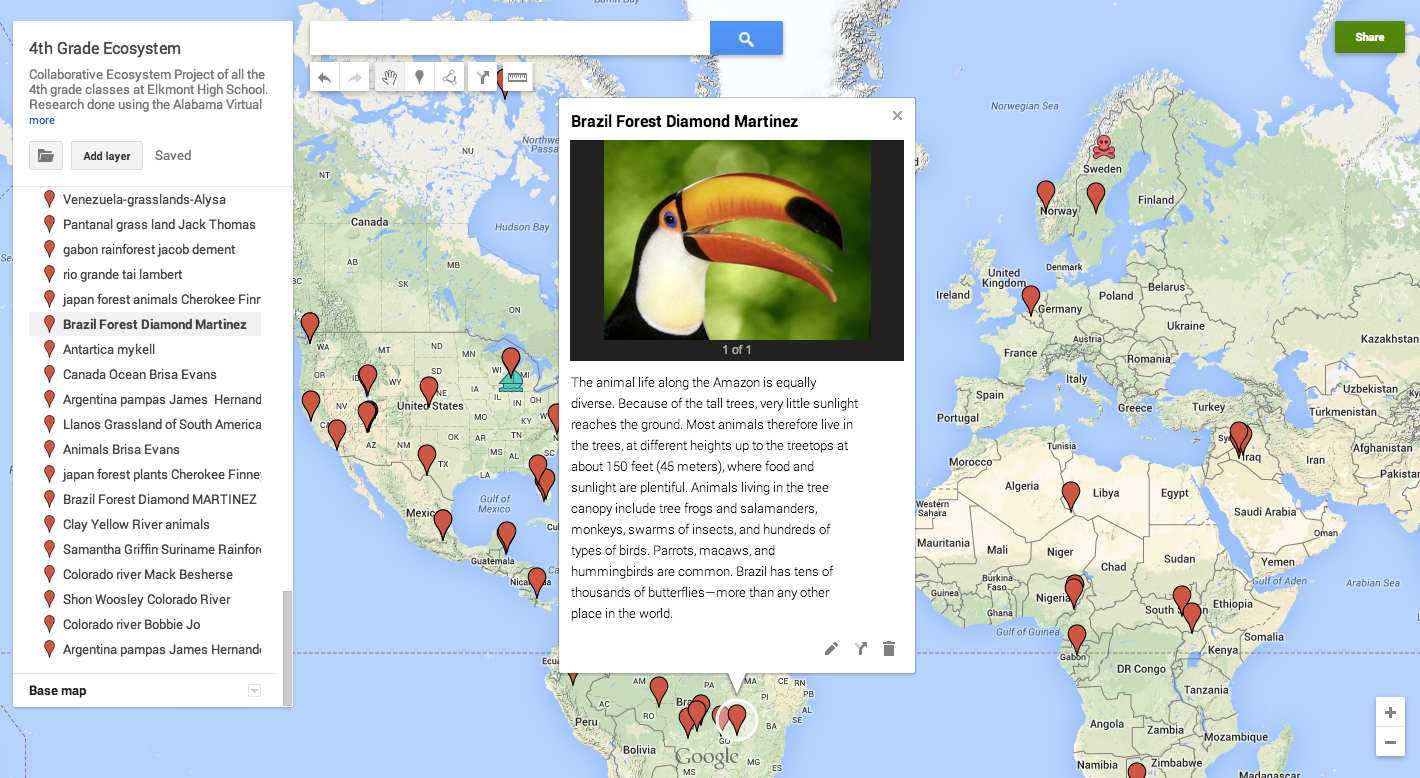
This past week our 4th graders began their unit on Ecosystems. We wanted this activity to be a collaborative one combining all the research from 120 fourth graders into one interactive location. It was decided that this activity seemed like a perfect fit for learning how to use Google Maps.
To begin the unit, students were presented with a list of Ecosystems and the countries where these ecosystems are located and asked to commit to one as their individual research goal. Next, students were introduced to the Alabama Virtual Library’s database, Britannica Elementary, as the resource they were to use for this unit. Using Britannica Elementary students were asked to find the following about their country’s ecosystem:
One interesting fact about the country where their ecosystem is located. Include a image/video.
A description of animal life found in their country's ecosystem. Include a image/video.
A description of the vegetation found in their country's ecosystem. Include a image/video.
Once students had located the basic facts about their country’s ecosystem we moved on to learning how to input that information on a collaborative Google Map. One thing I love about working with the DPI students is that they are willing to jump right into a new technology with little or no apprehension. I demonstrated how to add a pin to the map and that is all they needed. Before long students had discovered how to change the color and shape of their pins to individualize their pins from those of their peers. As students worked they were eager to share their discoveries with their teacher and other students.
Now that the interactive map has been made, our 4th grade teachers have been using it as a point of reference as they continue to teach the Ecosystem unit. The kids love this approach to the unit as their teacher references their pins and uses their pictures and videos to teach.
There are many great tie in activities that can be pursued throughout the year using this Google map, including longitude and latitude, mathematics, social studies and so much more!
Because this was our first time using Google maps our lesson was quite simple. Here are a few links to much more involved lessons with Google maps:
Professional Learning Opportunities
Wonders, GoMath, Global Scholar
Limestone County School District held a training this week to get Instructional Technology Facilitators not familiar with Wonders, GoMath, & Global Scholar up to speed. This training also set up ITFs as administrators over these accounts for their schools.
New Teacher Training (Graphic Organizers)
Limestone County School District provides a through new teacher training series to help orient new teachers to best teaching practices. This month our meeting concentrated on effective use of graphic organizers.
#USEdChat
This past Monday night (October 27, 2014) at 9 pm ET was the quarterly
#USEdChat, a joint chat that brings state twitter chats together. This #USEdChat was extra special as guest moderators
,
Sheryl NussbaumBeach,
Hal Roberts,
Jimmy Casas, &
Brian & Jessica Sztabnik joined
Jennifer Hogan,
Holly Sutherland and
Michael McLendon from
#ALEdChat to bring the nation an exhilarating discussion about connecting & collaborating.
#GaEd
October 30, 2014 I jumped in on the
#GaED chat session about assessment lead by
Aaryn Schmuhl, Henry County Asst. Super. for Learning and Leadership. Assessment is a very hot topic in education right now as 1:1 initiatives change the educational landscape to more student centered, competency based environment.