Showing posts with label Twitter. Show all posts

Monday, April 10, 2017

School Library Live Twitter Chats Are Cropping Up All Over!


School Library Live Twitter chats are cropping up all over!

by Nikki Robertson and Jane Lofton
cross-posted on both of our blogs
(See this on Nikki’s blog at The True Adventures of a High School Librarian

School librarians are incredible networkers, and many have discovered that Twitter is one of the very best tools for building and benefiting from a personal learning network (PLN). Those of us taking advantage of Twitter for our PLNs never go a single day without learning some new ideas from our colleagues and those in related fields. And, Twitter live chats offer a kind of “booster shot” of Twitter goodness in a short amount of time, typically an hour.

If you aren’t familiar with what a live Twitter chat is, here’s are the basics:

A live Twitter chat happens at an appointed/announced time. There is always a specific hashtag used to identify the chat. So, you can follow a chat by going to Twitter, searching for the hashtag, selecting Latest, and watching the tweets with that hashtag as people post. You join in by adding that hashtag to each of your own tweets.
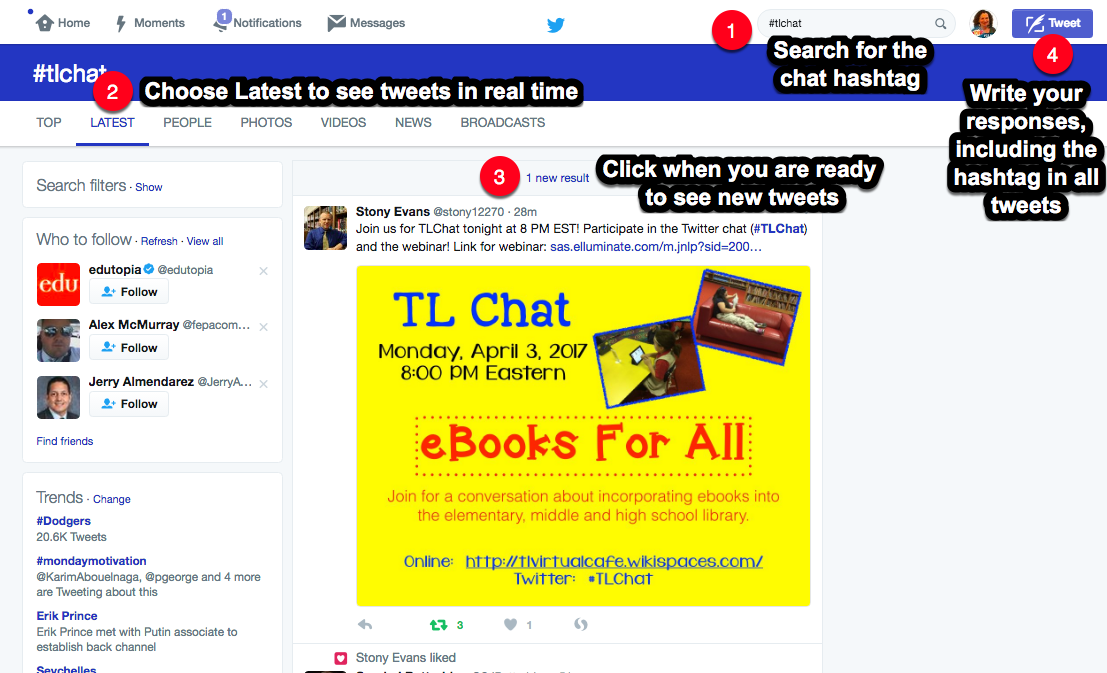


Most live Twitter chats take place the same time each month or week. Each session will have a new theme or topic to discuss. Live chats typically have two moderators who prepare questions in advance and send the questions out during the chat. They start by asking everyone to introduce themselves. Then, they use Q1 for question #1, Q2 for question #2, and so on as a preface as they post the questions. The questions go out every few minutes. Participants start their responses with A1, A2, and so on. The participants can also interact directly with each other by responding to their posts. At the end, the moderators typically create an archive transcript of the chat so that people who missed the event or want to review it can visit a link and see the conversation.

We can't pretend that live chats are relaxing. They aren't! They are definitely a bit stressful, since you are going to see lots of tweets flying by at once while you are simultaneously trying to think and compose your own answers and comments. At the same time, they are amazingly stimulating, informative, and a great chance to interact in real time with your peers and discuss a topic of interest. We have connected with many new Twitter friends and gotten countless wonderful new ideas through chats. Just be prepared in advance that you can't read all the tweets in an active chat; you are bound to miss stuff, and that's okay. You aren’t even obliged to answer all the questions. And, feel free to lurk if you like until you are comfortable.

Educators of all kinds have started live Twitter chats in the last several years, for different subject areas, grade levels, states, regions, and much more. To find out about more chats you can participate in than you ever dreamed of, check Participate’s Chat site or Cybraryman’s Educational Hashtags. Until recently, though, there was just one live chat specifically for school librarians: #TLChat. The #TLChat hashtag is used by school librarians all the time as one of the main hashtags for targeting school library tweets, but, once a month, it becomes a live chat, now on the first Monday of the month at 8pm ET. And, joining it as a live chat platform recently are at least 10 state- or regionally-based school library chats. Here are the ones we know about:


And, ever generous as librarians are, we believe that all these chats welcome anyone. For example, you don’t have to be from New Jersey to participate in #NJLIBCHAT.

Also, notice that we listed the chats above in an embedded Google spreadsheet, since we are hoping we can add to it as we learn about more of them. Recently, Nikki created and sent out a Google Form in which she asked school librarians to share state school library Twitter chat sessions & hashtags. We got the information about the chats listed above from the responses to that form. If your state or region has a chat, and you don’t see it in the table, please complete the form and we’ll add it. And, if your state or region doesn’t have one, perhaps this will motivate you to start one!

We hope to see you at a chat soon!


Wednesday, February 15, 2017

Social Media & The Connected Librarian


I need help from my awesome School Librarian (#TLChat ) Tribe.  Thanks to the generosity of Tiffany Whitehead, I have the honor of writing a book for ISTE about social media and the connected librarian.  

While I have many examples and stories of my own to share, nothing that I have been able to do with my career has been possible without the outpouring of love and support from my PLN...YOU! Thus, with this in mind, I would very much like to include YOUR stories of successes, failures, fixes, tips & tricks, etc as part of the book (credit given to you of course).  

Like so many things that we do in our community it is almost never just one person who does something STELLAR, but a conglomeration of ideas from a variety of sources and personal experiences that lift the project to astronomical proportions.

If you would like to add your experiences, thoughts, trials, lessons, etc to the book please use the form below and thank you in advance for being so willing to share.


Monday, September 14, 2015

Not Your Average Book Club (NYABC)

(Not Your Average Book Club)


I have been waiting for this week to come ever since the school year began because it is the first week that our new Not Your Average Book Club (NYABC) got to finally meet!  

To get members signed up I released a video detailing what type of book club we would have this year and asked students if they were cut out to be a member of the NYACB!

At James Clemens High School clubs are held during the day during Refuel Hour, not before or after school.  Due to this change, most clubs only get to meet for 30 minutes once a month.  Fortunately the Not Your Average Book Club is mostly virtual so time and date restrictions don't bother us; although was nice to all be together in the same place and the same time!


Unlike other book clubs you might be familiar with, the NYABC does not focus on all members reading and discussing the same book.  The NYABC focus is to connect club members with other school book clubs across the country. The two clubs we are currently connecting with are the #2JennsBookClub and the SWVBC or Somewhat Virtual Book Club.  

The #2JennsBookClub meets via Twitter.  During their twitter sessions participants discuss the book chosen for that date. Additionally, the #2JennsBookClub has the authors of the book participating LIVE during the twitter chat! As if that wasn't awesome enough, the #2JennsBookClub also gives away great prizes during each session!  

NYABC members get to choose whether to participate in the #2JennsBookClub or not. The choice is theirs to make. 

To learn more about the #2JennsBookClub click HERE.


The SWVBC or Somewhat Virtual Book Club meets using Google Hangouts. This way students from around the nation can see and talk with each other about the books they have read.  

The SWVBC meets once a month at 5 pm CT. Since this is after school students from the NYABC who would like to participate do so from home.  

The first SWVBC was September 2nd.  We decided to let students share some of their favorite books from the summer.  I was so proud of my NYABC member, Hailey, of making it onto the Google Hangout as there were some crazy technical glitches.

The next SWVBC meeting will be Wednesday, October 7 at 5PM Central Time to discuss I'll Give You the Sun. Mira Costa will be moderating.

The SWVBC November book is The Impossible Knife of Memory.

Again, NYABC members can decide if this is something they would like to participate in or not.


In addition to joining in the conversation with #2JennsBookClub and/or the SWVBC, NYABC members will get to help create a budget for purchasing new books for the JCHS Library, create book talkers, and more!

During our next meeting on October 16th we will have a NYABC "social" with punch, finger foods, and snacks.  While club members are eating and socializing they will also be given the opportunity to create book talkers or work on the book budget.  

As you can see, the NYABC is student centered and student driven.  Members get out of the club what they put into it and I love that it feels relaxed and happy and doesn't add to the stress of a full school load. 


Wednesday, June 10, 2015

Leadership Academy: Limestone County Schools


This week I had the pleasure of presenting with my fellow Instructional Technology Facilitators in the Limestone County School District during the annual Leadership Academy.  The Leadership Academy is a two day professional development specifically geared towards helping administrators in understanding the 1:1 Digital Passport Initiative that rolled out tho their schools this past year.

Add our Yapp App to see crowd pics and to see our schedule or click HERE to see our Google brochure.

If you would like to learn more about this conference and how to provide one at your school or about our 1:1 Digital Passport Initiative please contact Karen Tucker, District Instructional Technology Director.

During Day 2 of the Leadership Academy I will present four one hour sessions on Building a School Brand with Social Media with an emphasis on Twitter.  If you would like to join us live click on the appropriate sessions below:

Session 1- 9:00-9:50 am CT


Session 2- 10:00-10:50 am CT


Session 3-  12:00-12:50 pm CT


Session 4- 1:00-1:50 pm CT (Ugh! Bandwidth issues messed up this broadcast)


Friday, April 17, 2015

EMPOWERING YOUR OWN PROFESSIONAL LEARNING


GOOGLE IT!

STOP passively sitting by waiting for someone to bring professional learning to you.  Harness the power of Google to answer your teaching and learning questions.


GOOGLE IT!  


GOOGLE IT!


GOOGLE IT!


GOOGLE IT!


GOOGLE IT!


GOOGLE IT!


PD IN YOUR PJS WITH SIMPLEK12
*Special Report for Teachers: If you think your classroom is behind the times, you like to connect and learn from other educators, or you need to bring your classroom into the 21st Century – this is a must read.
Let me get right to the point… The Teacher Learning Community is a membership available for teachers just like you who know integrating the latest educational tips and techniques in the classroom will engage their students and increase academic achievement. When you join, you’ll get immediate access to a global network of educators with whom you can share and collaborate, live and recorded webinars with education leaders, a resource center for sharing classroom documents, as well as a collection of over 500 hours of classroom technology how-to videos available anytime anywhere. It’s all the help and support you’ll ever need from your very own personal learning network (PLN)!
Read more HERE!
*Content copied from SimpleK12


EDCAMP EVENTS

*Edcamp is a form of unconference designed specifically for teachers and their needs.

What makes Edcamp an unconference? Unlike traditional conferences which have schedules set months in advance by the people running the conference, Edcamp has an agenda that’s created by the participants at the start of the event. Instead of one person standing in front of the room talking for an hour, people are encouraged to have discussions and hands-on sessions. Sponsors don’t have their own special sessions or tables, all of the space and time are reserved for the things the people there want to talk about. People could pay hundreds of dollars to attend another conference, or they could go to Edcamp for free.

Built on principles of connected and participatory learning, Edcamp strives to bring teachers together to talk about the things that matter most to them: their interests, passions, and questions. Teachers who attend Edcamp can choose to lead sessions on those things that matter, with an expectation that the people in the room will work together to build understanding by sharing their own knowledge and questions.

Edcamps are:

  • free
  • non-commercial and conducted with a vendor-free presence
  • hosted by any organization interested in furthering the Edcamp mission
  • made up of sessions that are determined on the day of the event
  • events where anyone who attends can be a presenter
  • reliant on the “law of two feet” that encourages participants to find a session that meets their needs

Hundreds of Edcamp events have been held to date around the world. Find one near you today.

*Content copied from EdCamp Foundation Wiki Page


PROFESSIONAL DEVELOPMENT WITH TWITTER
*A week on Twitter is like a years worth of Professional Development.

Twitter can act as powerful and economical mean to give your students best and latest information on various subjects. However, a lot of educators just feel overwhelmed on how to make best of Twitter. Here are some easy yet effective ways Twitter can help in your professional development.

Use Hashtags to Search Information

Hashtags (#) are used in Twitter and placed before certain phrases or word to help to gather relevant information available on Twitter. Hashtags actually are search queries that help users to look tweets, chats and discussions related to that specific topic. When users put a phrase with hashtag in the search box, they will see a drop down list; this list contains the most common used phrases as suggestion. It is an important list that gives an insight about the type of information or hastags trending on Twitter.

For example - If a forth grade teacher wants to get latest discussions and idea on teaching the 4th grade. Making a tweet and putting the term with the hashtag (#4thchat) enables the teacher to collect valuable inputs and resources. And surely for this you need to know the common hashtags. Read more...

Find YOUR hashtag HERE.


PROFESSIONAL READING MADE EASY

Finding time to read professional journals to stay current in your profession is almost impossible for a busy teacher.

Stay current with these great sites. They bring the best from professional journals, blogs, articles, etc right to you:

RebelMouse: is based on the idea that people are proud of what they share on social networks, but are starting to feel embarrassed about their websites. RebelMouse creates your social front page, building a dynamic site around what you share.

You can connect all of your social networks—including Facebook, Twitter, Pinterest, Tumblr and Instagram—and create one beautiful page of your entire online presence. RebelMouse can also be embedded on your blog or site, and it can even be used to power your domain.

FlipBoard: is part social app, and part magazine and news app. It gathers content from social networks, news publications and blogs. Then the app displays stories, articles, blog posts, videos and other pieces of content in a magazine-like format.

Paper.li: is an online service that “organizes links shared on Twitter into an easy to read newspaper-style format.” You can create these “newspapers” to aggregate content for Twitter users, lists, or hashtags.


ELKMONT'S CUSTOMIZED PD IN YOUR PJS WITH BLENDSPACE


Saturday, February 21, 2015

Nurph: A Twitter Chat Moderator's Dream Come True!


Nurph is the #1 BEST product I have found to assist with moderating and archiving Twitter Chat sessions.  It beats other archiving websites hands down!


Here are just a few things Nurph allows: (a lifesaver for moderators)


  • set up the chat with questions in advance for participants to view


  • add more than one moderator to the chat


  • promote the chat with a link provided by Nurph


  • view how many participants RSVP'd via Nurph


  • participate in the chat live via Nurph


  • chat questions highlighted at top of Twitter stream inside Nurph


  • view number of participants who joined the chat using Nurph


  • view detailed statistics from your chat


  • allows access to a "replay" of your chat


Not convinced?  

Take a look at this #TLChat archived provided by Nurph: http://nurph.com/TLChat/chats/861 OR
take a look at this #MOEdChat archive provided by Nurph: http://nurph.com/MOedchat/chats/1474


Need help setting up a Nurph for your Twitter Chat? Vox me at nrober7689