Showing posts with label #edcamp. Show all posts

Friday, April 17, 2015

EMPOWERING YOUR OWN PROFESSIONAL LEARNING


GOOGLE IT!

STOP passively sitting by waiting for someone to bring professional learning to you.  Harness the power of Google to answer your teaching and learning questions.


GOOGLE IT!  


GOOGLE IT!


GOOGLE IT!


GOOGLE IT!


GOOGLE IT!


GOOGLE IT!


PD IN YOUR PJS WITH SIMPLEK12
*Special Report for Teachers: If you think your classroom is behind the times, you like to connect and learn from other educators, or you need to bring your classroom into the 21st Century – this is a must read.
Let me get right to the point… The Teacher Learning Community is a membership available for teachers just like you who know integrating the latest educational tips and techniques in the classroom will engage their students and increase academic achievement. When you join, you’ll get immediate access to a global network of educators with whom you can share and collaborate, live and recorded webinars with education leaders, a resource center for sharing classroom documents, as well as a collection of over 500 hours of classroom technology how-to videos available anytime anywhere. It’s all the help and support you’ll ever need from your very own personal learning network (PLN)!
Read more HERE!
*Content copied from SimpleK12


EDCAMP EVENTS

*Edcamp is a form of unconference designed specifically for teachers and their needs.

What makes Edcamp an unconference? Unlike traditional conferences which have schedules set months in advance by the people running the conference, Edcamp has an agenda that’s created by the participants at the start of the event. Instead of one person standing in front of the room talking for an hour, people are encouraged to have discussions and hands-on sessions. Sponsors don’t have their own special sessions or tables, all of the space and time are reserved for the things the people there want to talk about. People could pay hundreds of dollars to attend another conference, or they could go to Edcamp for free.

Built on principles of connected and participatory learning, Edcamp strives to bring teachers together to talk about the things that matter most to them: their interests, passions, and questions. Teachers who attend Edcamp can choose to lead sessions on those things that matter, with an expectation that the people in the room will work together to build understanding by sharing their own knowledge and questions.

Edcamps are:

  • free
  • non-commercial and conducted with a vendor-free presence
  • hosted by any organization interested in furthering the Edcamp mission
  • made up of sessions that are determined on the day of the event
  • events where anyone who attends can be a presenter
  • reliant on the “law of two feet” that encourages participants to find a session that meets their needs

Hundreds of Edcamp events have been held to date around the world. Find one near you today.

*Content copied from EdCamp Foundation Wiki Page


PROFESSIONAL DEVELOPMENT WITH TWITTER
*A week on Twitter is like a years worth of Professional Development.

Twitter can act as powerful and economical mean to give your students best and latest information on various subjects. However, a lot of educators just feel overwhelmed on how to make best of Twitter. Here are some easy yet effective ways Twitter can help in your professional development.

Use Hashtags to Search Information

Hashtags (#) are used in Twitter and placed before certain phrases or word to help to gather relevant information available on Twitter. Hashtags actually are search queries that help users to look tweets, chats and discussions related to that specific topic. When users put a phrase with hashtag in the search box, they will see a drop down list; this list contains the most common used phrases as suggestion. It is an important list that gives an insight about the type of information or hastags trending on Twitter.

For example - If a forth grade teacher wants to get latest discussions and idea on teaching the 4th grade. Making a tweet and putting the term with the hashtag (#4thchat) enables the teacher to collect valuable inputs and resources. And surely for this you need to know the common hashtags. Read more...

Find YOUR hashtag HERE.


PROFESSIONAL READING MADE EASY

Finding time to read professional journals to stay current in your profession is almost impossible for a busy teacher.

Stay current with these great sites. They bring the best from professional journals, blogs, articles, etc right to you:

RebelMouse: is based on the idea that people are proud of what they share on social networks, but are starting to feel embarrassed about their websites. RebelMouse creates your social front page, building a dynamic site around what you share.

You can connect all of your social networks—including Facebook, Twitter, Pinterest, Tumblr and Instagram—and create one beautiful page of your entire online presence. RebelMouse can also be embedded on your blog or site, and it can even be used to power your domain.

FlipBoard: is part social app, and part magazine and news app. It gathers content from social networks, news publications and blogs. Then the app displays stories, articles, blog posts, videos and other pieces of content in a magazine-like format.

Paper.li: is an online service that “organizes links shared on Twitter into an easy to read newspaper-style format.” You can create these “newspapers” to aggregate content for Twitter users, lists, or hashtags.


ELKMONT'S CUSTOMIZED PD IN YOUR PJS WITH BLENDSPACE


Friday, September 5, 2014

This Week @Elkmont & Beyond! September 2-5, 2014


This week has been an incredibly busy and rewarding week.  

Digital Passport Initiative Deployment:


Elkmont High School came back from the holiday weekend to the much anticipated Digital Passport Rollout Day. Piloted by Wendy Brightman at Blue Springs Elementary School last year, the Limestone County Schools Digital Passport Initiative was rolled out county wide this school year. Students have spent the month of August working through Digital Citizenship Modules to ensure they know how to be safe online. Students have also learned the basic use and care of their new MacBook Air laptops.

Elkmont High School started out our DPI Rollout Day by having classes come in one at a time to pack their laptops and charging cables into their laptop bag. Students logged into their laptops so that we could troubleshoot early in the day any log in issues that might exist.

Student aides from the high school helped move the laptops to the gym where a stage was set up for presenting the laptops to students "graduation style". In addition to the laptops, Digital Citizenship Certificate of Completion were also prepared, rolled and tied with a red ribbon.

At 1:00 all 2nd, 3rd, 4th, and 5th grade students filed into the gym and the ceremony began. Mr. Garris started by saying a few words and leading the pledge. Dr. Sisk then gave a brief speech about the Digital Passport Initiative and the learning opportunities that will now be available to them. Next, Ms. Pat Gartman took the stage. Calling one class at a time, Ms. Gartman read out the names of each student. As students proceeded across the stage they first received their laptop from their teacher and then their certificate of digital citizenship from Mr. Garris. When all laptops had been distributed, the 3rd and 4th grade classes posed with administration for group photos. Students then proceeded to the lobby area of the gym where Elkmont's wonderful PTSO had cookies and juice for the students. Our PTSO also spearheaded ordering covers for the MacBook Airs and delivered many of those to the students in their classrooms.

After getting snack courtesy of the PTSO, students went back to their classrooms for the last hour of the day. 3rd and 4th grades teachers had a variety of activities planned for this last hour. Ms. Adams jumped right in and taught her students how to use AirDrop. Ms. English got her students started taking pictures of themselves in preparation for learning about AirDrop. Other teachers walked their student through how to find the Elkmont High School website and how to log into their Moodle accounts.

Their were a few bumps in the road along the way but in the end, with the help of SwitchDesk, parent volunteers, student aides, teachers and administrators everything worked out in the end.

Take a look below at all the fun we had during Elkmont's DPI Deployment Day!


Building PLCs at Elkmont:

This week grade level/departmental PLC Teams began meeting to start developing a technology plan of action for their PLC and for individual teacher PLP requirements under EducateAlabama.

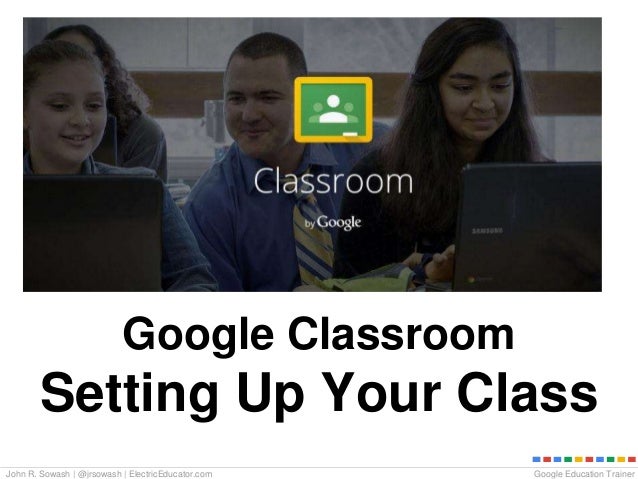
The 5th Grade PLC meet this week and set using Google Classroom with their students as their September PLC and PLP goal. To help support this goal, Ms. Robertson created Google Classroom tutorials and has set up dates and times to co teach using Google Classroom.

Step by Step Picture Tutorials:


For a SlideShare Tutorial for Google Classroom click HERE.

Linda Lindsey has compiled a list of 12 of the BEST Google Classroom Tutorials HERE.


Google Classroom:

Thursday, September 5, 2014 Ms. Robertson and Ms. Hardiman spent the first three periods of the day teaching students how to access their Google Classroom account. The students where very excited as they saw the ability to communicate in real time with their teacher on assignments shared through Google Classroom, worked on a shared Google Spreadsheet, and discovered the lifesaving and telling Restore History feature in Google Drive documents.

We learned several things during our day together, the most important was listening and following directions. This may seem obvious but the need to listen and follow directions is especially critical when using technology. Even one tiny little period out of place will cause frustration on the part of the person trying to get to a website or accomplish a technology task. Having completed this activity successfully, I am confident these students will be more apt to listen and follow directs next time now that they truly the the immediate effects of not doing so.

We also learned to support and help each other. This goes a long way in having a cohesive classroom and building positive classroom relationships. We were cheering so loud for our fellow classmates as they worked diligently to type in the URL perfectly that Ms. Adams stuck her head in the door to see what we were doing to have so much fun!

As a reward for successfully completing the lesson objectives for the day, students used the last 10 minutes of class to play with Photo Booth and Incredibox.

Ms. Hardiman and her students were awesome and patient as we worked through the inevitable kinks that pop up when using new technologies. I can't wait to see what they do with Google Classroom now that they know how it works!


EdCamp Atlanta:

With a little over a week before our third EdCamp Atlanta, organizers meet via Google Hangouts to finalize plans for the big day.  

EdCamp Atlanta just gets bigger and better every year.  We have an amazing group of sponsors who have provided us with the means to provide our attendees with delicious breakfast and lunch as well as an amazing array of door prizes.  Please find and support our sponsors HERE.

One super fun part of the EdCamp Atlanta lunch time will be getting a keepsake picture courtesy of TapSnap.  I first learned of TapSnap during ISTE's #EdTech Karaoke Party when Elissa Malespina and I got silly.


EdCamp Atlanta is also going to have a MakerSpace area featuring robotics courtesy of Hummingbird Robotics, Sphero and Little Bits.  

EdCamp Atlanta session boards will also look a bit different as well.  We will still have 25 and 50 minutes sessions but with the distinction of See, Learn Do sessions and Round Table Discussion session.  

Start the EdCamp Atlanta fun a day early at the EdCamp Atlanta TweetUp.  We will enjoy great company, meeting friends face to face, see amazing and functional classroom furniture and enjoy light refreshments and drinks at Dekalb Office in Alpharetta, Ga on Friday, September 12, 2014 from 6-8 pm ET.  

#iCONNECT Tech Tips Smore


Friday, August 15, 2014

Voice is Power: Are You Using Yours?

This post is a featured guest post on The Media Specialist's Guide To The Internet.  A special THANK YOU to Julie Greller for asking me to guest blog on her site.  Julie's blog has been an inspiration to me for years!


Summertime immediately brings to mind the raspy, soulful voice of Janis Joplin, sleeping in, and sand between my toes.  In reality, though, summertime is a flurry of professional development sessions, educational conferences, lesson planning, and connecting with other educators.


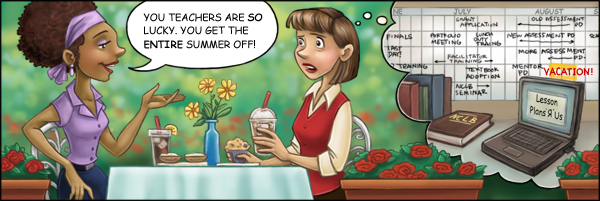
teachers-summer-break.jpg


This summer I attended four conferences, five professional development sessions, one 3 day workshop, moved, visited my new granddaughter in Kansas, got married, went on my honeymoon, and started a new job and I have loved every minute of the non stop action!  


As a connected educator, cofounder of EdCamp Atlanta, a “groupie” of all things EdCamp, a blogger, and a Twitterholic, I take for granted the fact that I speak up and contribute to educational conversations on a regular basis.  But many educators do not feel comfortable following suit, and this is a problem.  It is a problem because if we fail to speak up then who is doing the speaking for us?


TL_News_Night_Purpose_-_Google_Slides.png
Quote by Vickie Davis (aka: Cool Cat Teacher) Photo: http://bit.ly/14zotzp


It is a problem because if we fail to speak up, connect, share, and learn from others how are we going to continue to grow professionally?  Is passively waiting for our school district to provide us with timely, relevant, professional development good enough?  Do YOU want to be just “good enough”?


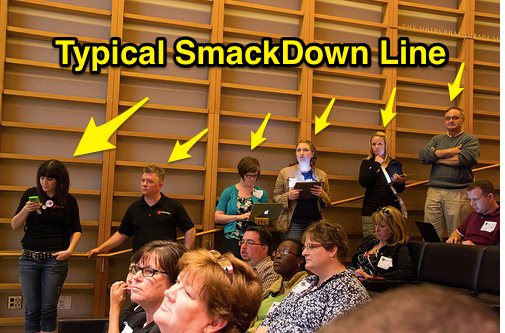
At one of the conferences I attended this summer the failure to speak up and it’s consequences became glaringly and embarrassingly obvious.  An amazing speaker had just finished talking about the importance of making our voices heard and how each one of us has a story to tell.  Immediately following this riveting speech that received a standing ovation the conference transitioned into a SmackDown session.  For those of you not familiar with a SmackDown session it is one of my favorite things!  During a SmackDown everyone in attendance is encouraged to come up to the microphone and share, in two minutes or less, an app, website, lesson, etc., that they used or discovered that year.  There is usually a long line of people waiting to share their great finds and often a cut off point is determined by the moderator of the SmackDown.  It is fast, energetic, exciting, and you learn a lot of new, cool things in just a small amount of time.


7230471408_32540b5ca0_jpg_500×333_pixels.png


At this particular conference for school librarians, however, no one shared during the SmackDown session.  


NO ONE.   


Yes…. NO ONE.  

As moderator, I and a few board members modeled how a SmackDown works.  I then encouraged the attendees to share some of their great tidbits.  


NO ONE.  


I encouraged attendees, saying, “Certainly everyone here has at least one thing they did in their library this year that they can share (big smiley face)”.  


NO ONE.


empty-stage.jpg


I was aghast at the deathly silence that engulfed the room filled with school librarians from around the state.  Librarians who had earlier expressed grave concerns about zero funding of their libraries for the last nine years.  Librarians who had just lamented the firing of all school library aides throughout the state.  Librarians who recounted horror stories of school districts that had received waivers from the state department to do away with having a school library at all.  Yet, these same librarians couldn’t find even one thing to share during the SmackDown session at a conference for and about school librarians.  

If this group of school librarians couldn’t think of anything worth sharing with others in their field is it any wonder that the state legislators don’t see school libraries as valuable enough to fund?  

If this group of school librarians couldn’t think of anything worth sharing with others in their field is it any wonder that principals and superintendents don’t allocate local resources to help fund their school libraries?


If this group of school librarians couldn’t think of anything worth sharing with others in their field is it any wonder that administrators don’t see libraries as valuable enough to even have at their schools?


At another conference later in the summer I asked a librarian friend of mine who was there that fateful, silent day, why she had not shared during the SmackDown.  Her reason for not sharing was that the other librarians in her district were jealous of her and “bullied” her when ever she spoke up about anything so now she just keeps her mouth shut.  Seriously???  She was “mean-girled” into silence by other librarians?


bd6.gif


This time I was silent.  I simply couldn’t think of anything to say in response.


Now that I have had time to recover from the shock, this is what I want my friend and all the other librarians to know:

Our deepest fear is not that we are inadequate. Our deepest fear is that we are powerful beyond measure. It is our light, not our darkness, that most frightens us. Your playing small does not serve the world. There is nothing enlightened about shrinking so that other people won't feel insecure around you. We are all meant to shine as children do. It's not just in some of us; it is in everyone. And as we let our own lights shine, we unconsciously give other people permission to do the same. As we are liberated from our own fear, our presence automatically liberates others. ~ Marianne Williamson


I challenge you, whether you are a school librarian, teacher, administrator, Instructional Technology Coordinator/Facilitator, Superintendent, etc., to share.


SHARE. SHARE. SHARE.  


Your voice matters!  


I also challenge you to ask yourself this question:  


Have I done, taught, discovered anything today, this week, this year, that is of value in my school, in my classroom, in my library, in my district that is worthy of sharing with others?  


If your answer to this question is no… turn in your letter of resignation.  You are hurting the rest of us and more importantly you are hurting children.


Yes. Speaking out and sharing is scary. What if people don’t like what you have to say? What if someone criticizes your blog? What if you sound stupid?  What if you aren’t as great as someone else?  The stakes in education are too high for the barrage of negative “What ifs” we cripple ourselves with and our students are too valuable for us to cheat them by giving into the fear that the negative “What if’s” bring.


what-if.jpg


If nothing else in this post has yet convinced you of the power of and importance of your voice, please watch the video, Obvious To You-Amazing To Others by Derek Sivers.  It does a great job explaining why you should share.


obvious-amazing-others-youtube-13665372.jpeg