Slideshow Link:
https://docs.google.com/presentation/d/1Sdf1huixFYPsi4XK9I-YPnJ2dqLoQv5jVf-0ss6S8HA/edit?usp=sharing
5 Tips for New School Librarians
(and those who aren't so new)
Congratulations on your new job as a school librarian! It is hands down the absolutely best job...EVER! Below are 5 tips to help you as you enter this new chapter of your life.

Connect
Being a school librarian can be a shockingly isolating profession, especially after having formed tight, supportive networks while you were a classroom teacher. As a school librarian you are in a sort of no man’s land. You aren’t part of the teacher peer group, you aren’t part of the administrative peer group. Often, you are the only person in your school that works in and understands what it takes to run an active, engaging, supportive library. Many school districts, unfortunately, often perpetuate this isolation by not allowing time for district librarians to meet and plan collaboratively which only exacerbates the isolation.
Find Your People
Don’t wait around for your district to connect you. Reach out to the other librarians in your district and find out what you have in common. Maybe your children both play softball, go to gymnastics, or dance class. Perhaps you could set up play dates, or other social interactions to get together outside the school day. My favorite since my children are grown and out of the house is to set up weekend brunch/lunch meetings or after school dinner meetings. Talk, have fun, swap ideas and plan. Plus, it’s fun to have time away with friends who really get each other. Don’t stop there. Connecting with librarians outside of your school, district, and state, and country brings a unique world view into your library program and enriches student learning.
Where To Find Your People
- Twitter
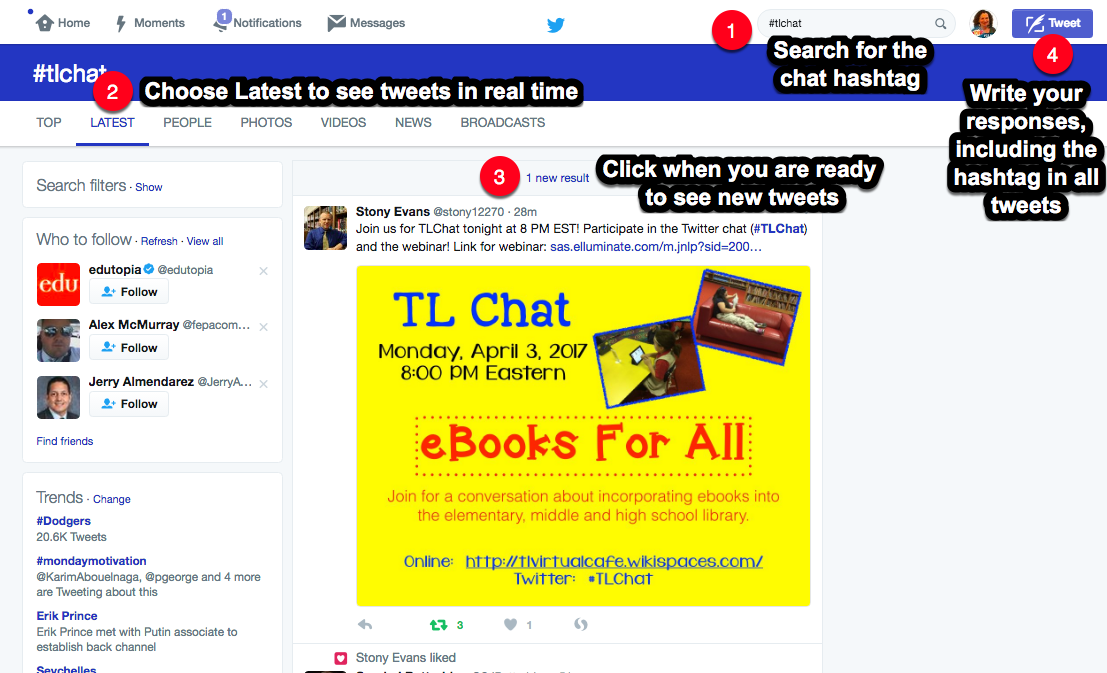
Twitter is one of the best places you can go to connect, share, learn and grow with other school librarians and connected educators. Twitter is how I went from being a burned out educator to feeling like I never want to do anything else but teach. Teaching before Twitter was lonely, frustrating, and boring. Teaching with Twitter is energizing, invigorating, fun, creative, and I never want to get off this ride of bringing awesome learning opportunities to my students and teachers.
There are a few secrets to truly harnessing the power of Twitter.
- Hashtags: By following, commenting, sharing, and connecting using hashtags you will maximize your own professional learning.
- Three hashtags I’d recommend for school librarians are:
- #TLChat
- #FutureReadyLibs
- #ISTELib
Don’t limit yourself to just these hashtags. Make sure to connect using state education hashtags, makerspace hashtags, and educational technology hashtags as well.
- Twitter Chats: Twitter chats are the scheduled conversations, usually in a Q/A format lead by a moderator or moderators that take place on a weekly or monthly basis.
Two places to find hashtags for you, your teachers, and administrators are:
- Facebook
Facebook is a great place to join groups. A few of my favorite Facebook Groups include:
- Professional Development Resources for School Librarians
Below are a few professional development resources where you can find your people
and have official professional development at the same time.

Be YOU
When I first started becoming a connected educator I thought it was going to be great. Little did I understand the feelings of inadequacy that would envelop me as I connected with and learned about all the amazing things other educators around the country (and world) were doing in their schools. I became overwhelmed and felt as if there was no way I could possibly even come close to being as good as the rock star educators I was learning from.
Be your own rock star
Early in my career as a school librarian I attended a BER seminar featuring Judy Freeman. Judy played an instrument, sang songs, and shared lesson ideas. Instead of focusing on the lesson ideas I got taken away in the need to play an instrument and sing! This is absolutely insane because I have never played an instrument and can’t carry a tune to save my life. I also have no rhythm and can completely relate to Steve Martin’s character in the movie, The Jerk, when he has no rhythm. Eventually, Steve’s character finds his own personal rhythm and is ready to take on the world.
The first lesson I had to learn was to deeply reflect and find what it was that I could bring to my profession that was uniquely me, my passion, the thing that made my feet tap, my fingers snap and my heart sing. I had to learn to stop comparing myself to this rock star librarian or that superstar teacher. Rather, I should absorb all I could from those I connected with and then see how I could tweak what I had learned to fit my own personal beat.
What makes a rockstar or superstar educator isn’t their ability to sing, play an instrument, be a graphic design genius, the ability to build their own apps, or anything else. It is their willingness to completely step outside of their comfort zone and try something new (without being forced by a school initiative), and their willingness to connect, share, learn and grow with others.

It’s Not About YOU
So many times when I talk with other school librarians or educators about new ideas I hear, “But I don’t like ______”. My question in response is, “Have you asked your students what they want”?
As educators it is easy to get set in our ways. It’s nice to feel like the expert in your space and anything that might change that paradigm can throw our whole world spinning into chaos, or at least that’s how it can feel.
The library is a service industry. You are there to serve the needs of your administration, teachers, and students, not your own agenda. Whether you are an elementary, middle or high school librarian, whether you work with a fixed or flex schedule, setting the right tone for the library in which all voices are heard is crucial to a successful, happy library.
Empower Teacher Voice
Jennifer LaGarde wrote a great post about her first day at a new school titled, The Art of Listening. What Jennifer did was quick, easy, low tech, and yet set the tone for the rest of the school year. She asked one question to which teachers responded on post it notes: What would it take to make you see bringing students to the library as a good use of your instructional time?
Jennifer didn’t stop there. Those notes weren’t put in file 13 (trash can) after the teachers left. Rather, Jennifer reviewed each response thoughtfully and then set a plan into motion for the school year that would let her staff know that she not only heard but valued their input.
Empower Student Voice
When I think of the words, empower student voice, it immediately brings to mind Andy Plemmons, elementary school librarian at Barrow Elementary School in Georgia. Andy continuously celebrates student voice with his use of FlipGrid, and connecting his library and teacher’s classes with other schools through Skype and Google Hangouts. One particular project where Andy empowers student voice is in the selection of book for the school library. A student book budget committee was formed under Andy’s guidance. This group “created a survey, surveyed the school, analyzed the results, set goals, met with vendors, compiled wish lists, cut lists to match the budget, and helped order the books”. The empowerment didn’t end with the ordering of the books. The learning and involvement continued once the books arrived with students “applying the barcode, spine labels, and label protectors, checking books off of the packing slip, and stamp them with the library stamp”. You can read more about Andy Plemmons and the Book Budget Committee here: https://expectmiraculous.com/2016/01/12/the-student-book-budget-books-have-arrived/
What I loved most about this particular activity from Andy were the real life connections that students saw in relation to their futures and future employment opportunities. Andy Plemmons always does an excellent job of helping students make real life, authentic learning connections.

Tell Your Story
Budget and personnel for school libraries are continuously targeted as school grapple with declining budgets. In 2010 Shonda Brisco created a collaborative Google Map, A Nation Without School Libraries, so that librarians around the globe could document cuts to school libraries.
We as school librarians need to change this narrative. Instead of simply documenting the decline of school libraries our efforts would be better spent through celebrating the incredible learning that takes place in our libraries every single day. In fact, it is imperative to our very survival that we tell our stories so that when budget crunches come, and they will, the very thought of not having a school library with at least one certified school librarian would be unthinkable.
Social Media
Harnessing the power of social media is one very important medium we as school librarians can use to tell our stories. Personally, I use the following social media sites in this way:
- Facebook = Parents & Grandparents
- Twitter = Professional/Educational Connections
- Instagram = Tweens, Teens, some parents
- SnapChat = Tweens & Teens
Posting information to this many different sites can seem taxing but can be simplified and streamlined with a few helpful social media tools. Instagram gives you a choice to also post to Facebook and Twitter. Thus, you have killed three birds with one stone.
SnapChat is a beast all its own, but I usually take all of my pictures and short (10 second or less) videos using SnapChat. I then share each picture and/or video in the form of a daily “story”. Additionally, I save each picture and/or video to my phone’s camera roll so that I can then share this information out via other social media sites like Instagram.
I like to think of SnapChat (and other social media sites) as a way to not only advertise new books or library events, but a place to celebrate students, teachers, and all the wonderful things that are happening in and around the library.
Here are a few ways to use SnapChat in your library:
- Promote new books
- Advertise library promotions
- Poem In Your Pocket
- Banned Books
- Spotlight new robots, art supplies, Legos, etc in the MakerSpace
- Showcase student talent
- music mixing in the MakerSpace
- impromptu singing
- Celebrate great co teaching lessons
- Breakout EDU
- Digital Portfolios
- Let followers know what is printing today on the 3D Printer
- Selfies, groupies, and SnapChat filters!
Really, taking Snaps of everything from a welcome message in the morning, "We are open and ready for business" to and evening snap, "Thanks for the most amazing day!" with pictures of the day throughout lets the world (and your admin) see just how busy and vitale the school library is to the whole school.
While the number of social media options can seem to be too many, overwhelming and cumbersome, we as school librarians need to make the time to celebrate our libraries, students, and teachers and all the great library connects made. Using the various forms of social media meets viewers where they are, not where we necessarily want to be. Remember….it’s not about you.
Virtual Hallway
When I left the library and became an Instructional Technology Facilitator/Coach in an elementary school my teachers were concerned that they couldn’t hang student work out in the hallway as the work they were doing was in a digital format.
To solve this problem I used the website builder, Weebly, to create a virtual hallway where student work like iMovies, Google Slide presentations, Scratch coding games, student created ebooks, and more could be displayed for parents to view.
I actually think we need to be doing something like this not just for student work in digital format but all student work. I see a virtual hallway as the first introductions to building individual student digital portfolios.
Daniel Whitt, the Instructional Technology Coordinator for Madison City Schools, has created a wonderful video detailing the importance of student digital portfolios (see below) and has also made all of his resources open source via the Madison City School’s website.
Blog
I love reading other librarian and educator posts on social media about what they are doing in their libraries, but these quick images with a 140 character explanation often leave me wanting more information so that I can implement similar things in my school. Social media avenues like Facebook groups, Twitter posts, Instagram updates and SnapChat all get lost in the stream. Trying to go back and find that “great idea” is often an impossible task as searching on these sites isn’t the most intuitive or productive. Blogging in more detail about the thing you are sharing on social media helps out your fellow librarian community.
One of the most unselfish acts we can do for our students, teachers, parents and fellow educators is to tell our story beyond the social media sound bites. I can’t even begin to express the gratitude I feel towards educators like Andy Plemmons, Gwyneth Jones, Joyce Valenza, Tiffany Whitehead, Elissa Malespina, Jennifer Lagarde and so many more that take the time to blog and share their experiences, the good, the bad and the ugly.
In addition to the assistance your blog posts bring to others, blogging is also a great way for you to continuously reflect on your own professional development and learning. For some reason, once we finish our student teaching or internship and get our own classroom or library we stop reflecting on our professional practice. Honest reflection of our own practice should be the driving factor behind writing a blog, not whether anyone will ever read your blog. It is also a great way to go back each year to remind yourself of what you did when with what teacher and or grade level.
One year I made it a point to write a blog post outlining what had happened in the library that week. Often I would sit down to write and think, “Geez. I don’t think we really did much to write about this week”. Then I would look back through the calendar and realize I had severely underestimated what we had accomplished. In fact, sometimes detailing everything simply became an overwhelming task and I would have to pick and choose what activities to bring to life with more detail. As in the video, Obvious To You Amazing To Others (see below) we are clearly bad judges of our own abilities.

Be Fearless
Be fearless even if you are trembling on the inside. Be the one who demonstrates that it is ok to not know something but be willing to learn, fail, and start again. Two years ago I finally found an innovative school that not only wanted but supported the innovative projects I wanted to bring to the school; specifically MakerSpaces and genrefication of the book collection.
Although I had never done either I threw myself into the work, relying heavily on blog posts my PLN had written on the topics and reaching out to my PLN for advice. I ordered a 3D Printer even though I knew nothing about them. When students asked me to get Raspberry Pi for the MakerSpace I said, “Sure! That sounds delicious”! During Hour of Code this past December I was shaking in my boots when the CyberSecurity teacher signed her kids up to participate. I had no idea what I could possibly show them about coding but I put on a brave face and went for it. We all had a great time learning together.
We need to model for both our students and our teachers the willingness to not know everything and the need to not control everything. My basic mode of operation was to let the students show me what to do with new MakerSpace equipment. This built a sense of pride and student ownership of the MakerSpace. It wasn’t my MakerSpace, it was theirs.
Genrefying the fiction collection in the library was also something I tasked my high school students to do. I let them decide the genres, separate the books into genre stacks, label the books, arrange the books on the shelves and make the necessary changes to the library automation system. Again, ownership was student centered.
I also like to think of our job as school librarians as matchmakers. Teachers are so busy with lesson planning, grading, wrangling kids, meeting, and their personal lives that there is little time for making valuable connections for collaboration. Since we as school librarians know all the teachers in the school and what they are teaching it is easy for us to connect teachers who are teaching similar content for in house collaborative opportunities.
We also need to assist our teachers with expanding collaboration beyond the school building to forge authentic real world learning opportunities with others across the country and around the world using video conferencing tools like Google Hangouts, YouTube Live, and Skype. Events like Read Across America, World Read Aloud Day, Andy Plemmons’ Picture Book Smackdown, Elissa Malespina’s virtual debates, Stony Evans’ #StonyStories empowering students to be in house PD and national presenters, National Poetry Month/Poem in Your Pocket Day, Mystery Skype, and so many more events can be made exponentially better by connecting with other schools celebrating or doing the same things. I love that Shannon Miller put together a Google Document this past year where we can all share monthly Library Celebrations, any of which could be made collaborative.
Part of being fearless is stepping out and trying new things even if you have never tried them before. The willingness to learn and put yourself out there even if failure ensues (and it will) is the most fearless thing you can do!
Other resources for new librarians:
Classroom 2.0 Presentation