Saturday, November 15, 2014

This Week @ Elkmont & Beyond! November 10-14, 2014


Student Voice & Choice


Ms. Anita Bates 4th grade students have been studying food chains in Science and first person narratives in Language Arts. Friday, Ms. Bates let her students choose what technology source they would use to write a first person narrative story about the food chain. Students could choose from StoryBird, Google Presentations, or iMovie to create their stories. These are all technologies they have learned since getting their MacBooks in September as part of Limestone County School's Digital Passport Initiative.

Student dove into writing their stories and for about 30 minutes you could have heard a pin drop and they were so focused on their task. After the first 30 minutes, Ms. Bates and Ms. Robertson had students peer review the story of the friend sitting to the right of them. Students took about ten minutes to review their neighbors story and write constructive comments. Next, students spoke with each other about the comments that were written. Lastly, students went back to their own stories and began implementing the comments suggested.


This story writing activity will continue throughout the next several weeks as students learn the revision process in writing. Upon its conclusion, student's stories will be published on Limestone County School District's DPI website and will be available for other students around the world to read.


Doin' It For Themselves


One of the ultimate goals for the Digital Passport Initiative (DPI) and the Instructional Technology Facilitators (ITFs) in each school are to get teachers and students comfortable with using and exploring the Internet with their MacBook Airs even when we are not in the classroom with them.

The teachers at Elkmont High School, even those not yet a part of the Digital Passport Initiative, are enthusiastic about integrating these devices into their classrooms as a natural part of the curriculum.

Judson Meadows, Middle Grades Social Studies teacher & basketball coach at Elkmont High School, has embraced BYOD in his classroom. This week he created a formative assessment quiz that grades itself using Google Forms and Flubaroo. Voila...simple, easy, success!

Tina McMunn, 3rd grade DPI teacher, discovered Soft Schools, a website filled with a dizzying array of games, quizzes, worksheet and more for grades Kindergarten through Middle Grades. Ms. McMunn also search the Internet and found great supporting videos and lesson ideas for their unit on Poetry via LearnZillion. Her kids used LearnZillion to read and analyze the poems "The Fog" by Carl Sandburg and Who Has Seen the Wind? By Christina Rossetti.

Anita Bates, 4th grade DPI teacher, started her unit on the American Revolutionary War by challenging her students to create a Google Presentation based on their own research using the Alabama Virtual Library and other research sources like Kid Rex. Without the Instructional Technology Facilitator in the classroom, the kids had no problem jumping right into the project, as they had learned these skills earlier in the school year.

Atina English, 3rd grade DPI teacher, has tackled using Google Classroom head on with her students. Ms. English is doing an incredible job mastering this new technology and her students see using their MacBook Airs and Google Classroom as a natural part of their everyday classroom experience.

Luann Adams, 4th grade DPI teachers, has incorporated the MacBooks and Google into her daily morning bell ringer to get students started for the day. Ms. Adams has also worked hard to get her students organized with Google Drive folders and using the calendar to keep track of important dates.


Peer Teaching


Each Thursday the Instructional Technology Facilitator, Ms. Nikki D Robertson, meets with our 3rd grade DPI teachers to answer any burning questions and to plan out a strategy for the following week with using the MacBook Airs. This week our session turned into a brilliant, impromptu sharing session. Ms. Atina English showed the other 3rd grade DPI teachers how she was creating Google Drive folders and organizing materials so that she would have the files easily accessible and ready to go for her classes next year. Ms. Tina McMunn showed the other 3rd grade DPI teachers how to sign their students up to use the website, LearnZillion, and how lessons could be accessed with a simple quick code. By the end of the meeting all of the 3rd grade teachers had folders in place and students entered into the LearnZillion website and ready to start working on their Poetry unit.


Cool Tech Source For ELL Teachers & Students


Michelle Davis is Elkmont High School's energetic ELL teacher. She is so awesome with the kids and is always looking for resources that will help her students with becoming acclimated to life in Elkmont, AL. On Veteran's Day Ms. Robertson, Elkmont's Instructional Technology Facilitator, discovered Unite for Literacy. Unite for Literacy provides a wide variety of free ebooks/audio books that have been translated into a wide variety of language because their mission is to eliminate illiteracy at a community, state, national and global scale. Ms. Robertson thought of Ms. Davis and her students immediately and shared this resource with her. Since then Ms. Davis has been using Unite for Literacy and has shared it with the rest of the ELL teachers in the Limestone County School District.  She says her students love the site & look forward to using it.


Food Chains Using Google Draw


Each year Ms. Adams 4th grade students draw pictures of a food chain during their Food Chain Unit. This year, however, Ms. Adams thought it would be cool to use Google Drawing to create the food chain. The kids jumped right onto Google Drawing and created great food chain illustrations. Ms. Adams printed these out and hung them up for everyone to see.


Fifth Grade Interdisciplinary Project Based Learning Unit Wraps Up


Small Town Livin' a Project Based Learning unit that has been in progress since the beginning of the school year came to a wonderful conclusion this week as students presented their work to parents, teachers, central office personnel and community members.

The idea for a Project Based Learning unit was devised last school year and was solidified by Elkmont High School's amazing 5th grade teachers, Ms. Bailey, Ms. Holt & Ms. Hardiman, at a three day professional development training about Project Based Learning in Talladega, AL. 

The PBL Summary read as follows: The students will research and propose an idea for an empty lot in Elkmont, AL downtown area. Students will work together to decide what might be the best addition to our new businesses and downtown atmosphere.

Students began the year with a field trip to downtown Elkmont to look at the businesses, building, geographic features, forms of advertising, etc. in preparation for their project. A tremendous amount of math went into this project as students had to account for the physical size of their businesses, which required them to have a working knowledge of area and perimiter.

Teamwork, collaboration, and compromise was the response from each group when ask what they learned the most about from having worked on this project.

The project included a wide variety of school staff including the Instructional Technology Facilitator, Librarians, Art Teacher and more.

Elkmont High School is proud of the effort our 5th grade unit has put into this project. The results have been phenomenal and a wonderful learning and growth opportunity for our students.


This group designed and made their own T-shirts to go with their proposed business!


Hour of Code is Coming to Elkmont


Computers are everywhere, but fewer schools teach computer science than 10 years ago. Girls and minorities are severely underrepresented. Good news is, we’re on our way to change this.

In one week last year, 15 million students tried computer science! Computer science was on homepages of Google, MSN, Yahoo! and Disney. President Obama, Shakira and Ashton Kutcher all kicked off the Hour of Code with videos. Over 100 partners came together to support this movement.

Now the Hour of Code movement is aiming for 100 million students.

That’s why every one of the 3rd and 4th grade DPI (Digital Passport Initiative) students at Elkmont High School are joining in on the largest learning event in history: The Hour of Code, during Dec. 8-12. BYOD students in grades 5-12 are encouraged to participate as well.


Weekly #iCONNECT Tech Tips Newsletter


Sunday, November 2, 2014

Collaborative Learning with Google Maps


My school district launched their 1:1 initiative, the Digital Passport Initiative (DPI), this year by providing all 3rd and 4th grade students with a MacBook Air.  Assisting teachers and students with how to seamlessly integrate these devices into the classroom setting is the focus of my position with the district this year.  

Now that students are not limited to when a computer lab is available we have launched into research, a must have yet often overlooked skill.  This starts with assisting students in locating reliable websites for gathering information.  In Alabama we are lucky that our legislators provide funding to a slew of databases for our students through the Alabama Virtual Library.  Starting the students off with a reliable website will give them a basis of comparison as they expand later in the year to finding reliable sources on their own.


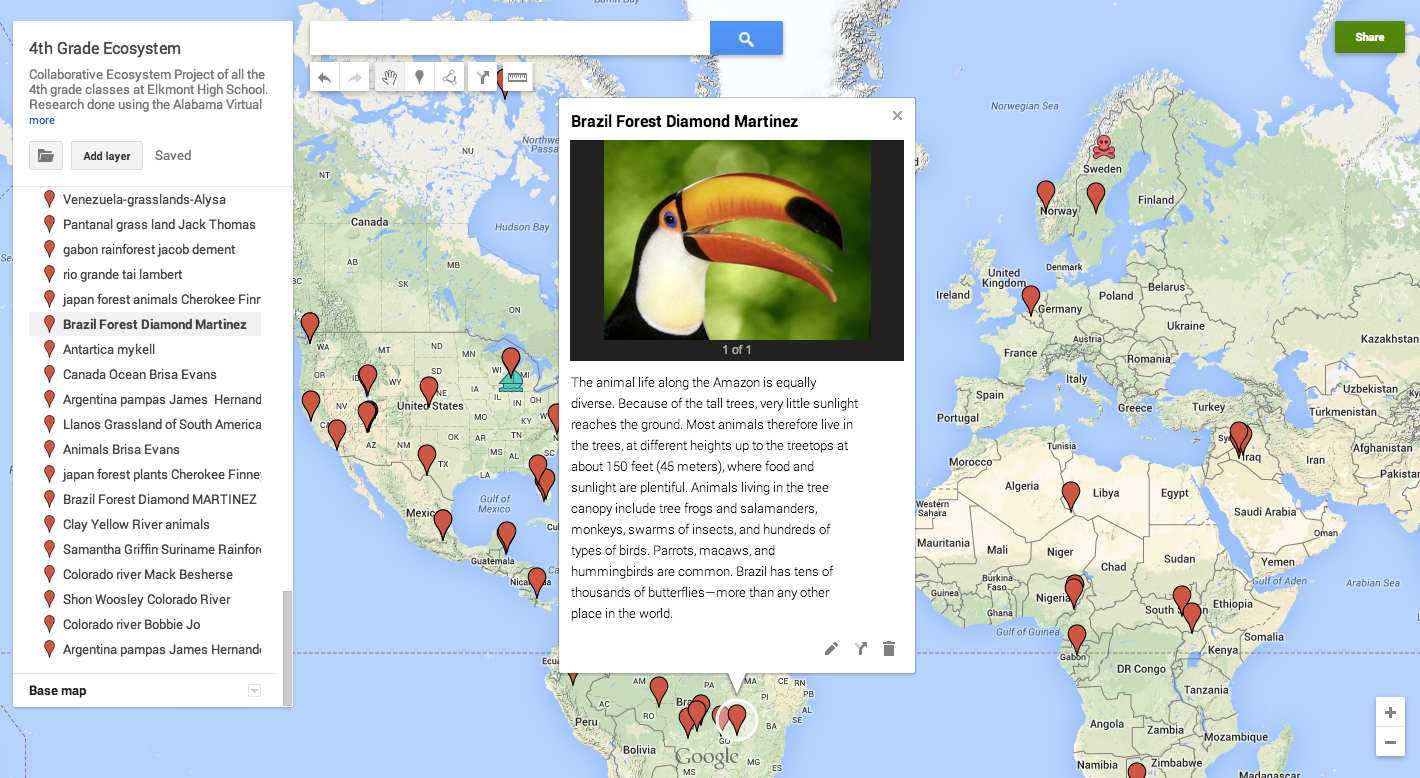
This past week our 4th graders began their unit on Ecosystems.  We wanted this activity to be a collaborative one combining all the research from 120 fourth graders into one interactive location. It was decided that this activity seemed like a perfect fit for learning how to use Google Maps.  

To begin the unit, students were presented with a list of Ecosystems and the countries where these ecosystems are located and asked to commit to one as their individual research goal.    Next, students were introduced to the Alabama Virtual Library’s database, Britannica Elementary,  as the resource they were to use for this unit.  Using Britannica Elementary students were asked to find the following about their country’s ecosystem:

  • One interesting fact about the country where their ecosystem is located. Include a image/video.
  • A description of animal life found in their country's ecosystem. Include a image/video.
  • A description of the vegetation found in their country's ecosystem. Include a image/video.

Once students had located the basic facts about their country’s ecosystem we moved on to learning how to input that information on a collaborative Google Map.  One thing I love about working with the DPI students is that they are willing to jump right into a new technology with little or no apprehension.  I demonstrated how to add a pin to the map and that is all they needed.  Before long students had discovered how to change the color and shape of their pins to individualize their pins from those of their peers.  As students worked they were eager to share their discoveries with their teacher and other students.  

Now that the interactive map has been made, our 4th grade teachers have been using it as a point of reference as they continue to teach the Ecosystem unit.  The kids love this approach to the unit as their teacher references their pins and uses their pictures and videos to teach.   

There are many great tie in activities that can be pursued throughout the year using this Google map, including longitude and latitude, mathematics, social studies and so much more!

Because this was our first time using Google maps our lesson was quite simple. Here are a few links to much more involved lessons with Google maps:


This Week @Elkmont & Beyond! October 27-31, 2014


Creepy Crawly Mind Maps


3rd graders got into the Halloween spirit this week by researching creepy, crawly spiders! We started the lesson by using KidRex to find interesting facts about spiders. Once students had written down at least four interesting or unusual facts about spiders, we organized their information using Popplet to build a mind map (graphic organizer).

Tuesday I started this project with Ms. Walker's 3rd grade students but we were only able to finish our research. I showed the students quickly what we would do with their research using Popplet the next time I was scheduled to come to their class. I was so excited and surprised when I walked in to Ms. Walker's class on Thursday and several students had already been on Popplet and had already made their mind map! 

TIP: Be sure to change up the mind maps (graphic organizers) you use with your students. Check out this link for some great online graphic organizers and what areas are best to use them with kids. https://sites.google.com/site/richardbyrnepdsite/rsu-1-mind-maps-and-timelines


Math, Reading, Grammar...Oh My! My MobyMax!


3rd grade spent time this week getting familiar with MobyMax. MobyMax is similar to Khan Academy in that it is an adaptive program and provides real time reports so that teachers can provide just in time intervention but covers not only math, but reading and grammar as well. Students can earn game time by completing set amounts of activities with a passing score. Students can also earn badges and other incentives as well as they work through the learning modules.

MobyMax makes it easy for teachers to differentiate based on each students ability level and actually find the gaps and fills them for each student's academic development.


Coding For Kids- By Linda Smith


Google has provided a fun, just in time for Halloween coding project for kids, The Yeti Project.

Coding is the ability to read and write a machine language as well as to think computationally. Learning to code can lead to outputs valuable in and of themselves, but the process of learning to code also develops problem-solving skills, (digital) confidence, and helps young people understand the world around them. In many respects, we should encourage kids to code for similar reasons to those we give for encouraging them to play sports and learn an instrument: it's good for their development.

Try it out and see how good you can be at coding! 


Collaborative Learning with Google Maps


My school district launched their 1:1 initiative, the Digital Passport Initiative (DPI), this year by providing all 3rd and 4th grade students with a MacBook Air.  Assisting teachers and students with how to seamlessly integrate these devices into the classroom setting is the focus of my position with the district this year.  

Now that students are not limited to when a computer lab is available we have launched into research, a must have yet often overlooked skill.  This starts with assisting students in locating reliable websites for gathering information.  In Alabama we are lucky that our legislators provide funding to a slew of databases for our students through the Alabama Virtual Library.  Starting the students off with a reliable website will give them a basis of comparison as they expand later in the year to finding reliable sources on their own.


This past week our 4th graders began their unit on Ecosystems.  We wanted this activity to be a collaborative one combining all the research from 120 fourth graders into one interactive location. It was decided that this activity seemed like a perfect fit for learning how to use Google Maps.  

To begin the unit, students were presented with a list of Ecosystems and the countries where these ecosystems are located and asked to commit to one as their individual research goal.    Next, students were introduced to the Alabama Virtual Library’s database, Britannica Elementary,  as the resource they were to use for this unit.  Using Britannica Elementary students were asked to find the following about their country’s ecosystem:

  • One interesting fact about the country where their ecosystem is located. Include a image/video.
  • A description of animal life found in their country's ecosystem. Include a image/video.
  • A description of the vegetation found in their country's ecosystem. Include a image/video.

Once students had located the basic facts about their country’s ecosystem we moved on to learning how to input that information on a collaborative Google Map.  One thing I love about working with the DPI students is that they are willing to jump right into a new technology with little or no apprehension.  I demonstrated how to add a pin to the map and that is all they needed.  Before long students had discovered how to change the color and shape of their pins to individualize their pins from those of their peers.  As students worked they were eager to share their discoveries with their teacher and other students.  

Now that the interactive map has been made, our 4th grade teachers have been using it as a point of reference as they continue to teach the Ecosystem unit.  The kids love this approach to the unit as their teacher references their pins and uses their pictures and videos to teach.   

There are many great tie in activities that can be pursued throughout the year using this Google map, including longitude and latitude, mathematics, social studies and so much more!

Because this was our first time using Google maps our lesson was quite simple. Here are a few links to much more involved lessons with Google maps:


Professional Learning Opportunities

Wonders, GoMath, Global Scholar

Limestone County School District held a training this week to get Instructional Technology Facilitators not familiar with Wonders, GoMath, & Global Scholar up to speed.  This training also set up ITFs as administrators over these accounts for their schools.

New Teacher Training (Graphic Organizers)

Limestone County School District provides a through new teacher training series to help orient new teachers to best teaching practices.  This month our meeting concentrated on effective use of graphic organizers.

#USEdChat

This past Monday night (October 27, 2014) at 9 pm ET was the quarterly #USEdChat, a joint chat that brings state twitter chats together.  This #USEdChat was extra special as guest moderators 
Tom Murray, Sheryl NussbaumBeach, Hal Roberts, Jimmy Casas, & Brian & Jessica Sztabnik joined Jennifer Hogan, Holly Sutherland and Michael McLendon from #ALEdChat to bring the nation an exhilarating discussion about connecting & collaborating.


#GaEd

October 30, 2014 I jumped in on the #GaED chat session about assessment lead by Aaryn Schmuhl, Henry County Asst. Super. for Learning and Leadership.  Assessment is a very hot topic in education right now as 1:1 initiatives change the educational landscape to more student centered, competency based environment.  


#FutureReady: Strategies/Processes for Rolling Out Devices

·    14928696280_a777b30bb9_z.jpg


Rolling out a successful 1:1 initiative is a massive undertaking for a school district that requires careful and deliberate planning well in advance of the actual deployment of devices.  Whether your school district has already rolled out it’s 1:1 initiative or is planning one, Project 24 with the Alliance For Excellent Education, provides a framework that can assist your district in it’s endeavors.  Project 24 is a systemic planning framework around the effective use of technology and digital learning to achieve the goal of "career and college readiness" for all students. It is a free, one-stop shop of planning tools, expert advice, creative ideas, and tangible suggestions from experienced education experts and nonprofit education membership organizations.


Last school year I was part of the 1:1 roll out of iPads in one of the largest school district in Alabama.  This year I got married, moved, and took a job in a small, rural school district deploying it’s 1:1 initiative.  The experience in both places has been eye opening and I have learned a great deal about what works well and what pitfalls to avoid.


First and foremost a school district can’t just jump on the bandwagon of Bring Your Own Device (BYOD) or providing 1:1 devices without a well studied and thought out plan that includes everything from infrastructure to classroom use and teacher training.


Under the leadership of Dr. Tom Sisk (Superintendent) and Ms. Karen Tucker (Director of Information Technology), Limestone County Schools although a small, rural, impoverished school district, has gotten their 1:1 deployment right.


In 2012 the journey to a 1:1 initiative began in Limestone County.  Gathering information and laying out a plan to success was key when Dr. Sisk came aboard as Superintendent of Limestone County Schools.  A team from Limestone County visited Mooresville Graded School District to learn how their one-to-one laptop program led to higher test scores and a lower dropout rate and how to bring that same success to the students of Limestone County.  Next, issues dealing with infrastructure, device choice, grade levels to begin deployment, and teacher training were tackled.  Two full years were spent just getting the infrastructure in place to handle the bandwidth needed to handle a 1:1 deployment.  

“This is not about the technology,” Mark Edwards, superintendent of Mooresville Graded School District, would tell the visitors later over lunch. “It’s not about the box. It’s about changing the culture of instruction — preparing students for their future, not our past.”
Taking to heart the words of Mooresville Graded School District’s superintendent, Ms. Karen Tucker should be commended for sticking to her guns and insisting that Instructional Technology Facilitators be embedded in each school for the deployment and incorporating of 1:1 devices into the curriculum.  This, unfortunately, is a step that many school districts fail to take that I feel is key to a true integration of the technology into the daily curriculum in a 1:1 school.  
Limestone County Schools decided to launch their 1:1 program using 11’ MacBook Air laptops with 3rd and 4th grade students.  The plan is to expand the program each year by adding two more grade levels ensuring a complete 1:1 program for grades 3-12 within four years.  
During the second semester of the 2013-2014 school year, Limestone County Schools deployed a 1:1 pilot program at Blue Springs Elementary School with Ms. Wendy Brightman as the Instructional Technology Facilitator embedded in the school.  Ms. Brightman, Ms. Tucker, Dr. Sisk and principal Mr. Randy Hamilton worked collaboratively to create a program that could be replicated in each school throughout the district the following year.
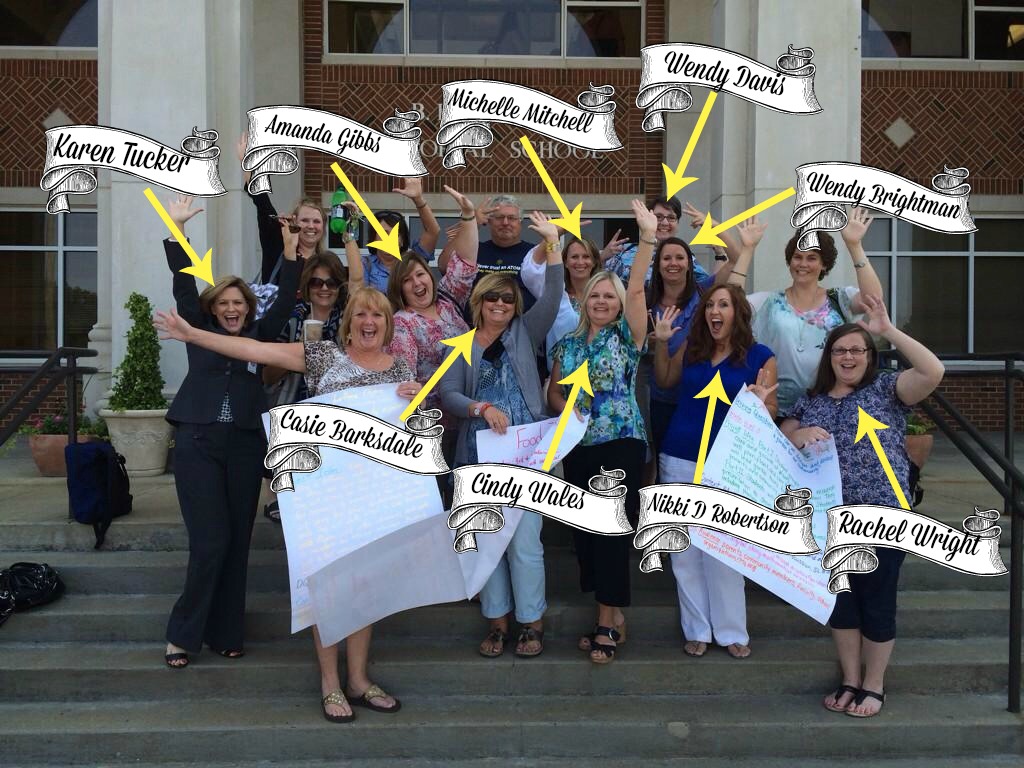
During the Spring and Summer of 2014 an exhaustive search for nine Instructional Technology Facilitators for eight schools resulted in a dedicated, collaborative team:
DPI TEAM 2014.jpg


Wendy Brightman
Rachael Wright
Cindy Wales

Wendy Davis
Amy Jackson
Michelle Mitchell
Casie Barksdale
Nikki D Robertson

Amanda Gibbs


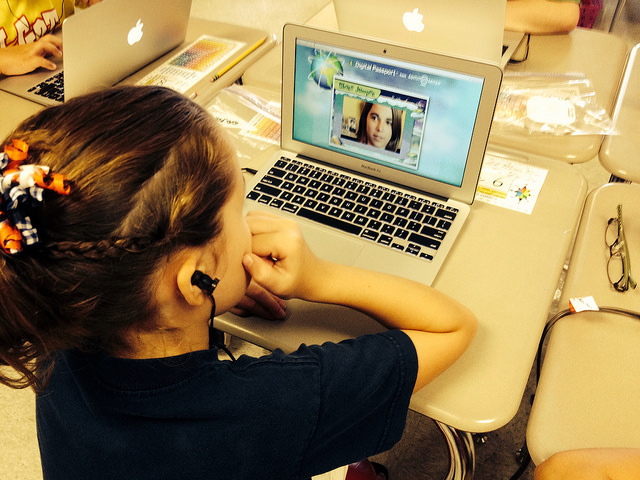
Beginning in August, after a summer of training sessions, the Limestone County Instructional Technology Facilitators began teaching 3rd and 4th grade students digital citizenship using Digital Passport from Common Sense Education using a set of 30 MacBook Air laptops per school.  It was important to the district that students knew how to use the devices provided in a safe, ethical manner before issuing 1:1 devices.  


14743583329_355be94fe9_z.jpg


The Instructional Technology Facilitators also used this time to teach students the basic functions of the MacBook Air as many had only used the PCs located in each school’s computer lab.  In addition to training students, the Instructional Technology Facilitators also worked closely with teachers training them as well and strategizing the best implementation for each school.  Instructional Technology Facilitators also held mandatory parent meetings before, during and after school to inform and train parents about the devices their students would bring home.  


14645498508_ddc7ee972d_z.jpg
14832112875_7ff8db5371_z.jpg
14838518084_925edf0429_z.jpg
14838518924_5020a87e9c_z.jpg


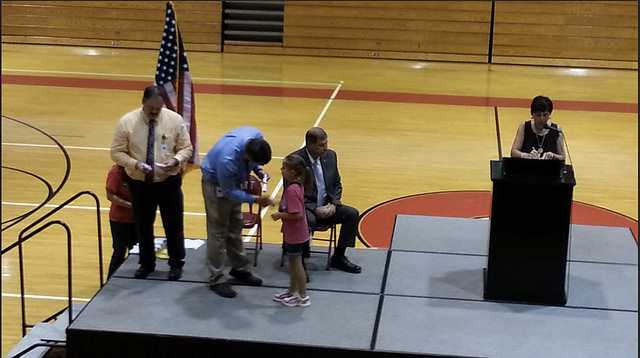
After a month of training the big day finally arrived to distribute the devices to students.  Each school had their own unique way of rolling out the devices, but all included parents, school staff, central office staff, and community members.  Elkmont went with a graduation style roll out.  A stage was set up in the gym and parents, family members, community members and students from 2nd grade and 5th grade were invited to participate.  Dr. Sisk delivered an inspiring keynote after which students were called one by one to the stage.  As students walked across the stage their teacher placed their laptop (in bag) over their head and shoulder.  Students then proceeded to Mr. Garth Garris, Elkmont principal, who presented them with their Digital Citizenship Diploma from Common Sense Education.  Pictures were taken and our PTSO provided refreshments afterwards.  


14961121209_bb7becb805_z.jpg


Since that day the Instructional Technology Facilitators have worked daily with the 3rd and 4th grade teachers to ensure that the devices are being used as a natural and integral part of daily learning, not just as something special to use occasionally.  Each day brings new challenges, new discoveries, and new opportunities.  You can read details of our weekly DPI escapades on our Limestone County School’s DPI Blog.  


This is just the beginning of our journey with our 1:1 Digital Passport Initiative.  Currently, Ms. Tucker has assembled a team consisting of an Instructional Technology Facilitator, Curriculum Coordinator, Instructional Coach, Classroom Teacher, & Principal to look at establishing student and teacher benchmarks for the DPI program as well as correlating DPI with district curriculum goals.  We still have a long way to go and much to learn but feel that, thanks to the vision of our district leaders, we have a solid foundation on which to build.